

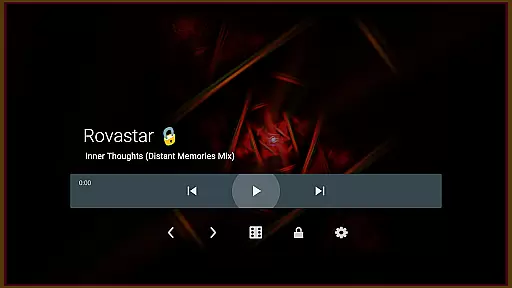
projectM Music Visualizer TV is a cutting-edge music visualization app designed specifically for Android TV. It offers the smoothest graphics and an extensive library of presets, making it highly responsive to any audio played on your device. Whether you're streaming music through Spotify, Pandora, or other platforms, projectM transforms your audio experience into stunning visual effects. With compatibility for MilkDrop (.milk) presets, this app brings modernized features based on classic technologies.
The app allows users to control music playback directly from the interface, eliminating the need to switch between apps. This seamless integration enhances user convenience while enjoying synchronized visuals with their favorite tracks. The application supports high-quality rendering at 60 FPS and includes over 200 customizable visual effects, ensuring a dynamic and immersive entertainment experience tailored to individual preferences.
projectM Music Visualizer TV stands out with its advanced feature set that caters to both casual listeners and audiophiles alike. One notable feature is its support for pixel-shaded rendering at 60 FPS, providing ultra-smooth animations that sync perfectly with the rhythm of the music. Additionally, users can choose from more than 200 unique visual effects, each offering a distinct aesthetic appeal.
Another key aspect is its ability to integrate with various music players such as Google Music, Spotify, Pandora, and PowerAMP. Users can play, pause, and skip tracks without leaving the app, streamlining the overall user experience. Furthermore, configurable graphics settings allow users to adjust texture size and mesh dimensions under settings, enabling them to optimize performance or enhance visual quality according to their device's capabilities.
projectM Music Visualizer TV offers an extensive library of over 200 visual effects, ensuring a rich and diverse audio-visual experience. This vast collection provides users with a wide array of visual styles that cater to every musical genre and personal preference.
The application is not just about quantity but also quality. Each preset is crafted with attention to detail, offering 60 FPS Pixel Shaded Rendering for smooth and stunning graphics. The compatibility with MilkDrop (.milk) presets further extends the creative possibilities, allowing users to import their favorite visualizations.
Copyright authenticity is at the core of projectM's offerings. Users can enjoy these visual effects with peace of mind, knowing that they are created and shared by the original developers. This commitment to original content ensures that users receive an authentic and legal music visualization experience.
One of the standout features of projectM Music Visualizer TV is its configurable graphics quality, which directly impacts audio representation. Users have the flexibility to adjust settings such as texture size and mesh size to optimize their visual experience according to their device capabilities.
The application supports high-quality audio visualization for various music players like Stock Player, Google Music, Spotify, Pandora, and PowerAMP. This compatibility ensures that no matter which service you use, projectM will deliver a synchronized and immersive audio-visual show.
For audiophiles who demand the best sound paired with visuals, projectM allows fine-tuning of both audio quality options and visual effects. By balancing these elements, users can achieve an unparalleled sensory experience that remains responsive even during resource-intensive tracks or scenes.
Smooth graphics
Extensive preset library
Music player control
High-quality rendering
Customizable effects
Requires compatible devices
May consume significant resources
Limited mobile functionality
Preset loading times
Complex settings for beginners





The Skullcandy App Experience
 3.20
3.20
Offline and always ad-free - stream in the highest quality available.
4.10
Taal player that lets you sing any Indian & Western song with Tabla & Tanpura
4.60
Enhance the sound quality of your devices, listen to what you want
4.50
Simple & Intuitive Metronome
4.70
Music, News & Sports Radio Tuner App. Tune in Live FM & AM Radio Stations.
4.80
Simple mp3 and mp4 player with advanced features.
3.40
Master Salsa Rhythm quickly and with a lot of fun!
4.30
Travel To The Music Universe
3.40
Full-featured, High-Quality Groovebox Workstation, perfect for Live Performance!
4.80
Your song collections with lyrics and chords on Android smartphones and tablets.
4.80
Guzheng Master supports many playing techniques as an acoustic Guzheng
4.50
Formerly known as Spotistats! View your top tracks, artists, albums and more!
4.40
Learn and play 2M+ music tabs & chords on guitar, ukulele, bass, and more
4.30
No wifi music app. Mp3 offline. Tuner radio, young radio music. Music downloader
4.20
Smart piano keyboard, Classical to Pop, Real-time multiplayer connection!
4.20
The original SP-1200 experience on your iPad
4.20
Turn your Android phone into a professional audio analyser with up to 120 bands.
4.00
USB audio recording and playback finally possible on Android 3.1 or higher!
3.90

User Reviews