

MyWalmart is a comprehensive business application designed to enhance the work experience for Walmart associates while providing potential candidates with essential information about career opportunities at Walmart. The app serves as a one-stop solution for both employees and job seekers, offering features that streamline daily operations and provide valuable insights into the company's culture and values.
For Walmart associates, MyWalmart offers powerful tools such as schedule management, two-step verification security, and an AI-powered assistant called Ask Sam. These features help users efficiently manage their work schedules, communicate with team members, and access important company information. Additionally, the app provides customers with detailed information about Walmart's history, benefits, and available career paths, making it an invaluable resource for those interested in joining the company.
The app's ability to integrate various workplace functions into a single platform demonstrates its practical value for improving productivity and communication within the organization. Whether you're a current associate looking to optimize your workflow or a potential candidate exploring career options, MyWalmart delivers essential tools and information to support your professional journey.
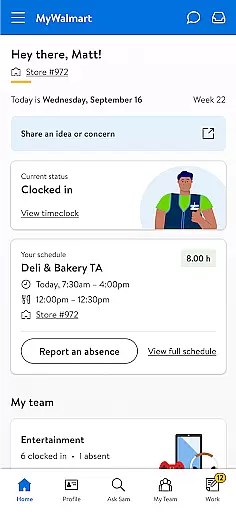
MyWalmart stands out with its diverse range of features tailored specifically for Walmart associates and potential employees. One of its key functionalities is the robust schedule management system, which allows users to view their work schedules, request time off, and even swap shifts with colleagues. This feature streamulates workforce management and helps maintain optimal staffing levels across different departments.
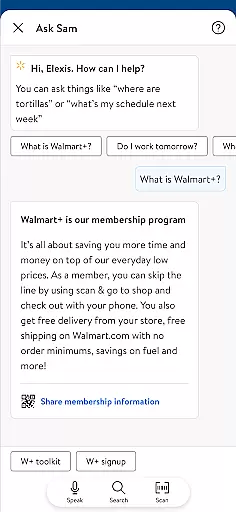
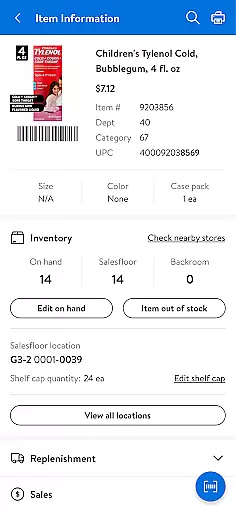
The innovative Ask Sam feature serves as a personal search and voice assistant for associates, capable of answering questions related to products, metrics, and company policies. As an intelligent tool, it learns from each interaction, becoming more accurate and helpful over time. Another notable feature is the My Team functionality, which provides a roster view of working associates and includes a built-in walkie-talkie feature for seamless communication among team members.
Additionally, the app incorporates an Inbox system for managing notifications and actions related to scheduling and time-off requests. For potential candidates, MyWalmart offers detailed information about the company's history, cultural values, and benefits package. While some advanced features require two-step verification and may have location-based restrictions, the app consistently delivers valuable tools for both current and prospective Walmart associates.
Collaborative work features are essential for modern businesses to enhance team productivity and communication. MyWalmart app excels in this area by offering tools that connect associates and streamline workflows.
The app provides a comprehensive suite of features designed to foster collaboration among Walmart associates. With functionalities like Ask Sam, an intelligent search and voice assistant, users can quickly find information about products and metrics, making daily operations more efficient.
Another standout feature is My Team, which offers a roster view of working associates and includes an in-app walkie-talkie function. This ensures that team members can stay connected in real-time, facilitating seamless communication and coordination.
By integrating these collaborative tools, MyWalmart not only improves individual efficiency but also enhances the overall synergy within teams, leading to better business outcomes.
Effective task management is crucial for organizing work schedules and ensuring timely completion of duties. The MyWalmart app addresses this need by providing robust scheduling and time-off management features tailored for Walmart associates.
Associates can view their work schedules, manage time-off requests, and even swap or pick up unfilled shifts directly through the app. This level of control helps them balance their professional and personal commitments more effectively.
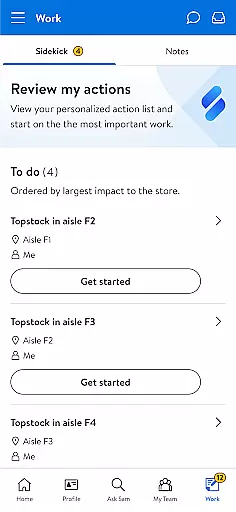
In addition to scheduling, the app's Inbox feature consolidates notifications and actions related to various tasks such as scheduling adjustments and time-off approvals. This centralized approach ensures that users never miss important updates or deadlines.
Overall, MyWalmart empowers associates with the tools they need to manage their tasks efficiently, contributing to a more organized and productive work environment.
User-friendly interface
Comprehensive scheduling tools
AI-powered assistance
Secure authentication
Team collaboration features
Limited external access
Location-based restrictions
Verification requirements
Feature availability varies
Primarily for associates


AI-powered document scanner with auto enhance for perfect PDFs.
 4.60
4.60
All Your Gig Work. One App.
4.30
Scan Business Cards & Conference Badges - Capture Leads at Events & Tradeshows
4.20
FaxCover - Create fax cover pages. Works with any app or fax machine.
4.90
Manage work life on the go
4.50
Take the stress out of storage with the all-in-one app to manage your space.
3.70
Find jobs near you and temp work in minutes, from your phone.
4.50
Roadie connects people with stuff to send with drivers already going that way.
3.50
No more passwords, easier sign-in, and greater protection for your accounts.
4.60 4.70
4.70
Find the right fit, faster.
4.70
Use Generative Summary to understand your rental or insurance docs in seconds.
4.70
USPS Mobile®Access USPS.com’s most popular tools on-the-go.
4.70
Access to Paylocity, empowering employees with information they need 24/7.
4.70
We help people get jobs
4.70
Deliver and earn money
4.30
All document reader, pdf viewer app, read docs & excel files
3.80
Windows App allows you to connect to remote PCs and virtual apps.
3.70
Convert Your Lovable.dev Website into a Mobile App Instantly!
4.5


User Reviews