

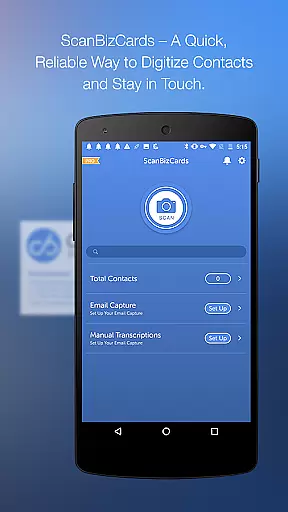
ScanBizCards Premium is a versatile business card management app designed for Android users. This app allows you to digitize and organize your scattered business cards efficiently, keeping them all in one place on your mobile device. With features like email signature capture, direct CRM integration, and support for 22 scanning languages, it caters to both individual and enterprise needs.
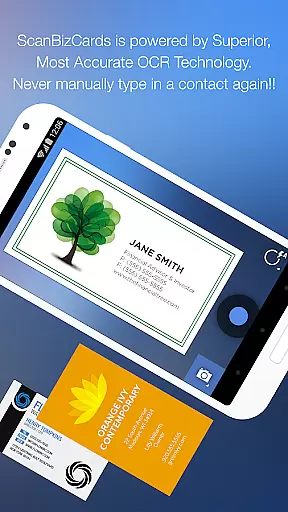
The app offers advanced OCR technology for faster and more accurate scanning, batch scanning capabilities, and unlimited exports to Salesforce CRM. Whether you're attending conferences or managing daily contacts, ScanBizCards streamlines the process of converting physical cards into digital contacts. Its ability to sync trade show leads directly to CRM makes it an indispensable tool for sales professionals.
ScanBizCards Premium stands out with its comprehensive feature set tailored for efficient contact management. The app includes an upgraded OCR engine that scans business cards five times faster than before, ensuring quick processing even during busy events. Users can also take advantage of batch scanning, which allows multiple cards to be processed simultaneously, significantly reducing time spent on manual entry.
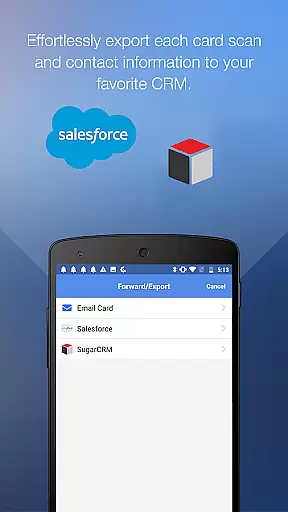
One of the key highlights is the seamless integration with major CRM platforms like Salesforce and SugarCRM. This enables users to export scanned contacts directly into their CRM systems, keeping their databases up-to-date effortlessly. Additionally, the unique option to submit cards for 100%-accurate human transcription ensures precision when dealing with complex or non-standard card formats.
Collaborative work features are essential for modern business applications, enabling teams to work together efficiently regardless of location. ScanBizCards Premium excels in this area by offering seamless integration with popular CRM platforms like Salesforce and SugarCRM.
The app allows sales professionals to export scanned business cards directly to their preferred CRM system. With the latest update, users can now enjoy unlimited card exports to Salesforce, a significant improvement from the previous limit of seven cards per month. This ensures that your CRM stays up-to-date with minimal effort.
Additionally, the newly upgraded Email Signature Capture feature supports Gmail and Outlook, automatically finding new contacts and updates from incoming emails. By connecting your email account, you can effortlessly sync these details to your address book or export them to your CRM.
This comprehensive approach to collaboration ensures that all team members have access to the most current contact information, streamlining communication and enhancing productivity across the board.
Effective task management is crucial for organizing and prioritizing work, especially when dealing with numerous business contacts. ScanBizCards Premium offers robust tools to manage and streamline these tasks efficiently.
One standout feature is batch scanning, which allows users to scan multiple business cards at once. This capability significantly reduces the time required to digitize physical cards, making it ideal for busy professionals attending conferences or networking events.
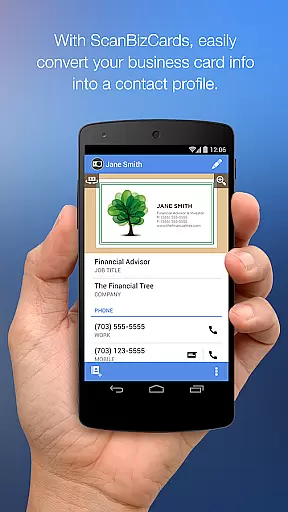
After scanning, users can review and edit the extracted information alongside the card image, ensuring accuracy before adding it to their address book or merging it with existing contacts. The app also supports creating personal notes for each card and organizing them using custom folder names.
Furthermore, the ability to search through your card collection and share business cards via email enhances task management by providing quick access to needed information and facilitating easy sharing among colleagues.
User-friendly interface
Fast and accurate scanning
Unlimited CRM exports
Supports 22 languages
Batch scanning capability
Premium version costly
Limited free features
Occasional OCR errors
Heavy on storage
Requires internet

 4.70
4.70
viewing and sharing of PDFs
3.60
The revolutionary flexible staffing platform
4.40
Earn crypto with secure cloud mining. Monitor, track & withdraw easily
4.40
Convert Your Lovable.dev Website into a Mobile App Instantly!
4.4
The MyWalmart App is available for all associates in stores.
4.70
Use Generative Summary to understand your rental or insurance docs in seconds.
4.70
Master crypto trading with real-time simulations and exciting challenges!
4.50
Shop, deliver, and earn with the Spark Driver™ App
4.10
All your team communication in one place
4.70
Get instant construction estimates: accurate home repair & material calculator.
4.70
AI-powered document scanner with auto enhance for perfect PDFs.
4.60
No more passwords, easier sign-in, and greater protection for your accounts.
4.60
Amazon A to Z is the place to manage your work-life at Amazon.
4.50
Deliver and earn money
4.30
Say hello to the mobile work experience built to help you thrive at work.
4.30
Formerly Facebook Ads Manager. Manage and create ads on the go.
4.20
Build a store in minutes with our full suite of AI tools. Start for free!
4.20
enjoy effortless PDF reading anytime, anywhere
3.90

User Reviews