
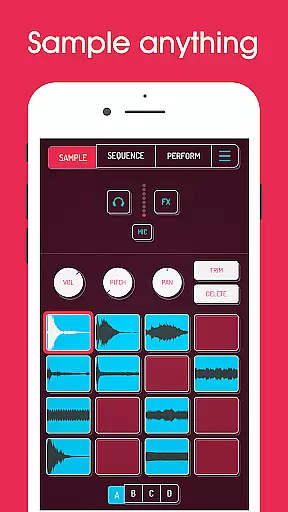
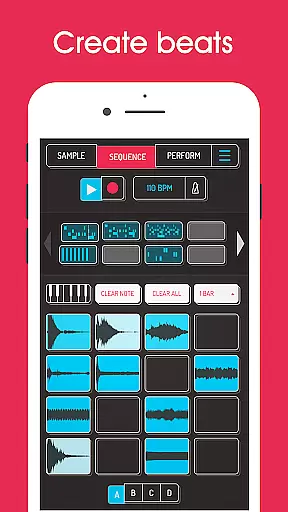
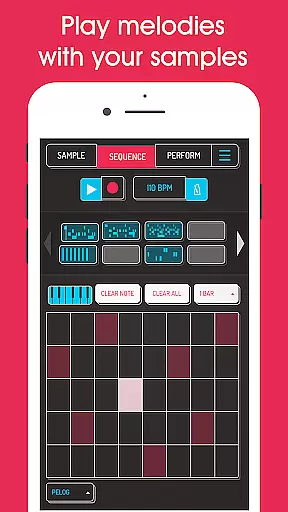
Koala Sampler is a pocket-sized music production tool designed for both amateur enthusiasts and professional musicians. This app allows users to record sounds through their phone's microphone or import pre-existing samples, transforming them into beats with built-in effects. With an intuitive interface, Koala ensures rapid track creation without the complexity of traditional music software.
The app offers advanced features such as AI-driven sample separation, high-resolution sequencing, and MIDI compatibility, making it a versatile choice for creating professional-quality tracks on-the-go. Whether you're crafting beats, experimenting with effects, or performing live, Koala Sampler keeps the creative process engaging and efficient.
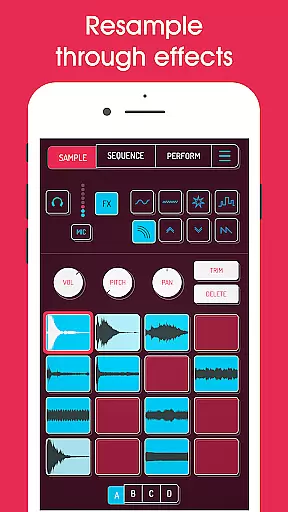
Koala Sampler stands out with its comprehensive set of features tailored for music producers. The app supports up to 64 different samples, each customizable with attack, release, and tone adjustments. Its 16 built-in effects range from basic filters to complex modulators, allowing detailed sound manipulation.
One of the unique capabilities is the resampling feature, which lets users feed the output back into the input for endless sonic exploration. Additionally, the AI-powered sample separation enables isolation of individual instruments from mixed audio. With MIDI control, keyboard mode, and swing quantization, Koala provides all the tools necessary for dynamic music creation.
When it comes to music creation apps like Koala Sampler, the size and variety of the music library play a crucial role in user experience. A comprehensive library allows users to explore different genres and styles, thus enhancing creativity.
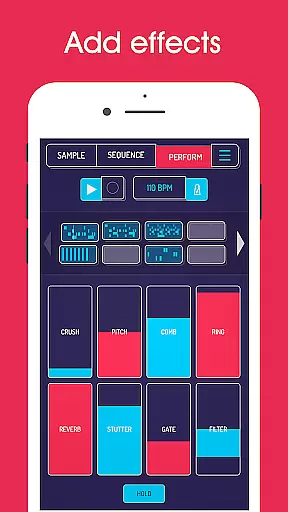
Koala Sampler offers an impressive collection of built-in effects and the ability to import your own samples, ensuring that users have access to a wide range of sounds. The app includes 16 superb built-in FX for transforming voices or any other sound, along with 8 microphone FX and 16 DJ Mix FX, providing countless sonic possibilities.
Copyright authenticity is equally important as it guarantees that all the music content within the app is legally usable. This protects users from potential legal issues when using the samples in their projects. Koala Sampler ensures peace of mind by offering professional-quality WAV file exports without hidden copyright infringements.
By combining a vast array of high-quality, royalty-free samples with powerful editing tools, Koala Sampler empowers musicians to create tracks that are both original and professionally polished.
Audio quality options are essential for any music production tool, determining how well the final output meets industry standards. High audio quality ensures clarity, depth, and richness in sound, which is vital for producing professional-grade tracks.
Koala Sampler excels in this area by providing various features such as attack, release, and tone adjustments on each sample. These controls allow users to fine-tune their sounds precisely, ensuring optimal audio performance. Additionally, the app supports exporting loops or entire tracks as professional-quality WAV files, maintaining high fidelity throughout the process.
The inclusion of advanced audio effects further enhances the overall sound quality. With features like bit-crusher, pitch-shift, reverb, and more, Koala Sampler enables users to add unique touches to their compositions while preserving excellent audio standards.
Moreover, the app's intuitive interface simplifies the use of these sophisticated audio settings, making it accessible even for beginners. By focusing on instant music-making progress and keeping the workflow enjoyable, Koala Sampler ensures that users can achieve outstanding audio results without getting bogged down by complex parameters.
Intuitive user interface
Extensive sound effects
AI sample separation
MIDI compatibility
Professional export options
Limited free features
Occasional bugs
High learning curve
In-app purchases required
Microphone input issues

Turn your phone into a musical instrument from the future!
 3.90
3.90
Time Guru will strengthen your internal sense of musical time via random muting.
4.30
The Skullcandy App Experience
3.20
Tune in to the greatest hits on UK Radio | The home of Capital, Smooth & Heart.
4.90
Simple & Intuitive Metronome
4.70
Brian Eno and Peter Chilvers’ acclaimed music app Bloom, radically reinvented.
4.80
Simple mp3 and mp4 player with advanced features.
3.40
Ringtone Maker is free app create ringtone from music files or your recording.
4.40
Customize Your Favorite Songs and Videos with booster.
4.70
Over 100 million tracks available for high quality streaming and download
4.60
Reverse your voice & songs instantly! Fun singing challenge with cool effects.
4.60
Fun & Easy Voice Changer – Record, Edit & Add Hilarious Effects!
4.50
Let your Android device with the sound effects you want
4.50
Advanced 10-Band Audio Graphic Equalizer Sound Booster Pro
4.30
Enjoy singing any song, no matter how high or low it is
4.30
The alternative folder based music player.
4.20
A sleek, no-frills player designed for true music lovers.
4.20
Versatile MP3 recorder with auto-backup to Dropbox and Google Drive
4.10
USB audio recording and playback finally possible on Android 3.1 or higher!
3.90


User Reviews