

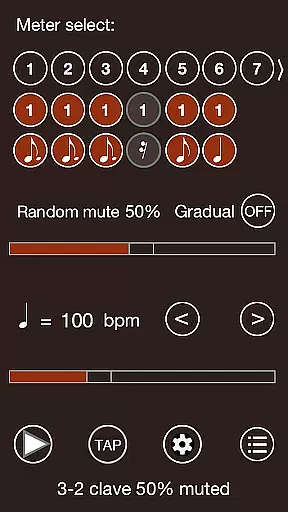
Time Guru Metronome is a sophisticated rhythm training tool designed to help musicians develop an internal sense of timing. Unlike traditional metronomes, this app can mute its sound randomly or in sequenced patterns, allowing users to practice without relying on constant external beats. This feature is particularly beneficial for those working with odd meters or complex time signatures.
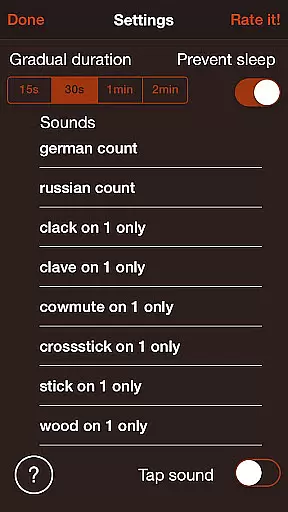
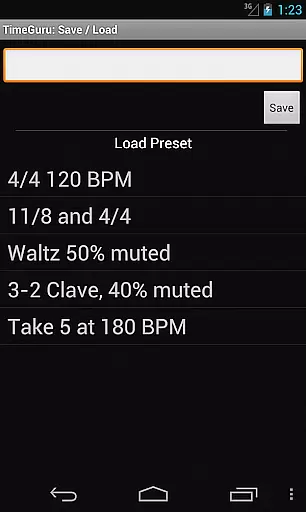
The app offers advanced functionalities such as support for different time signatures, customizable rhythmic patterns, and the ability to save presets for various settings. With 35 loud sound sets and multilingual voice counting options, Time Guru caters to both professional musicians and music students. Whether you need a simple metronome or a comprehensive rhythm training solution, this app provides the tools necessary to enhance your timing skills.
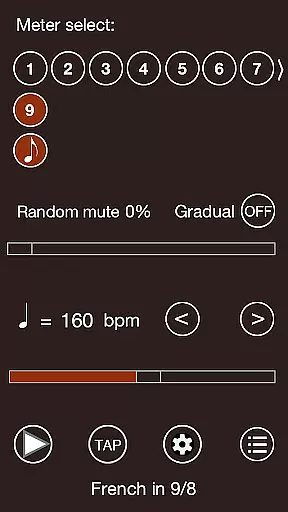
Time Guru stands out with its unique muting capabilities that challenge users to maintain accurate timing independently. The random and sequenced muting options simulate real-world performance conditions, helping musicians build confidence in their inner clock. Additionally, the app supports additive time signatures, enabling users to create complex rhythmic patterns by chaining multiple time signatures together.
Another key feature is the ability to design drum-machine like patterns, which expands the app's utility beyond basic metronome functions. Users can save custom presets for tempo, meter, sound, and muting configurations, ensuring quick access to preferred settings. The inclusion of human or robot voice counting in five languages makes it an excellent teaching aid, while the tap tempo function and rock-solid timing engine guarantee precise practice sessions.
Time Guru Metronome offers a comprehensive music library that caters to musicians of all levels. With 35 loud sound sets, users can explore different tones and styles, enhancing their practice sessions.
The app ensures copyright authenticity by providing original and unique sound samples. This means every beat and rhythm you hear is legally licensed, giving peace of mind while using the metronome for personal or professional purposes.
Furthermore, the inclusion of human or robot voice counting in multiple languages adds an educational layer to the library. This feature not only enriches the learning experience but also aligns with global teaching standards.
By prioritizing both size and authenticity, Time Guru Metronome becomes an indispensable tool for anyone looking to refine their musical timing without legal concerns.
One of the standout features of Time Guru Metronome is its superior audio quality options. The customized audio engine delivers super accurate, rock-solid timing, ensuring that each beat is crisp and clear.
Musicians can choose from various sound sets, allowing them to tailor the auditory experience to their preferences or specific practice needs. Whether it's a soft click or a pronounced beat, the app accommodates diverse requirements.
In addition to standard metronome sounds, the app provides drum-machine like patterns. These patterns offer dynamic listening experiences, making practice sessions more engaging and realistic.
With such meticulous attention to audio detail, Time Guru Metronome guarantees an immersive and high-quality sound environment conducive to mastering rhythm and timing.
Unique muting feature
Supports complex time signatures
Customizable rhythmic patterns
Multilingual voice counting
Accurate timing engine
Interface may seem complex
Limited free sound sets
No MIDI connectivity
Occasional audio glitches
Steep learning curve

Your HD audio recorder on the go for music, meetings, ambience, animal sounds…
 4.30
4.30
Equalizer, Bass Booster and Volume Booster (Eq & Bass) improve sound quality
4.30
Control your MIDI USB or Bluetooth devices in app and avoid some trampling
3.30
Performance-Synthesizer & Multi-Track-Sequencer, polyphonic + multi timbral!
4.70
VB-AUDIO Software / VBAN-Receptor allows listening to any VBAN Streams
4.10
Enhance the sound quality of your devices, listen to what you want
4.50
Ultimate Sonos Controller
4.70
Bass Booster Pro takes auto-equalizing to the next level!
4.30
PowerAudio is a powerful offline music player.
4.20
Responsive piano with great sounds, graphics, and songs
4.80
Simple & Intuitive Metronome
4.70
Bass Booster & Volume Equalizer Pro improves your music and video sound quality
4.60
Super Sound Editor, Song Maker & Mixer, Vocal Remover, Voice Recorder & Changer!
4.60
Fun & Easy Voice Changer – Record, Edit & Add Hilarious Effects!
4.50
Guzheng Master supports many playing techniques as an acoustic Guzheng
4.50
DJ Music Mixer - DJ Remix: remix songs, make beat music & record mix of DJ.
4.40
Permanently backup Now Playing. Maps, filters & listening stats.
4.00
The iconic iOS metronome app is now on Android.
3.70
Music Streaming suite for Ampache, Nextcloud Music and compatible backends.
4.0


User Reviews