

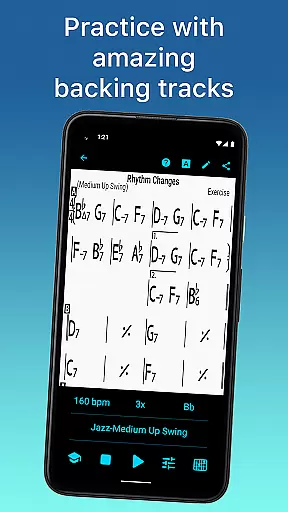
iReal Pro is a comprehensive music practice tool designed for musicians of all skill levels. The app functions as both a virtual band and a chord chart repository, providing users with realistic accompaniments to aid in their practice sessions. It supports various musical styles and offers extensive customization options for personalizing the accompaniment sound.
One of its standout features is the ability to simulate different instruments such as piano, guitar, bass, and drums, creating an immersive practice environment. Additionally, iReal Pro allows musicians to create, edit, and collect chord charts, making it an invaluable resource for both practice and performance. Used by top music schools worldwide, this app is perfect for aspiring musicians looking to refine their skills.
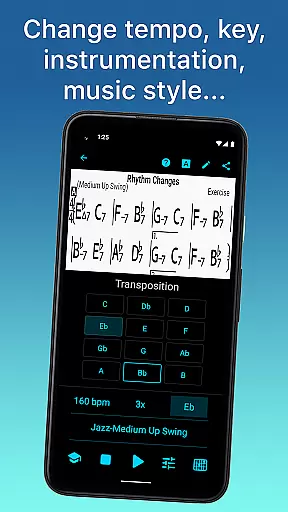
iReal Pro boasts a wide array of features that cater to diverse musical needs. Users can choose from 51 included accompaniment styles, ranging from Swing and Ballad to Reggae and Latin, with additional styles available via in-app purchases. Each style can be personalized with various instrument sounds including electric and acoustic guitars, pianos, and more.
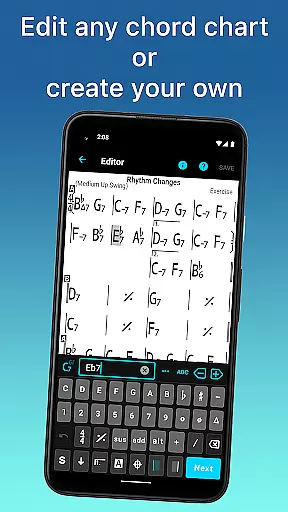
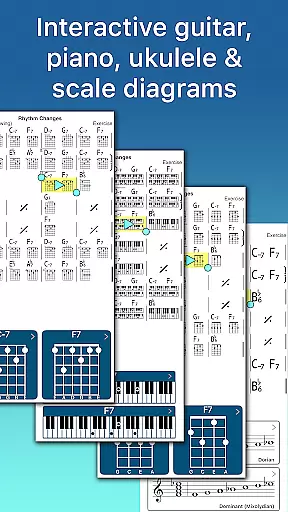
The app also includes a built-in editor for creating and editing songs, allowing musicians to build custom playlists and transpose charts into any key. Advanced practice settings like automatic tempo increase and key transposition help users focus on specific areas of improvement. Furthermore, iReal Pro provides chord diagrams and scale recommendations, aiding in improvisation and skill enhancement.
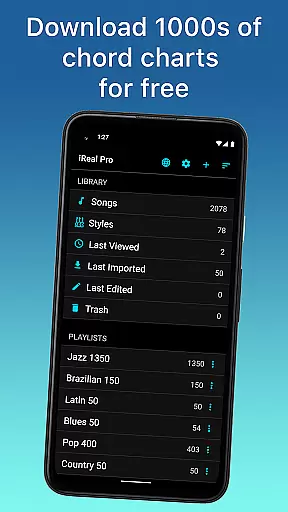
Having a comprehensive music library is essential for any musician looking to practice and improve their skills. iReal Pro offers access to thousands of songs that can be downloaded directly from the forums, providing users with an extensive repertoire to choose from.
The app ensures copyright authenticity by allowing users to create, edit, and collect chord charts of their favorite songs. This means musicians can build a personalized and legal collection of music resources for reference while practicing or performing.
Moreover, iReal Pro enables sharing and exporting capabilities that enhance collaborative learning experiences. Users can share individual charts or whole playlists with fellow iReal Pro users via email and forums, ensuring that music follows you wherever you need it.
Audio quality is paramount when simulating a real-sounding band for practice sessions. iReal Pro provides high-quality accompaniments with its included 51 different styles, such as Swing, Ballad, Gypsy Jazz, and more, each available in various sounds including piano, Fender Rhodes, acoustic and electric guitars, basses, drums, and even vibraphone and organ.
Musicians have the option to personalize each style with a variety of instrument sounds, ensuring that the audio experience is as close to playing with a live band as possible. This level of customization allows users to tailor their practice sessions according to their preferences and needs.
In addition, iReal Pro supports recording features where users can record themselves playing or singing along with the accompaniment. The ability to export audio as WAV, AAC, and MIDI formats guarantees that musicians can produce professional-grade recordings suitable for sharing or further production work.
Comprehensive practice tool
Versatile accompaniment styles
Extensive customization options
Used by top music schools
Valuable for all skill levels
Some features require in-app purchases
Interface may overwhelm beginners
Advanced settings need time to master
Limited free song downloads
Occasional sync issues reported

SqueezePlayer turns your Android phone or tablet into a SqueezeBox on its own!
 4.60
4.60
10-Band Audio Equalizer, Sound / Bass Booster for Spotify Users & Music Players
4.40
Walkout Song DJ is the most intuitive app to manage your sports music.
4.70
Permanently backup Now Playing. Maps, filters & listening stats.
4.00
Bass Booster Pro takes auto-equalizing to the next level!
4.30
No wifi music app. Mp3 offline. Tuner radio, young radio music. Music downloader
4.20
Offline Music Player&MP3 Player with themes, equalizer, lyrics, music play mode
4.60
Sheet music reader, piano & music note player. Play music score & learn to read.
3.90
Offline Tunes, Unlimited Vibes
3.90
Your song collections with lyrics and chords on Android smartphones and tablets.
4.80
Ultimate Sonos Controller
4.70
Record, Mix & Master with all n-Track effects, 64-bit audio and Stem Separation.
4.70
Learn the notes on the guitar fretboard fast with this easy and fun app
4.60
Help you quickly get started with Shokz headphones
4.40
The original SP-1200 experience on your iPad
4.20
Versatile MP3 recorder with auto-backup to Dropbox and Google Drive
4.10
Turn your phone into a musical instrument from the future!
3.90
The ultimate media player for Android devices
3.90
Music Streaming suite for Ampache, Nextcloud Music and compatible backends.
4.4


User Reviews