

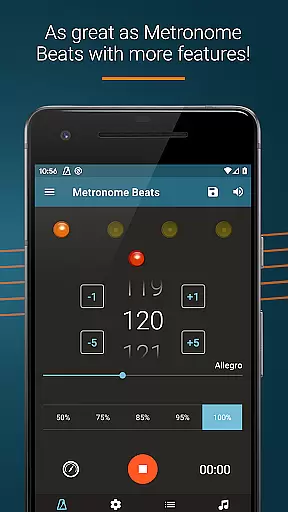
Metronome Beats Pro is a comprehensive music tool designed for musicians of all levels. This professional-grade metronome offers advanced features such as speed training, customizable tempo settings from 1 to 900 beats per minute, and tap tempo functionality for precise tempo selection.
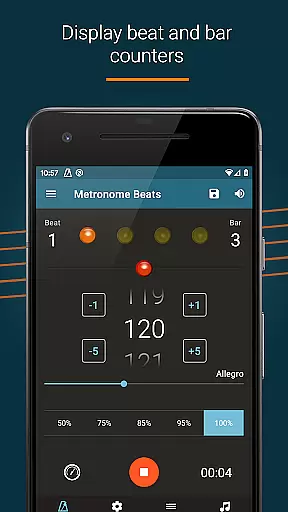
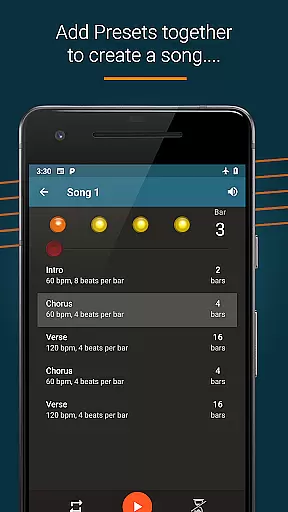
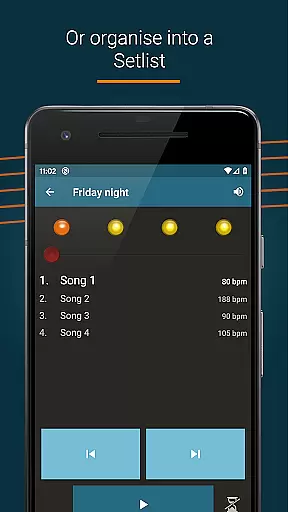
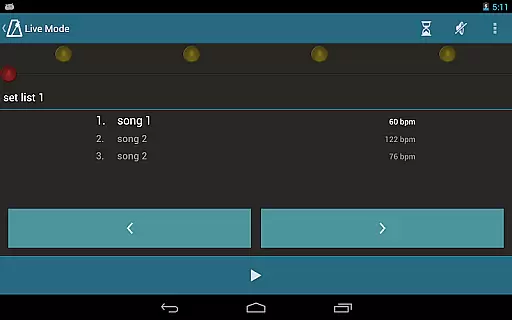
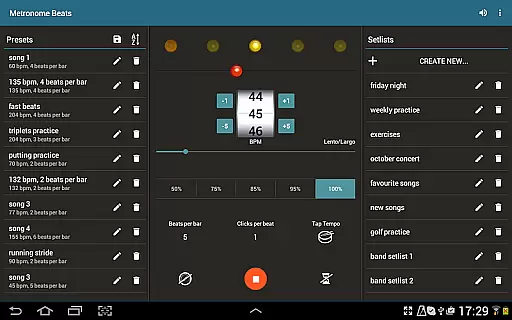
The app's standout feature is its 'Live Mode,' which allows users to create setlists of songs with varying tempos and play through them sequentially. This makes it an invaluable tool for both solo practice sessions and live stage performances. The visual beat indicators and bar counters help musicians maintain perfect timing while playing.
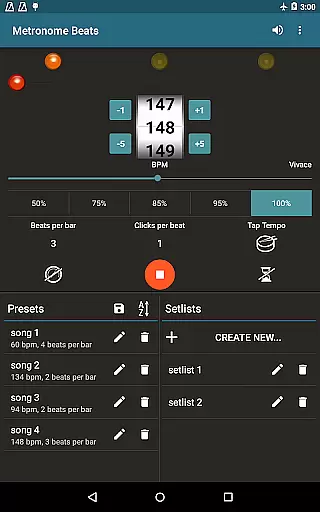
Designed with practicality in mind, Metronome Beats Pro enables seamless multitasking with other music apps, making it ideal for reading sheet music while maintaining accurate tempo. Its intuitive interface provides easy access to all features on one screen for larger devices, enhancing the user experience during practice or performance sessions.
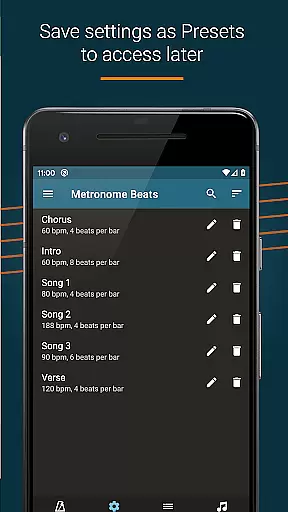
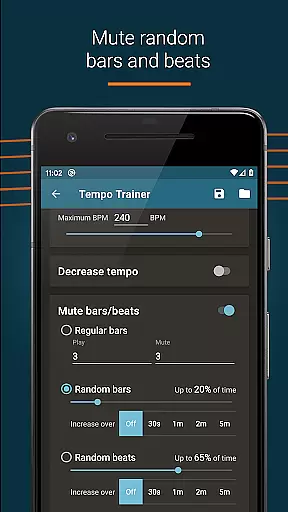
Metronome Beats Pro stands out with its extensive feature set tailored for serious musicians. The app includes essential tools like beat and bar counters, preset saving functionality, and the ability to create complex songs with multiple tempo changes. These features are complemented by randomised bar and beat muting options for advanced practice scenarios.
Additional professional-grade features include a dedicated speed trainer, Italian tempo markings display, and beat subdivision capabilities up to 16 clicks per beat. Users can accent the first beat of each bar and adjust sound pitch for optimal audibility over their instruments. The app's timer function allows precise control over practice sessions, stopping automatically after a set number of bars.
What sets this pro version apart is its seamless integration capabilities - musicians can run Metronome Beats alongside other music apps, enabling simultaneous sheet music reading and tempo monitoring. The app's automatic settings save feature ensures users can pick up exactly where they left off in their next practice session.
Metronome Beats Pro offers a comprehensive set of features that cater to musicians' tempo and rhythm needs, ensuring a rich library of beat and tempo variations. This application allows users to select any tempo from 1 to 900 beats per minute, providing an extensive range for practice and performance.
The app includes exclusive options such as creating songs with varying tempos and organizing favorite songs into setlists for 'Live' mode playthroughs. These features not only enhance the music library size but also ensure that each composition can be customized to fit the user's specific requirements.
Regarding copyright authenticity, Metronome Beats Pro provides peace of mind by offering original sound settings and presets that users can customize and save. This means musicians can rely on the app to deliver authentic and legal sound patterns without infringing on copyrighted material.
Overall, the depth and flexibility of the music library in Metronome Beats Pro, combined with its assurance of copyright authenticity, make it an invaluable tool for musicians who require precision and variety in their practice routines.
Audio quality is paramount when using a metronome application, and Metronome Beats Pro excels in delivering clear and customizable audio options. Users have the ability to change the pitch of the sound, making the metronome easier to hear over their instruments, which is crucial during practice sessions or live performances.
In addition to pitch adjustments, the app offers a range of different sound types and the option to create custom sound settings. This ensures that musicians can find the perfect audio cue that suits their listening preferences and playing environment.
For those who prefer visual cues, the app provides visual beat indication, allowing users to mute the sound and follow the beat through visualizations. This feature caters to diverse learning styles and situational needs, enhancing the overall user experience.
By combining these audio quality options with practical features like speed training and tempo subdivisions, Metronome Beats Pro delivers a high-quality auditory experience that supports musicians in honing their timing skills effectively.
Highly customizable
Accurate tempo control
Professional features
Intuitive interface
Multi-app support
Paid version only
Complex for beginners
Feature overload
No basic free version
Advanced settings

JBL PartyBox APP works with 110/310/710/120/320/520/Encore/Encore 2/Encore Ess 2
 4.80
4.80
Network/Cloud Streaming, Visualization, Graphic Equalizer and Sound Effects.
4.20
USB audio recording and playback finally possible on Android 3.1 or higher!
3.90
Bass Booster & Volume Equalizer Pro improves your music and video sound quality
4.60
Make songs with AI! Any genre, custom lyric, song generator for music creation!
4.80
Help you quickly get started with Shokz headphones
4.40
Offline Music Player & MP3 Player.Powerful equalizer, Lyrics, Themes, Tag Editor
4.80
Uninterrupted Tunes, Unmatched Vibes
3.90
Get alarms that fit your lifestyle and wake up to the sounds you love.
4.80
Walkout Song DJ is the most intuitive app to manage your sports music.
4.70
SqueezePlayer turns your Android phone or tablet into a SqueezeBox on its own!
4.60
The best music and audio player, with beautiful UI, music search and equalizer.
4.60
Full featured mp3 and audio player with Chromecast and Android Auto support.
4.40
Next generation modular control surface
4.10
Permanently backup Now Playing. Maps, filters & listening stats.
4.00
Powerful beat maker & DJ mixer to remix tracks, make music, & perform DJ mix
3.70
The iconic iOS metronome app is now on Android.
3.70
Make music anywhere. Turn your device into an instrument.
4.1
Remove ads permanently from Music Visualizer
4.1

User Reviews