

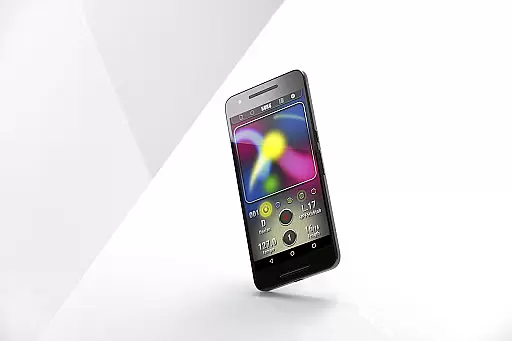
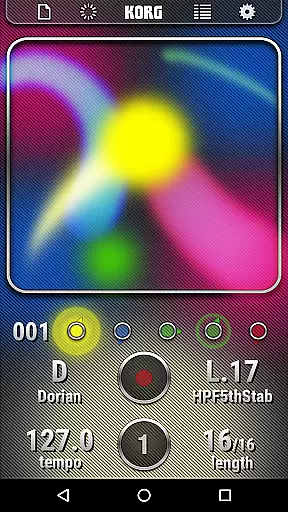
KORG Kaossilator for Android is a powerful mobile synthesizer app that allows users to create professional-quality music tracks directly from their Android devices. With its intuitive touch-based X-Y interface, the app makes it easy to generate melodies and phrases by simply moving your finger across the screen. This innovative approach to music production enables both beginners and experienced musicians to explore a wide range of sounds and genres.
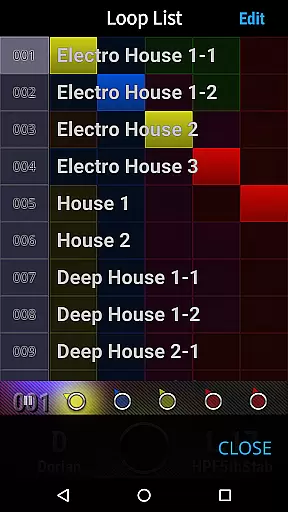
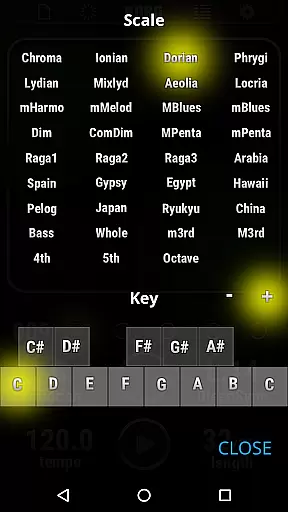
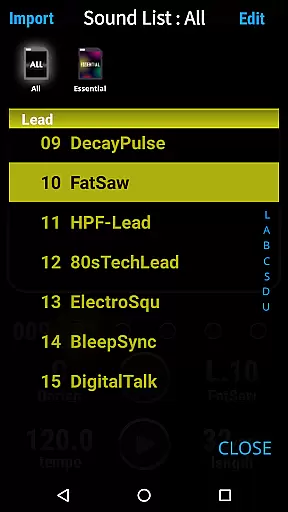
The app features 150 built-in sounds covering various musical styles such as EDM, hip-hop, house, techno, dubstep, nu-disco, and electro. Additionally, the Scale/Key feature ensures that all performances stay in the specified key, eliminating any wrong notes. The built-in loop sequencer allows layering of up to five musical parts, making it simple to create complex tracks by recording different elements like synths, bass, chords, sound effects, and drums.
Whether you're an aspiring musician or a seasoned producer, KORG Kaossilator for Android offers a versatile platform for creating music on the go. Its combination of ease-of-use and advanced features makes it an ideal tool for live performances and studio production alike.
KORG Kaossilator for Android stands out with its unique X-Y touch interface, allowing users to perform and create music through intuitive gestures such as stroking, tapping, or rubbing the screen. This tactile method of music production opens up new possibilities for creativity and expression, making it accessible even to those without formal musical training.
The app includes 150 diverse sounds that cater to a broad spectrum of music styles including electronic dance music, hip-hop, house, techno, dubstep, nu-disco, and electro. Each sound has been carefully crafted to provide high-quality audio output suitable for both casual experimentation and serious music production. Furthermore, the Scale/Key feature supports 35 different scales, ensuring that every note played fits harmoniously within the chosen key.
Another standout feature is the built-in loop sequencer, which lets users layer up to five musical parts. This functionality is essential for building intricate compositions by recording multiple elements such as synths, basslines, chords, sound effects, and drum patterns. The ability to save and revisit these layers adds another dimension to the creative process, enabling users to refine their tracks over time.
The KORG Kaossilator for Android provides a rich music library with 150 built-in sounds, covering a wide range of musical styles. This extensive selection allows users to explore and perform various genres such as EDM, hip-hop, house, techno, dubstep, nu-disco, and electro. With this app, musicians and enthusiasts can access a diverse array of high-quality sounds without the need for additional purchases or downloads.
Each sound within the Kaossilator app is crafted to ensure authenticity and quality, reflecting KORG's legacy in music production equipment. The inclusion of these sounds not only enhances the creative possibilities but also guarantees that users are working with top-tier audio samples. This attention to detail ensures that every performance or track created carries the hallmark of professional-grade audio.
Copyright compliance is crucial in today's digital age, and KORG has taken great care to provide sounds that respect intellectual property rights. Users can be confident that their creations using the Kaossilator app are built on legally sound foundations, allowing them to focus on their artistic expression without concern for legal repercussions. This commitment to copyright authenticity empowers creators to share and distribute their work freely.
Audio quality is paramount when producing music, and the KORG Kaossilator for Android excels in delivering pristine sound output. The app supports various audio formats and settings, ensuring that users can achieve the best possible sound reproduction on their Android devices. Whether performing live or recording tracks, the clarity and depth of the audio remain uncompromised.
One of the standout features of the Kaossilator app is its ability to maintain high-fidelity audio across different sound categories. From electronic synthesizers to acoustic instruments and drums, each note is rendered with precision and accuracy. This level of audio fidelity ensures that performances sound professional and polished, regardless of the complexity or style of the music being produced.
In addition to supporting multiple audio formats, the Kaossilator app offers adjustable settings that allow users to fine-tune their audio experience. These options cater to both novice users who want straightforward controls and experienced producers seeking detailed customization. By providing versatile audio quality options, the Kaossilator app enables musicians to craft their unique sound while maintaining exceptional audio standards.
User-friendly interface
Wide range of sounds
Scale/Key feature
Powerful loop sequencer
Ideal for live performances
Requires Android 5.0+
Limited to touchscreen devices
No MIDI support
Learning curve for beginners
Fewer features than desktop DAWs

Make music anywhere. Turn your device into an instrument.
 4.4
4.4
Guzheng Master supports many playing techniques as an acoustic Guzheng
4.50
The official Sonos app
4.10
Learn the notes on the guitar fretboard fast with this easy and fun app
4.60
Manage your Sonos system directly from your home-screen!
4.40
The iconic iOS metronome app is now on Android.
3.70
Sing, record, and create music together — enhanced by smart voice tools.
4.00
One-tap booster for max volume - enjoy powerful sound with this audio booster
4.50
Melody Beat: Great for travel, workouts, offline vibes, play your tunes anytime.
4.10
Full-featured, High-Quality Groovebox Workstation, perfect for Live Performance!
4.80
More downloads than any other metronome. Includes drum machine & tempo trainer.
4.80
Make songs with AI! Any genre, custom lyric, song generator for music creation!
4.80
Walkout Song DJ is the most intuitive app to manage your sports music.
4.70
Unleash your creativity! Turn simple prompts into full fledged songs.
4.70
Time Guru will strengthen your internal sense of musical time via random muting.
4.30
Advanced 10-Band Audio Graphic Equalizer Sound Booster Pro
4.30
Master Salsa Rhythm quickly and with a lot of fun!
4.30
MilkDrop for Android TV
3.00
Remove ads permanently from Music Visualizer
4.0


User Reviews