

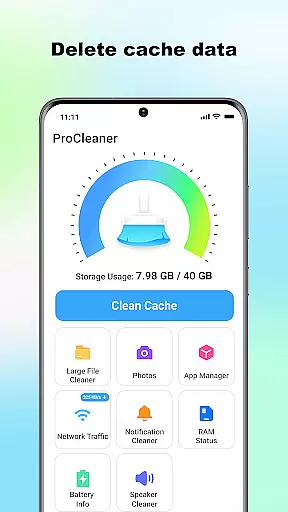
ProCleaner is a comprehensive device optimization tool designed to help users efficiently manage their smartphone storage. The app's core functionality revolves around scanning and cleaning various types of unnecessary files, including cache, residual, and junk files that accumulate over time.
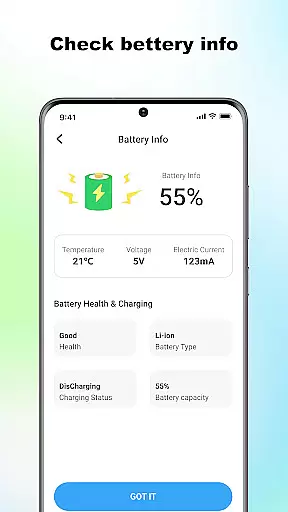
Beyond basic cleaning capabilities, ProCleaner offers advanced features for managing large files and uninstalling multiple applications simultaneously. Users can also monitor network speed and check battery status, providing a complete solution for device maintenance and performance optimization.
This application is particularly useful for individuals who frequently encounter storage issues or want to maintain optimal device performance. By providing both basic and advanced tools for file management and system monitoring, ProCleaner delivers significant value to users looking to keep their devices running smoothly.
ProCleaner distinguishes itself through its comprehensive suite of optimization tools. The app's primary feature is its intelligent scanning system, which can detect various types of unnecessary files across the device's storage. This includes temporary cache files, leftover residual files from uninstalled apps, and other junk files that consume valuable space.
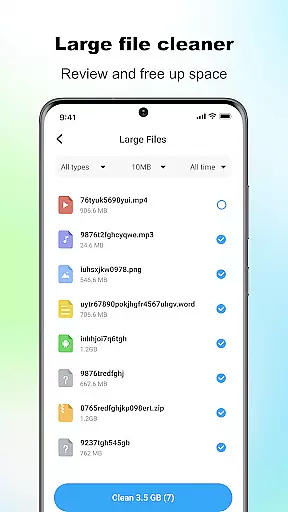
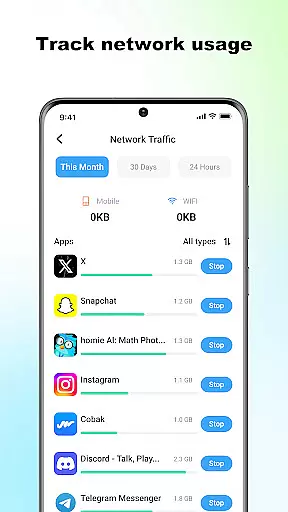
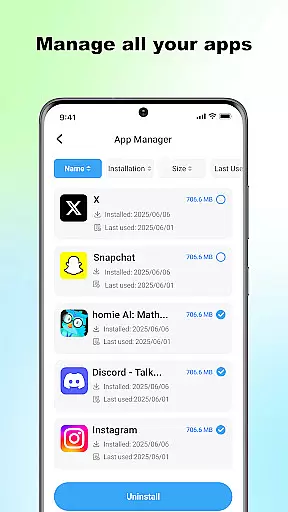
The application goes beyond simple cleaning functions by offering advanced management capabilities. Users can identify and organize large files, making it easier to decide which files to keep or remove. The multiple app uninstallation feature streamlines the process of removing unwanted applications, while the network speed monitoring tool helps users track their internet connection performance.
Additional features include detailed battery status monitoring and the ability to perform all operations locally without collecting personal data. These characteristics make ProCleaner a privacy-conscious choice for users seeking to optimize their device's performance without compromising their personal information security.
ProCleaner excels in delivering accurate and effective core functions that enhance device performance. The app meticulously scans and cleans cache files, ensuring no unnecessary data occupies your storage.
Additionally, it removes residual and junk files left behind by uninstalled apps, freeing up valuable space. Its ability to find and manage large files allows users to prioritize what stays on their device, further optimizing storage capacity.
The feature to uninstall multiple applications streamlines the process of managing installed apps efficiently. With network speed monitoring and battery status checking, ProCleaner ensures comprehensive device management.
Users benefit from a smoother, faster device experience without manual intervention or technical know-how, making daily operations seamless and efficient.
A simple and intuitive interface is crucial for effective tool apps, and ProCleaner delivers this with ease. Upon opening the app, users are greeted with a clean layout that organizes its features logically, allowing quick access to essential functions.
Each tool is represented by clear icons and labels, ensuring that even first-time users can navigate effortlessly. The straightforward design eliminates any learning curve, enabling immediate productivity.
Moreover, ProCleaner's one-tap solutions for cleaning and optimization reduce complex tasks to single actions. This approach not only simplifies interactions but also saves time, enhancing overall user satisfaction.
By focusing on clarity and ease of use, ProCleaner ensures that users of all technical backgrounds can maintain their devices without frustration or confusion.
User-friendly interface
Comprehensive cleaning options
Local data processing
Advanced file management
Multiple app uninstallation
Requires storage access
Basic features only in free version
Occasional slow scanning
Limited customer support
No cloud backup option

 4.10
4.10
1-Click close all background apps on Android TV
3.90
Remote for Roku, Fire TV, Samsung TV, LG TV, Android TV, Chromecast and VIZIO TV
4.20
Family Locator, Share location, StayConnect with your family in real time
3.90
Universal TV remote control all TVs, Roku, LG, Samsung, Fire, Vizio, Sony, TCL.
4.40
Best leveling tool for your Android device. Hang paintings like a pro.
4.90
Create your own custom widget with endless possibilities
3.90
Protect your device with antivirus, storage cleanup, and system monitoring
4.70
A clean app.
4.50
Connect wirelessly to your computer to watch movies, browse the web, play games
5.00
Extremely fast, secure, and protects your privacy
4.80
Excellent scientific calculator with symbolic algebra, integrals, derivatives
4.80
Small and simple app to Verify Root Access and BusyBox Install!
4.70
App to pay for FUTO Keyboard
4.60
Fun lie-detection pranks for friends and parties.
3.80
A recovery soft,it features photo recovery, video recovery, file recovery.
3.40
A non-root local ADB shell client. READ BELOW!
3.40
PDF Reader - Document Viewer: Read, Manage & Organize Your Documents
3.10
Transfer Files, APK from Phone to Watch & Install.
4.4

User Reviews