

Permission Manager X is a powerful tool designed to provide users with complete control over app permissions on their Android devices. It allows you to view, grant, or revoke both manifest and AppOps permissions for each installed application from a single interface. The app emphasizes privacy protection by enabling users to set reference states for permissions, which can be backed up and restored across reinstalls or devices.
Beyond basic permission management, the app offers advanced features like scheduled checks, auto-revoke of unnecessary permissions, and a Permission Watcher function that dynamically removes unwanted access. With support for multi-user profiles, theming options, and batch operations, it caters to both casual users and power users who demand granular control over their device's security and performance.
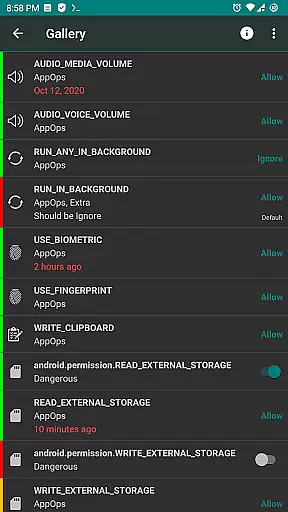
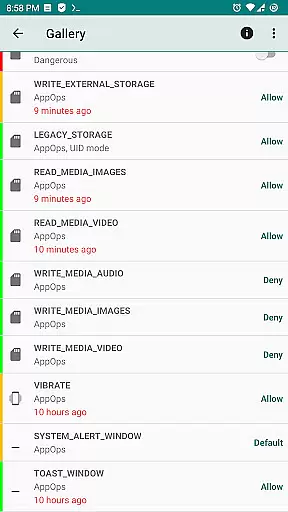
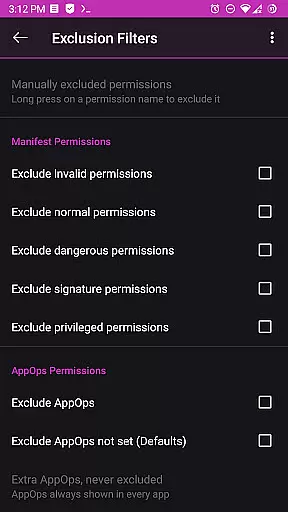
One of the standout features of Permission Manager X is its ability to manage both manifest permissions (such as storage, camera, and location) and AppOps permissions, which provide deeper access controls like background execution and clipboard access. This dual-layer approach ensures comprehensive oversight of how apps interact with your device.
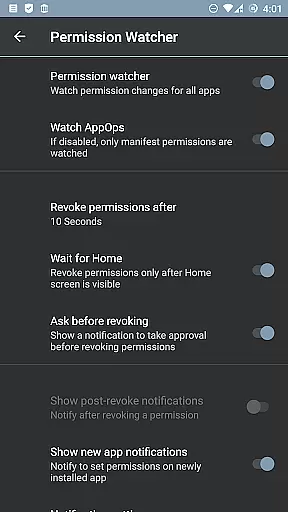
The app also includes paid functionalities such as sorting options, scheduled permission audits, and automatic backups when changes are made. Additionally, tools like the Permission Watcher enable real-time monitoring and removal of unwanted permissions as soon as an app stops being used. For rooted devices or those configured with ADB over network, the app provides unrestricted access to critical system settings, making it indispensable for advanced customization.
With open-source transparency, no ads, and a strong focus on user privacy, Permission Manager X stands out in the realm of permission management tools. Its active development community ensures regular updates and new feature additions, while the availability of translations makes it accessible to a global audience.
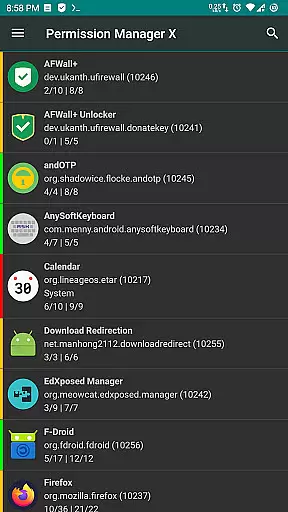
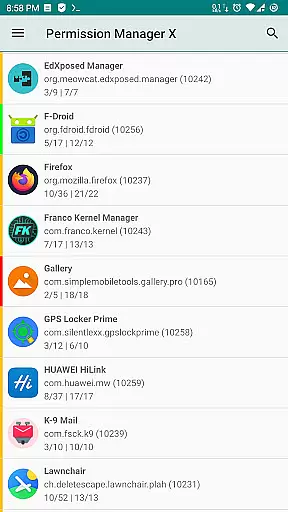
Permission Manager X offers a comprehensive solution for managing app permissions with precision and control. The core functionality allows users to view, grant, or revoke both manifest permissions and AppOps permissions from a single screen. This ensures that every permission change is accurately reflected in real-time, providing an effective way to manage privacy settings.
The app's ability to handle both manifest permissions and AppOps provides fine-grained control over various access rights. Users can set desired reference values for each changeable permission, ensuring that their privacy preferences are maintained consistently across different apps. This dual management approach highlights the app's commitment to delivering accurate and reliable permission controls.
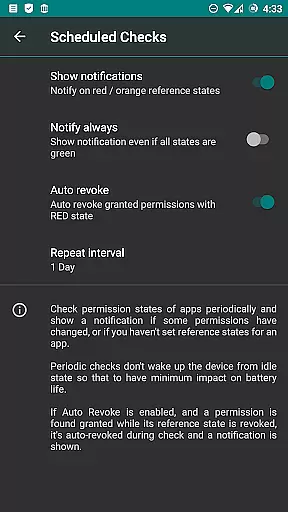
With features like scheduled checks and auto-revoke options, Permission Manager X enhances its effectiveness by notifying users of any bad reference states and automatically revoking granted permissions with RED states. These proactive measures ensure that users maintain optimal privacy settings without constant manual oversight.
Despite its powerful capabilities, Permission Manager X maintains a simple and intuitive interface. The design ensures that even users new to permission management can easily navigate through the app's features. Clear categorization and straightforward controls make it easy to understand and modify permissions for each installed app.
The app uses colored bars on the left side of the interface to provide quick visual cues about permission states. This intuitive visual representation allows users to review packages and permissions at a glance, making the process more efficient and user-friendly. Such thoughtful design elements enhance the overall usability of the app.
Additional features like search suggestions, theming options, and permission summary views further contribute to the app's intuitive nature. These enhancements ensure that users can customize their experience while maintaining ease of use. By combining powerful functionality with a simple interface, Permission Manager X delivers an exceptional user experience.
Comprehensive permission control
Privacy-focused design
Advanced AppOps management
Open-source and ad-free
Active developer support
Limited without root access
Complex for beginners
Paid features required
ADB setup needed
Not compatible with all ROMs

 4.10
4.10
Connect instantly to a fast, encrypted VPN with one tap
4.60
PDF Reader - Document Viewer: Read, Manage & Organize Your Documents
3.10
This app unlocks the Pro features of the Central for DayZ app
3.60
Clean the junk files on your device
3.40
Smart and comfortable browsing experience.
3.80
Detect hidden spy camera with advanced scanning {{ Premium version }}
4.00
The ultimate tool for network analysis, wifi scanning and problem detection.
4.90
Clean up large files and similar photos, fast and easy to use
4.40
Enjoy smooth gameplay with Game Booster
4.90
Head tracking for PC sim games such as MSFS 2024 or Elite:Dangerous. No headset!
4.50
Screen Mirroring for Roku Sticks, Roku TCL TV and Roku Hisense TV
4.50
Use your phone as a webcam on your computer over WiFi or USB.
4.40
Quickly check the frequency of the Earth
4.30
Just one-tap to easy translate in any language after calls within seconds.
4.20
Remote for Roku, Fire TV, Samsung TV, LG TV, Android TV, Chromecast and VIZIO TV
4.20
Quickly & easily calculate the spacing of handrail balusters
4.20
Amateur Radio app for APRS: Track friends, exchange messages, get tactical info.
3.90
Create your own custom widget with endless possibilities
3.90

User Reviews