

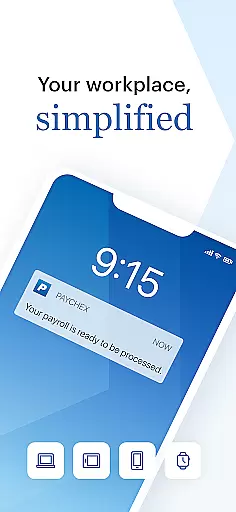
Paychex Flex is a comprehensive business management application designed specifically for employers and employees who are registered users of Paychex Flex. This app provides seamless access to essential payroll and benefits features, ensuring that businesses can manage their operations efficiently from anywhere. With functionalities varying based on the company's plan options, it offers tools such as Touch ID and Face ID authentication, payroll submission, and detailed reporting.
The app allows employers to submit payroll on the go, review cash requirements, and access employee profiles and tax documents. Employees benefit from accessing their check stubs, W2s, retirement balances, and health benefits information. The ability to update personal details and manage contributions makes it an indispensable tool for modern businesses looking to streamline their HR processes.
One of the standout features of Paychex Flex is its robust security measures, including Touch ID and Face ID authentication, which ensure that sensitive payroll and employee data remain secure. Employers can enter, review, and submit payroll directly from their mobile devices, making it convenient to manage payroll operations even when away from the office.
Additionally, the app provides extensive reporting capabilities, allowing users to access payroll reports, employee profiles, compensation details, and tax documents. For employees, the app offers easy access to their financial and benefits information, including retirement plans and health insurance details. This level of accessibility and control helps businesses maintain transparency and empowers employees to manage their personal information effectively.
Collaborative work features are essential for modern business applications, enabling seamless interaction between employers and employees. Paychex Flex offers a robust platform where both parties can access vital payroll and benefits information, ensuring everyone stays connected and informed.
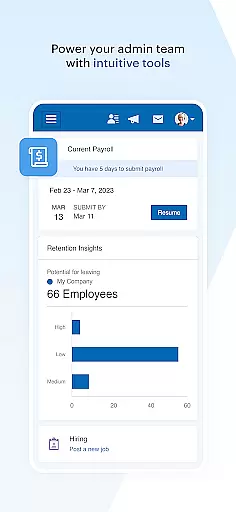
The app provides employers with the ability to authenticate using Touch ID and Face ID, making secure access straightforward and efficient. Employers can submit payroll on the go, enter and review details, and even resume payrolls started on other devices like tablets or desktops. This flexibility ensures that payroll processes are not hindered by location or device constraints.
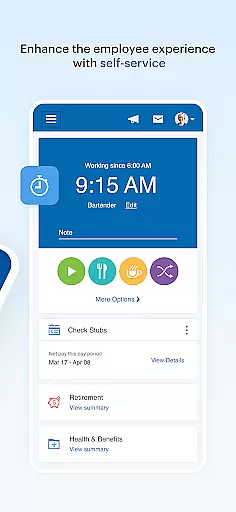
For employees, the app grants access to crucial documents such as check stubs and W2s, retirement balances, and health benefits information. Employees can update their retirement contributions and investments directly through the app, ensuring their personal information is always current. This level of access empowers employees to manage their benefits actively, leading to better financial health and job satisfaction.
By integrating collaborative features, Paychex Flex enhances communication and operational efficiency within businesses. The ability for both employers and employees to access and manage essential data from anywhere significantly boosts productivity and ensures that all stakeholders are aligned and informed.
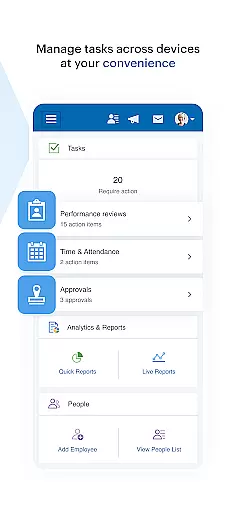
Effective task management is crucial for maintaining operational efficiency in any business environment. Paychex Flex excels in this area by offering a comprehensive suite of tools designed to streamline various HR and payroll tasks, ensuring that businesses can operate smoothly and without unnecessary interruptions.
Employers utilizing Paychex Flex can access a wide array of reports, including payroll reports and cash requirements. This feature allows for meticulous tracking of financial data, helping businesses maintain accurate records and make informed decisions. Additionally, employers can view employee profiles, compensation details, tax information, and time-off balances, providing a holistic view of workforce management.
Employees also benefit from the app's task management capabilities. They can easily access their check stubs, W2s, and detailed information about their retirement plans, including balances, contributions, and loan statuses. The app further enables employees to update their retirement investments and review their health, dental, and life insurance benefits, ensuring they have a clear understanding of their compensation packages.
Overall, Paychex Flexu2019s task management features ensure that both employers and employees can efficiently handle their respective responsibilities. By centralizing these tasks within a single, accessible platform, the app reduces administrative burdens and enhances overall workplace productivity.
User-friendly interface
Comprehensive payroll tools
Robust security features
Extensive reporting capabilities
Employee self-service options
Limited to registered users
Feature availability varies
Requires company subscription
No offline functionality
Complex setup process

Completed Course Lectures on how to use IBM Maximo in Maintenance issues
 4.2
4.2
Formerly Facebook Ads Manager. Manage and create ads on the go.
4.20
ANDROID'S TOP MOBILE OFFICE - Word, Excel, PowerPoint and PDF at your fingertips
4.50
VSD Viewer - Visio Drawings Viewer for Android Preview VSD, VDX, VSDX drawings
4.10
Manage Your Shop
4.70
Drive and earn extra money
4.50
Use Generative Summary to understand your rental or insurance docs in seconds.
4.70
Chat, meet, and collaborate to achieve more together, all in one place on Teams
4.60
Work happy with AI Companion
4.10
Job search app that finds jobs for you! Takes the work out of looking for a job!
4.90
GoTo Mobile is a simple & secure calling, messaging & meetings solution
4.80
Your employer must have UKG Ready software configured for Mobile.
4.60
ADP Mobile Solutions is an employee self service app
4.50
Deliver and earn money
4.30
On the go? Take FedEx with you.
4.00
Simple, Fast & Lightweight
3.90
Quickly open and manage PDF files on your device.
3.80
Delivery Track App - Tracking with Fedex, USPS, UPS, DHL. Monitor your Orders.
3.20
We are a dynamic team of creatives people of design, marketing, web & apps
3.00


User Reviews