

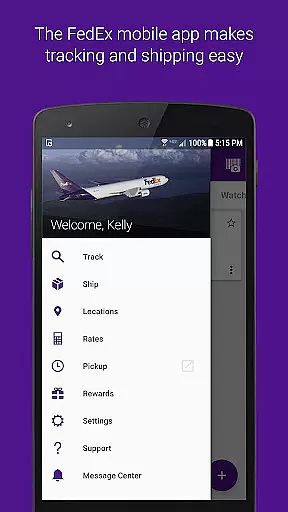
FedEx Mobile is a comprehensive business application designed to streamline shipping and package management for users on the go. With this app, you can create domestic and international shipping labels, track the status of all incoming or outgoing packages, and manage your shipments from anywhere. The app also offers features such as getting quick rates, finding pickup or drop-off locations, scanning barcodes for easy tracking, and viewing rewards.
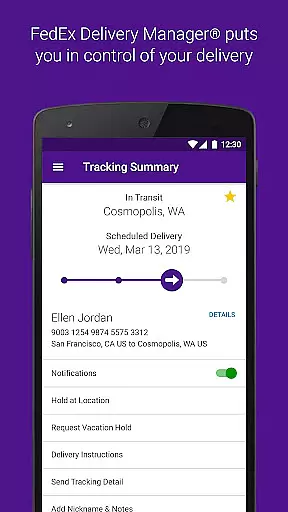
One of the standout capabilities of FedEx Mobile is the ability to enroll in FedEx Delivery Manager, which allows you to customize when and where you receive your packages. This feature is particularly useful for businesses that require flexible delivery options. Whether you need to hold a package at a preferred location, leave delivery instructions, or request a vacation hold, FedEx Mobile has got you covered.
The app's availability across all regions and its support for various functionalities make it an indispensable tool for modern businesses. By enabling push notifications and using the app's location services, users can stay updated on their shipments and easily find nearby FedEx locations. Overall, FedEx Mobile empowers businesses with efficient logistics management right at their fingertips.
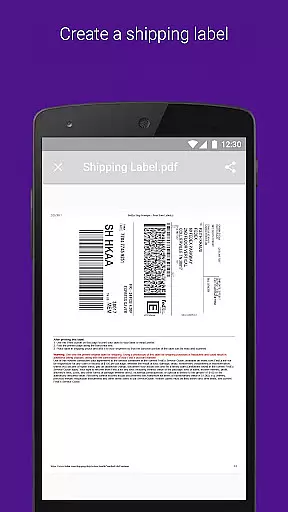
FedEx Mobile boasts a wide array of features tailored to enhance the shipping and package management experience. One of its primary functions is the ability to create mobile shipment labels and request pickups directly from the app. This streamlines the shipping process, making it more convenient for businesses to send out packages without the need for physical visits to FedEx locations.
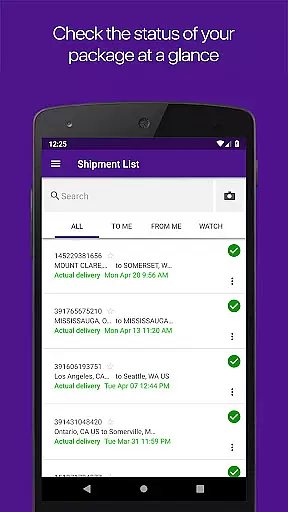
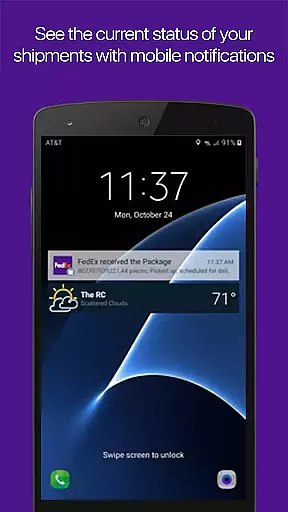
In addition to label creation, the app provides robust tracking capabilities. Users can track the status of all incoming or outgoing packages, scan barcodes for easy tracking, and search their list of shipments by tracking number, references, vendors, and more. Push notifications further enhance this experience by providing real-time updates on shipments and sound notifications for delivered packages, ensuring that users are always informed about their package status.
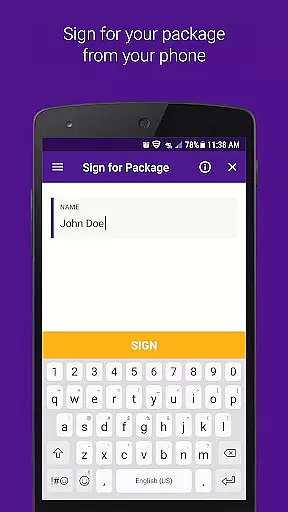
Another significant feature is the integration with FedEx Delivery Manager, which allows users to customize delivery preferences. This includes options to hold packages at preferred locations, leave delivery instructions, sign for packages requiring signatures, and even reroute packages to different FedEx locations. These features collectively ensure that businesses have maximum flexibility and control over their deliveries, optimizing their logistics operations.
In the realm of business logistics, collaboration is key. The FedEx Mobile app enhances collaborative work features by enabling teams to manage shipments collectively. With functionalities such as creating mobile shipment labels and requesting pickups, team members can ensure that operations run smoothly even when they are not physically present in the office.
Furthermore, the app allows users to search their list of shipments using various filters like tracking numbers and vendors, which streamlines communication within teams. This feature ensures that everyone involved in the shipping process is on the same page, reducing errors and increasing efficiency.
The inclusion of push notifications adds another layer of collaboration by keeping all stakeholders updated on shipment statuses. Whether it's a delivery confirmation or an update on a shipment's location, these real-time alerts help maintain a seamless workflow among distributed teams.
Effective task management is crucial for businesses, and the FedEx Mobile app excels in this area by providing tools that allow users to track and manage their packages efficiently. One standout feature is the ability to track the status of all incoming and outgoing packages, ensuring that users are always aware of their shipment's whereabouts.
Additionally, the app offers task-specific features such as enabling push notifications for shipment updates and sound notifications for delivered shipments. These features help users prioritize their tasks and respond promptly to any changes in shipment status, enhancing overall productivity.
For those needing more control over their deliveries, enrolling in FedEx Delivery Manager provides advanced options like holding packages at preferred locations and leaving delivery instructions for couriers. Such capabilities empower users to customize their delivery experiences according to their schedules, making task management more flexible and user-centric.
User-friendly interface
Comprehensive tracking system
Customizable delivery options
Efficient label creation
Global availability
Limited to FedEx services
Some features region-specific
Requires account registration
Dependent on internet connectivity
Permissions needed for full functionality

The All-in-One File Manager for Phone, TV, Watch, Cars, XR / VR, Chromebook
 4.10
4.10
BuildCalc - the easiest AND the most advanced construction calculator app.
4.80
Finance, Investing, Stocks, Trading and Stock news
4.60
enjoy effortless PDF reading anytime, anywhere
3.90
Delivery Track App - Tracking with Fedex, USPS, UPS, DHL. Monitor your Orders.
3.20
Build a store in minutes with our full suite of AI tools. Start for free!
4.20
view, manage, and share every PDF file you have
3.60
Job search app that finds jobs for you! Takes the work out of looking for a job!
4.90
The app that lets you deliver with Amazon.
4.50
Earn free swag, G-Cards & food • Enter sweepstakes • Find stores • So much more.
4.70
All your team communication in one place
4.70
AI-powered document scanner with auto enhance for perfect PDFs.
4.60
Ask Accio anything about business. Alibaba-backed, built by experts, not just AI
4.60
The revolutionary flexible staffing platform
4.40
All-in-one Mobile solutions for employees & managers to succeed at work
4.30
The Penny Puss app with DG penny finder
4.10
Shop, deliver, and earn with the Spark Driver™ App
4.10
Work happy with AI Companion
4.10
We are a dynamic team of creatives people of design, marketing, web & apps
3.00


User Reviews