
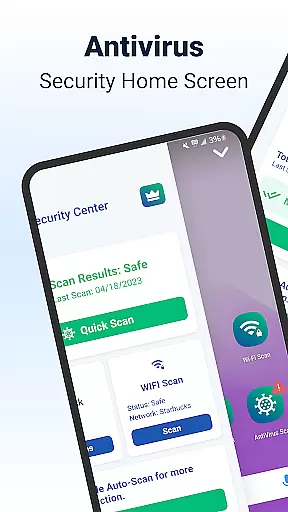
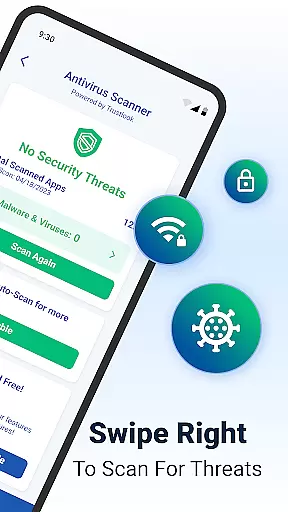
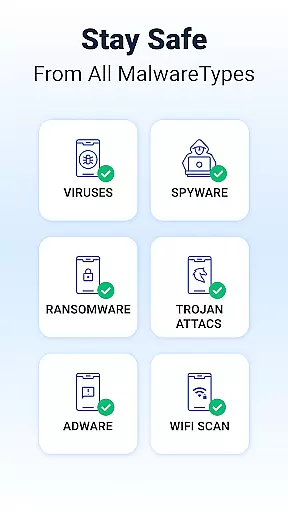
Shield Antivirus Home Screen is a comprehensive security solution designed specifically for Android devices. This free application provides robust protection against viruses, malware, and various cyber threats while enhancing user privacy through advanced features like secure WiFi scanning. With its AI-driven antivirus scanner boasting a 99% detection rate, Shield ensures top-tier device safety with minimal false positives.
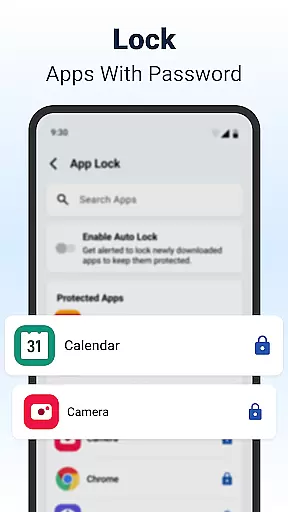
Beyond basic security, Shield offers additional tools such as AppLock, which allows users to password-protect sensitive applications, and customizable privacy settings that adapt to individual preferences. The app also includes network security features that detect potential vulnerabilities in your WiFi connection, making it an all-in-one solution for both personal and networked device protection.
Whether you're looking to safeguard personal data or optimize your home screen experience with enhanced security controls, Shield delivers a seamless blend of functionality and style. Its intuitive interface and extensive feature set make it suitable for everyday users seeking reliable protection without compromising on aesthetics or performance.
Shield Antivirus stands out with its advanced feature set tailored to meet diverse security needs. At the core of its offering is the AI-powered antivirus scanner, which operates with exceptional accuracy, ensuring real-time threat detection and neutralization. This technology not only identifies existing risks but also proactively blocks emerging ones, providing continuous protection for your device.
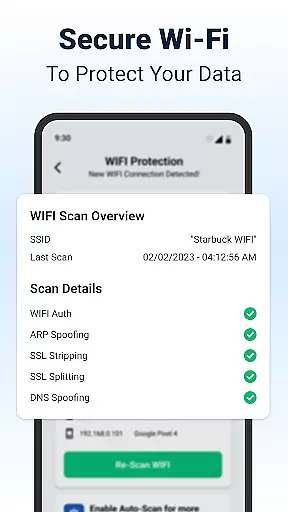
In addition to malware defense, Shield incorporates privacy-centric tools such as AppLock and secure WiFi scanning. AppLock enables users to restrict access to specific apps using biometric authentication or PIN codes, while the WiFi scanner monitors network integrity by identifying vulnerabilities like ARP spoofing and DNS hijacking. These features collectively create a fortified barrier against unauthorized access and data breaches.
Customization is another key highlight of Shield's design philosophy. Users can personalize their lock screens and app interfaces, aligning security measures with their unique preferences. By combining cutting-edge protection mechanisms with visually appealing customization options, Shield redefines what it means to have a secure yet stylish Android experience.
Shield Antivirus Home Screen offers a rich array of customization options that allow users to tailor their Android experience. The app provides personalized lock screen settings and app configurations, ensuring that security does not come at the cost of individual expression.
With features like AppLock, users can secure sensitive applications with a password or fingerprint. Additionally, the ability to hide apps and customize privacy controls adds another layer of personalization. This ensures that your device remains both secure and reflective of your personal style.
The home screen transformation feature enhances user experience by integrating intuitive privacy controls and custom settings. Users can modify their home screens to suit their preferences while maintaining top-notch security protocols.
Overall, Shield's customization capabilities empower users to create a personalized yet secure environment on their devices, making it an ideal choice for those who value both aesthetics and protection.
Theme compatibility is a crucial aspect of any personalization-focused application, and Shield Antivirus Home excels in this area. The app supports various themes, allowing users to choose designs that best match their personal tastes while ensuring visual consistency across their devices.
Users can select from multiple theme options that integrate seamlessly with the appu2019s existing security features. Whether you prefer a minimalist design or something more vibrant, Shield provides a cohesive look and feel that aligns with your preferences without compromising functionality.
In addition to aesthetic appeal, theme compatibility extends to functional elements such as privacy controls and app settings. This ensures that all aspects of the user interface are harmonized, providing a smooth and visually pleasing experience.
By offering extensive theme compatibility, Shield Antivirus Home enables users to enjoy a personalized and consistent interface, enhancing both usability and satisfaction. This makes it easier for individuals to maintain a unique digital identity while benefiting from robust security measures.
Powerful AI-driven antivirus engine
Advanced WiFi security scanning
Customizable privacy settings
User-friendly interface design
Comprehensive threat detection
Limited iOS compatibility
Premium features require subscription
Occasional performance slowdowns
Ad-supported free version
Complex setup for beginners

Vertically oriented rectangular icons
 4.70
4.70
Ultra realistic high quality analog watch face for Wear OS.
4.60
Personalize your phone with stunning HD and 4K wallpapers!
4.70
Dark icon pack based on One 8
4.80
The definitive Icon pack maker and editor
4.30 3.50
3.50
Organize and manage your photos and videos effortlessly with Photo Gallery
4.20
Transform your device in a game console
4.40
Transform your phone with stunning video wallpapers and a unique, personal touch
3.80
100+ Stylish Fonts, Emojis, Symbols keyboard for Instagram & TikTok!
4.80
Winter's Journey: digital watch face for Galaxy Watch & Wear OS
4.80
Unique Android Launcher
4.60
Over 28,000 high quality icons to bring color & homogeneity to your phone.
4.60
Customize your home screen with stunning themes, blur, widgets & icons.
4.60
Customizable screen pets that play, climb, and keep you company.
4.50 4.50
4.50
A light in the dark, a unique style and an andless cutomization!
4.30
Design your screen with unique, vibrant clocks
3.80
Turn your lock screen into fun with smile live wallpapers & animated wallpapers!
2.50

User Reviews