

Shopify stands as a comprehensive commerce platform tailored for entrepreneurs looking to expand their business reach. It enables selling both online and offline, locally and globally, on desktops and mobile devices alike. The platform is powered by innovative AI tools that require zero coding or design skills, making it accessible for everyone.
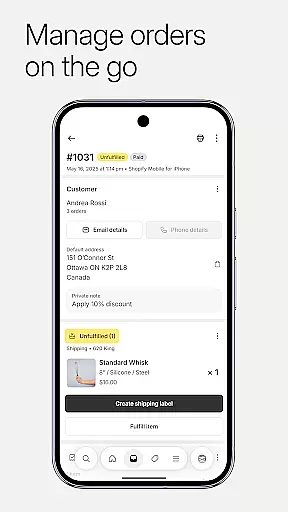
One of the key strengths of Shopify is its ability to manage an entire business on the go. Users can process orders, track inventory, analyze sales, and launch marketing campaigns directly from their mobile devices. This flexibility is perfect for entrepreneurs who are always on the move. Additionally, Shopify simplifies dropshipping, streamlines order automation, and optimizes operations for maximum efficiency and profit.
Shopify offers a robust suite of features designed to enhance every aspect of running an ecommerce business. Product management is made easy with capabilities to upload product photos, set details and pricing, organize products into collections, and adjust inventory by scanning barcodes. Quick order processing allows users to fulfill, refund, or archive orders with just a few taps, buy and print shipping labels effortlessly, and track conversion details to optimize business performance.
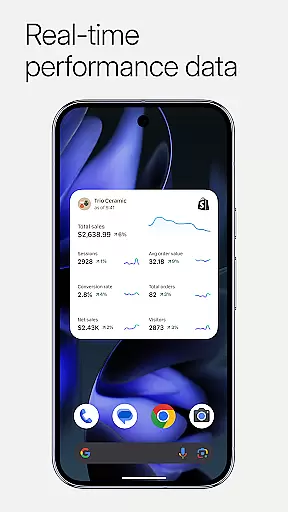
The app provides real-time business insights, enabling users to watch live sales and visitor traffic, receive instant new order notifications, and communicate seamlessly with their team. With powerful marketing tools, users can launch Google Smart Shopping campaigns, create Facebook and Instagram ads on the go, and track results for better performance. Furthermore, Shopify's customer relationship management features allow viewing and managing customer segments, editing customer details anytime, anywhere, and adding timeline comments to orders for better tracking.
Collaborative work features are essential for modern businesses that require seamless communication and coordination among team members. Shopify offers a comprehensive suite of tools designed to enhance teamwork and productivity. Through the platform, users can easily communicate with their team, manage customer relationships, and synchronize inventory and orders across multiple channels.
The app provides real-time business insights, allowing teams to watch live sales and visitor traffic as they happen. This feature ensures that all team members are on the same page, making it easier to respond to changes in the market quickly. Additionally, Shopify enables instant order notifications, ensuring that everyone involved in the fulfillment process is alerted as soon as a new order comes in.
Shopify also supports integration with popular social media platforms like Instagram, Facebook, and Messenger. This allows businesses to reach customers online and in-store effortlessly while keeping all operations synchronized. With these collaborative work features, Shopify empowers entrepreneurs to manage their entire business on the go, from processing orders to launching marketing campaigns.
Moreover, the app facilitates easy access to all Shopify apps and professional free themes, enabling teams to customize their stores efficiently. By providing tools for financial management, such as organizing finances with Balance accounts and monitoring cash flow in real-time, Shopify ensures that every aspect of running a business is streamlined and accessible to all team members.
Effective task management is crucial for maintaining an organized and efficient workflow within any business. Shopify excels in this area by offering robust tools that help entrepreneurs handle various tasks seamlessly. From managing inventory to processing orders, Shopify's task management capabilities ensure that every aspect of your business runs smoothly.
One of the standout features of Shopify is its ability to streamline order automation. Users can fulfill, refund, or archive orders with just a few taps, significantly reducing the time spent on manual processes. The app also allows users to buy and print shipping labels without hassle, further simplifying the logistics side of the business.
In addition to order processing, Shopify provides powerful marketing tools that enable users to launch Google Smart Shopping campaigns and create Facebook and Instagram ads directly from their mobile devices. These features not only save time but also allow for better tracking of results, helping businesses optimize their performance continuously.
Furthermore, Shopify includes functionalities for product management, such as uploading product photos, setting details and pricing, and organizing products into collections. With the ability to scan barcodes and adjust inventory on the fly, users can maintain accurate stock levels effortlessly. Overall, Shopifyu2019s task management features empower entrepreneurs to focus on growing their business rather than getting bogged down by operational details.
User-friendly interface
Comprehensive commerce solution
AI-powered tools
Mobile management capabilities
Extensive integration options
Subscription costs
Limited free themes
Transaction fees
Complexity for beginners
Occasional app glitches







Earn crypto with secure cloud mining. Monitor, track & withdraw easily
 4.40
4.40
TurboScan turns your phone into a full-featured PDF document scanner.
4.80
Manage work life on the go
4.50
All document reader, pdf viewer app, read docs & excel files
3.80
Find part-time earning opportunities near you that pay within days.
3.20
Job search app that finds jobs for you! Takes the work out of looking for a job!
4.90
Make invoices, bills, receipts & estimates on the go with Invoice Generator.
4.70
Ship, Track, Find a Location or Get a Quote with UPS. Anytime. Anywhere.
4.60
Work happy with AI Companion
4.10
GoTo Mobile is a simple & secure calling, messaging & meetings solution
4.80
Earn free swag, G-Cards & food • Enter sweepstakes • Find stores • So much more.
4.70
Get instant construction estimates: accurate home repair & material calculator.
4.70
Finance, Investing, Stocks, Trading and Stock news
4.60
Mobile POS for any business: sales, invoices, retail, restaurants & appointments
4.60
Chat, meet, and collaborate to achieve more together, all in one place on Teams
4.60
A secure, all-in-one team collaboration app
4.30
Make money as a delivery driver with DoorDash and work when you want as a Dasher
4.30
Formerly Facebook Ads Manager. Manage and create ads on the go.
4.20
Find flexible, hourly jobs hiring near you in restaurant, retail & hospitality!
4.00

User Reviews