

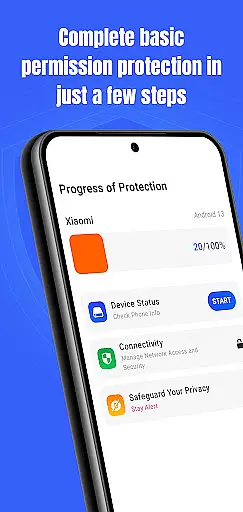
Permission Guard is a security app designed to help you manage app permissions and protect your device. It monitors the permissions granted to apps, ensuring that they only access the data they need. With Permission Guard, you can stay informed about your device's privacy settings and maintain control over your personal information.
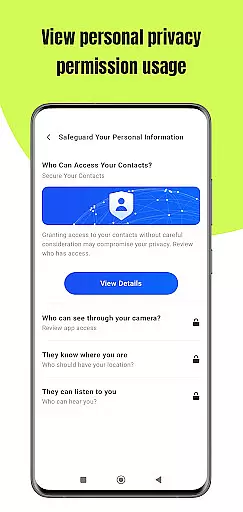
This app is particularly useful for business users who handle sensitive data on their devices. By providing detailed insights into which apps have access to what information, Permission Guard helps prevent unauthorized access and potential data breaches. This ensures that your business information remains secure at all times.
With its user-friendly interface, Permission Guard makes it easy to adjust permissions and customize privacy settings according to your needs. Whether you're looking to restrict access to certain features or simply want to keep an eye on your app permissions, this app provides the tools necessary to safeguard your device and data.
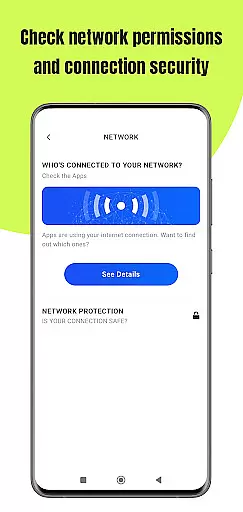
Permission Guard offers a comprehensive set of features to enhance your device's security. One of its key capabilities is the ability to monitor and manage app permissions in real-time. This allows you to see exactly what each app is accessing and make adjustments as needed.
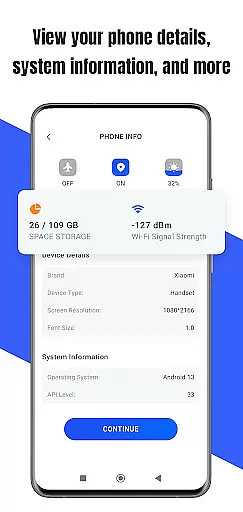
In addition to permission management, Permission Guard also provides detailed reports on app activity. These reports help you understand how your apps are using your data and identify any potential risks. By staying informed, you can take proactive steps to protect your information.
Another standout feature is the app's intuitive interface, which makes it easy to navigate and customize settings. Whether you're a tech-savvy user or new to device security, Permission Guard offers a seamless experience that empowers you to take control of your privacy with confidence.
Collaborative work features are essential for modern business applications, enabling teams to work together efficiently and securely. Permission Guard enhances collaborative efforts by ensuring that shared data remains protected through stringent permission controls.
This app allows teams to monitor and manage permissions across multiple devices, ensuring that only authorized personnel can access sensitive information. By providing real-time updates on permission changes, it fosters a transparent working environment where team members are always aware of who has access to what data.
With Permission Guard, businesses can create customized permission profiles for different teams or projects. This flexibility ensures that collaboration does not come at the cost of security, as each team member can be granted precisely the level of access they need, no more and no less.
The result is a significant boost in both productivity and security. Teams can focus on their tasks without worrying about accidental data breaches, knowing that Permission Guard is safeguarding their collaborative efforts with robust permission management.
Effective task management is crucial for maintaining productivity and ensuring that all team members are aligned with the organization's goals. Permission Guard contributes to task management by allowing users to assign specific permissions related to task-related data, ensuring that only relevant team members can access or modify this information.
By monitoring app permissions, Permission Guard helps prevent unauthorized access to task management tools and data. This means that your project timelines, task assignments, and progress reports remain secure from potential threats or accidental exposure.
Moreover, Permission Guard provides detailed logs of permission-related activities, which can be invaluable for auditing purposes. Managers can review these logs to understand how task-related data is being accessed and used, helping them make informed decisions about permission settings.
Ultimately, Permission Guard empowers businesses to manage tasks more effectively while maintaining strict control over sensitive information. This dual capability enhances both operational efficiency and data security, making it an indispensable tool for modern businesses focused on achieving their objectives safely and efficiently.
Enhanced Security
User-Friendly Interface
Real-Time Monitoring
Detailed Reports
Customizable Settings
Limited Free Features
Occasional Bugs
Requires Regular Updates
Not Compatible with All Devices
Some Permissions Hard to Revoke

Quickly open and manage PDF files on your device.
 3.80
3.80
Create curriculum vitae, a professional cover letter creator and resume designer
4.80
Get your benefits on-the-go.
3.80
Your employer must have UKG Ready software configured for Mobile.
4.60
Drive and earn extra money
4.50
Recover what matters — quickly and easily.
4.70
USPS Mobile®Access USPS.com’s most popular tools on-the-go.
4.70
Say hello to the mobile work experience built to help you thrive at work.
4.30
The app that lets you deliver with Amazon.
4.50
Use Generative Summary to understand your rental or insurance docs in seconds.
4.70
Find the right fit, faster.
4.70
Access to Paylocity, empowering employees with information they need 24/7.
4.70
Find jobs and make money fast with JobStack.
4.60
Amazon A to Z is the place to manage your work-life at Amazon.
4.50
Find jobs near you and temp work in minutes, from your phone.
4.50
The revolutionary flexible staffing platform
4.40
Build a store in minutes with our full suite of AI tools. Start for free!
4.20
FX Plus adds media, networking, and cloud capabilities to FX File Explorer.
4.10
viewing and sharing PDFs and other files—anytime, anywhere!
4.4

User Reviews