

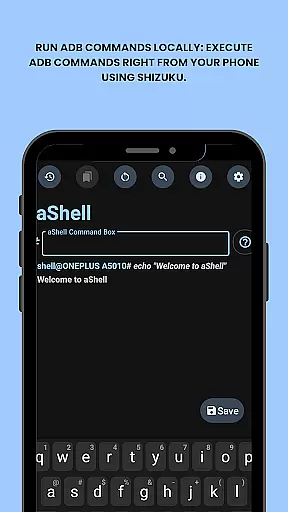
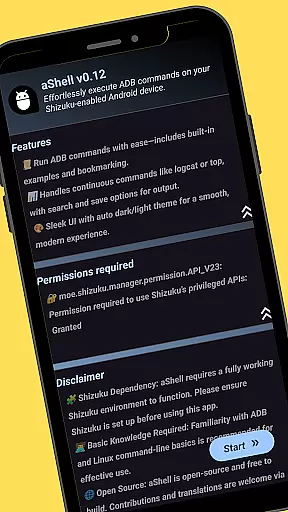
aShell is a specialized tool for Android users seeking to execute ADB commands directly from their devices without the need for a PC. Designed for developers and power users, it operates within a Shizuku-enabled environment, offering full control over device internals.
The app features an intuitive interface that supports live command output, search functionality within results, and saving outputs to text files. With preloaded command examples and support for dark/light modes, aShell streamlines the process of managing Android devices via command-line operations.
aShell stands out with its unique set of features tailored for advanced Android management. The core functionality allows users to run ADB commands locally on their phones through Shizuku, providing unprecedented access to device internals.
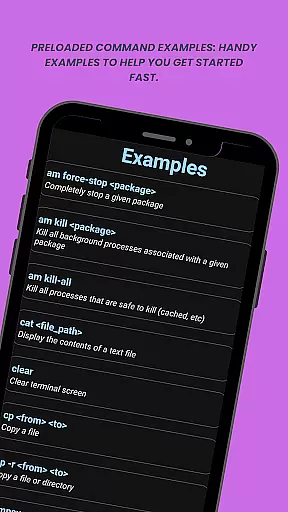
Additional features include preloaded command examples for quick reference, continuous command support like logcat or top, and the ability to bookmark frequently used commands. Users can also search within command output, save results to files, and enjoy adaptive theming that matches system settings.
aShell is designed to execute ADB commands directly from an Android device, offering a seamless and efficient way for developers and power users to interact with their device internals. The app leverages the Shizuku environment to ensure that all commands are processed accurately and effectively.
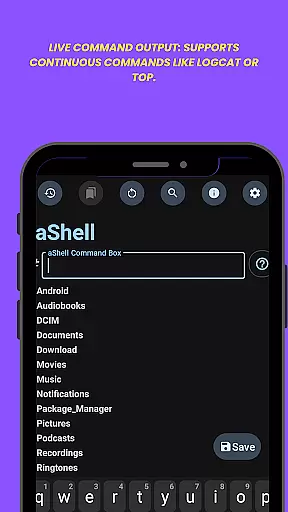
One of the standout features of aShell is its ability to run continuous commands like logcat or top, providing live output that allows users to monitor system processes in real-time. This ensures that users can debug issues or track performance without any delays or inaccuracies.
The inclusion of preloaded command examples helps users quickly get started, even if they have basic knowledge of ADB/Linux operations. These examples enhance the overall user experience by reducing the learning curve and ensuring that users can execute commands correctly.
By supporting both dark and light modes, aShell adapts to user preferences and system settings, making it visually comfortable for prolonged use. Additionally, the ability to save command outputs to files provides a convenient way to document results or share them with others, further enhancing the app's utility.
aShell offers a straightforward and intuitive interface that simplifies the process of executing complex ADB commands on Android devices. Despite the technical nature of its functions, the app is designed to be accessible even to those with minimal command-line experience.
The app includes handy features such as the ability to search within command output, which makes it easier for users to find specific information among potentially large volumes of data. This functionality significantly enhances usability, allowing users to quickly locate relevant details without manually sifting through text.
Another notable feature is the bookmarking system, which lets users save frequently used commands for quick access. This not only speeds up repetitive tasks but also reduces the likelihood of input errors, contributing to a more efficient workflow.
With automatic adaptation to the system theme, aShell ensures a consistent and comfortable user experience regardless of whether the device is set to dark or light mode. This attention to detail underscores the app's commitment to providing a simple yet powerful tool for managing Android devices via ADB commands.
User-friendly interface
Live command execution
Comprehensive feature set
Dark mode support
Open-source availability
Requires Shizuku setup
Limited to tech-savvy users
No standalone functionality
Dependent on external tools
Potential compatibility issues

Transfer Files, APK from Phone to Watch & Install.
 4.3
4.3
A recovery soft,it features photo recovery, video recovery, file recovery.
3.40
Learn the vast amount of system information about device and monitor it's state
4.70
This app unlocks the Pro features of the Central for DayZ app
3.60
View detailed information about your Nissan Leaf the dealer never shows you.
4.10
Quickly check the frequency of the Earth
4.30
Clean up your phone, find files, play media, and share files offline
4.50
A clean app.
4.50
fast and easy mp3 music downloader
4.80
Best leveling tool for your Android device. Hang paintings like a pro.
4.90
Easily install aab(Android App Bundle) files on your Android device with our app
4.80
Extremely fast, secure, and protects your privacy
4.80
Remote Play with FSR upscaling, low latency & full controller support
4.80
Protect your device with antivirus, storage cleanup, and system monitoring
4.70 4.50
4.50
Just one-tap to easy translate in any language after calls within seconds.
4.20
Screen Mirroring with sound for Samsung TV, LG TV, Sony TV, Smart TV and Browser
4.20
MS-DOS in your pocket. Play old DOS games anywhere you are ;)
4.10
Detect hidden spy camera with advanced scanning {{ Premium version }}
4.00

User Reviews