

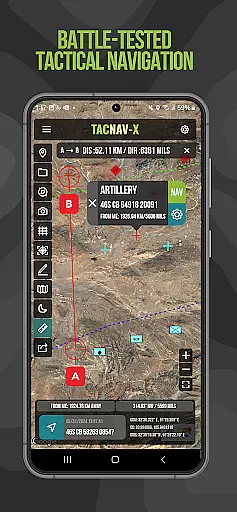
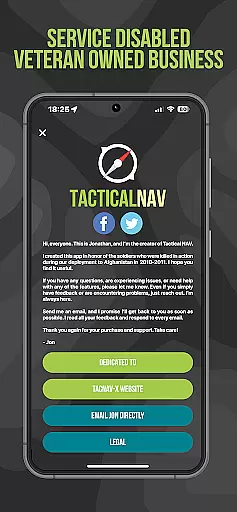
Tactical NAV is a specialized navigation app designed for military use, particularly by soldiers in the field. Developed during a combat deployment in Afghanistan, this app focuses on providing precise Military Grid Reference System (MGRS) navigation capabilities. It offers offline mapping, tactical drawing modes, and waypoint plotting with military graphics, making it an essential tool for mission planning and execution.
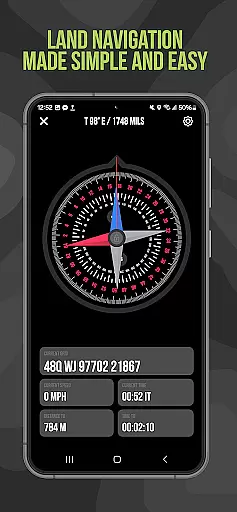
The app's accuracy rivals official Department of Defense systems like Nett Warrior and ATAK, ensuring reliable performance even in austere environments. With features such as Compass 'FastLock' for capturing azimuths and location sharing via email or text, Tactical NAV empowers service members to operate effectively in both training and combat scenarios.
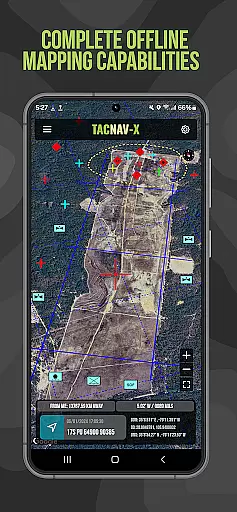
Tactical NAV stands out with its military-grade precision targeting platform, purpose-built for individual soldiers. The app supports various coordinate systems including MGRS, UTM, BNG, and USNG, adhering to WGS-84 standards. Its offline mapping capability allows complete usage without emitting cellular signals, crucial for stealth operations.
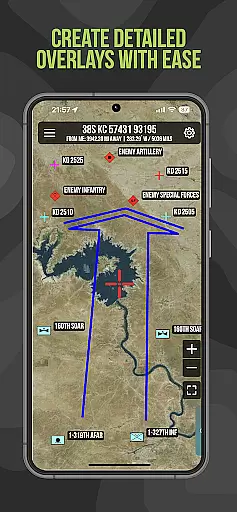
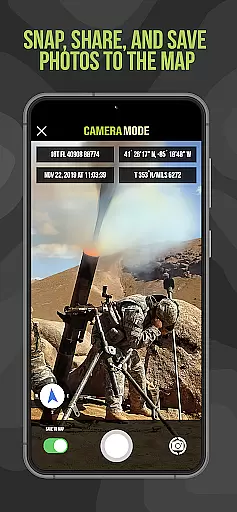
Additional features include tactical drawing mode for mission planning, a 'Go to Grid' function for precise planning, and the ability to snap and save photos onto maps for enhanced situational awareness. Users can plot waypoints with military graphics and share locations, waypoints, and photos securely through email and text.
The Android native code ensures optimal performance in contested environments, while the Compass 'FastLock' function enables quick and accurate azimuth capture. These robust features collectively support operational success across diverse military engagements.
Map accuracy is a critical feature for any navigation application, especially one designed for military use like Tactical NAV. This app offers precision targeting and mapping capabilities that are essential in austere and contested environments where every millimeter counts.
Tactical NAV's performance matches that of the AN/PSN-13 Defense Advanced GPS Receiver (DAGR), ensuring users can rely on its accuracy within 1mm of officially approved systems issued by the DoD. The app supports various coordinate systems including MGRS, UTM, BNG, and USNG under the WGS-84 standard, providing comprehensive location plotting with military graphics as per FM 1-02.2.
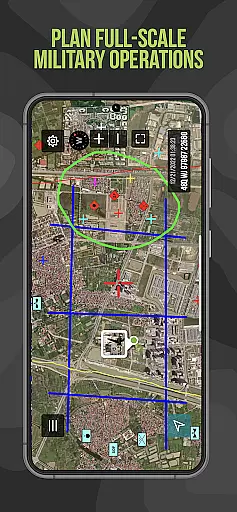
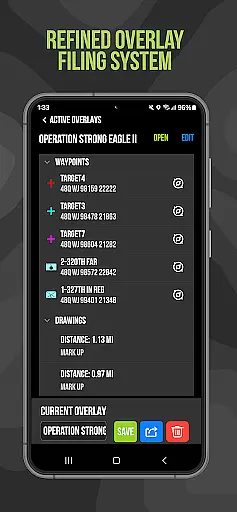
For soldiers in the field, this level of map accuracy means enhanced situational awareness and mission success. With features such as 'Go to Grid' for precision planning, tactical drawing mode for mission overlays, and offline mapping capabilities, service members have a powerful tool at their disposal that functions even without cellular signals.
The importance of having an accurate and reliable navigation platform cannot be overstated when it comes to training or combat scenarios. By equipping military personnel with Tactical NAV, they are empowered to operate effectively and safely, honoring those who have made sacrifices while striving towards successful operations both domestically and abroad.
Route planning is a fundamental aspect of navigation, particularly for military operations where efficiency and safety are paramount. Tactical NAV provides soldiers with advanced route planning tools that enable them to plot waypoints using precise military graphics, ensuring clear and strategic movement across any terrain.
The app includes a 'Compass FastLock' function which allows users to capture quick and accurate azimuths, facilitating efficient route creation. Additionally, the ability to snap and save photographs onto the main map enhances situational awareness by allowing troops to mark significant points along their planned routes visually.
With location, waypoint, and photo-sharing capabilities via email and text, Tactical NAV supports collaborative mission preparation among team members. This ensures all participants are aligned on the planned path and can communicate effectively during operations.
By integrating these sophisticated route planning features into a mobile platform, Tactical NAV not only aids in successful navigation but also contributes significantly to operational readiness. Military personnel can trust this tool to support them in both training exercises and real-world combat situations, making it an invaluable asset for modern warfare.
Highly accurate navigation
Offline mapping capabilities
Military-specific features
Robust tactical tools
Secure sharing options
No DoD endorsement
Limited to military use
Subscription required
Complex for civilians
Not for life-threatening situations

Turn your tablet or Android powered unit into a full blow Android Auto headunit.
 2.30
2.30
Navigate confidently with our precise Digital Compass app & Direction Compass!
4.70
Ride CTA, Metra & Pace: Manage your fares, buy Metra tickets, get arrivals.
3.00
Explore with GPS Navigation with GPS offline, voice GPS, speed camera radar
4.60
Bolt is a ride-hailing app for requesting fast, safe, and affordable transport
4.80
GPS navigation offers route finder, compass, translator, currency converter, etc
4.30
Track friends in real-time and explore worldwide live cameras.
4.60
GPS phone tracker, family locator, secure location sharing app
4.20
Navigation, weather, offline maps & tools for smarter, safer travel planning.
4.00
Find EV & Tesla charging stations with PlugShare
4.70
Find AI powered cameras, ALPRs, and other surveillance infrastructure near you
4.70
GPS Speedometer & Odometer: Track car, bike, truck speed & distance in real-time
4.70
The fastest and most convenient way to pay for parking on our lots.
4.40
Instant diesel discounts - save big with each fill up!
4.40
Easy, Moderate and difficult offroad adventures.
4.00
GPS Navigation: Get map directions and find the shortest routes to avoid delays!
4.00
MapQuest is your go-to app for maps, GPS, voice navigation & live traffic.
3.80
Find 93 Octane Gas: Locate Gasoline Stations Selling Premium 93 Octane or Higher
4.5
Fully offline 1:50k New Zealand topographical map North Island
4.3

User Reviews