

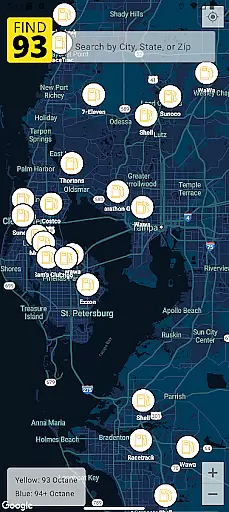
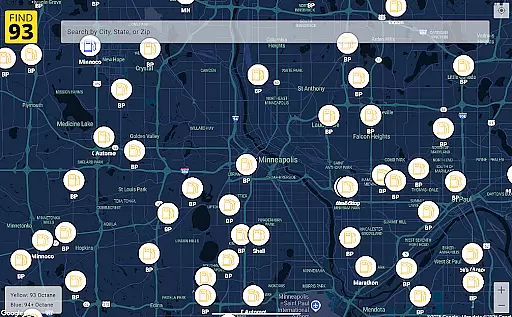
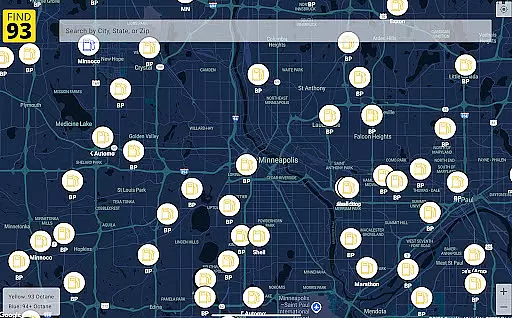
Find93 is a specialized navigation app designed to help drivers locate gas stations that offer 93 octane gasoline or higher. The app's core functionality revolves around its crowdsourced map system, which provides real-time information about premium fuel availability across different locations.
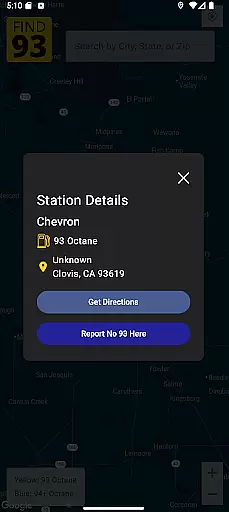
Key features include detailed station information with addresses and fuel types, seamless integration with major navigation apps like Apple Maps and Google Maps, and a user-friendly reporting system for stations that no longer carry 93 octane fuel. Whether you're on a long road trip or need premium fuel near your location, Find93 ensures you can find the right gas station quickly and efficiently.
This app is particularly valuable for owners of high-performance vehicles that require higher octane fuel, providing peace of mind when traveling through unfamiliar areas.
Find93 stands out in the navigation category through its unique focus on premium fuel stations and innovative crowdsourcing model. The app's most distinctive feature is its community-driven map that allows users to report stations not offering 93 octane fuel anymore, ensuring the database remains current and accurate.
The application provides comprehensive station details including precise location coordinates, fuel types available, and additional descriptions. Its integration with multiple navigation systems - Apple Maps, Google Maps, and Waze - offers users flexibility in route planning. The interface is designed for maximum usability, with clear markers and easy-to-access information panels.
Additional practical features include one-tap reporting functionality for outdated information and intuitive filtering options for specific fuel types. This combination of real-time data, multiple navigation options, and community engagement creates a powerful tool for drivers who need access to premium fuel stations.
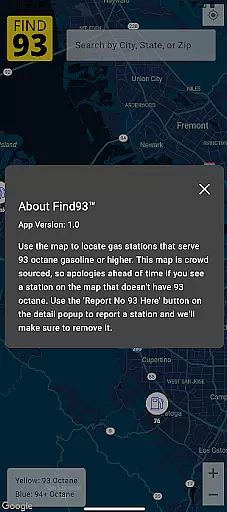
Map accuracy is crucial for any navigation application, and Find93 excels in this area by providing users with the most up-to-date information on gas stations that serve 93 octane or higher. This crowdsourced map relies on contributions from its active user base to ensure that station data is current and reliable.
The app's community-driven approach allows drivers to report stations that no longer offer the desired fuel type through a simple tap of the 'Report No 93 Here' button. This feature not only maintains map precision but also fosters trust among users who depend on accurate station details for their journeys.
With Find93, you can locate stations with confidence, knowing that each pin on the map represents a verified source of high-octane gasoline. The detailed station information, including names, addresses, and fuel types, further enhances the reliability of your search results.
Effective route planning is essential for travelers seeking efficient paths to their destinations, and Find93 offers integrated navigation features that make this process seamless. By partnering with leading navigation apps such as Apple Maps, Google Maps, and Waze, Find93 ensures that users have multiple options for plotting their courses.
Upon selecting a gas station from the app's detailed listings, drivers can choose their preferred navigation service to receive optimized directions. This flexibility empowers users to select routes based on traffic conditions, distance, or personal preference, enhancing both convenience and travel efficiency.
Find93's commitment to user-friendly interface design means accessing these route planning tools is straightforward and intuitive. With just a few taps, you can transition from station details to turn-by-turn guidance, ensuring you reach your chosen destination without unnecessary delays or complications.
User-friendly interface
Real-time station updates
Multiple navigation options
Comprehensive station details
Active community support
Limited to premium fuel
Dependent on user reports
No offline functionality
Occasional data delays
Specific use case only


The fastest and most convenient way to pay for parking on our lots.
 4.40
4.40
Route schedules, maps, and real-time tracking of MTA buses in New York City.
4.20
Instant diesel discounts - save big with each fill up!
4.40
Voice GPS with driving directions, offline maps navigation GPS for safe travel
4.50
Ride CTA, Metra & Pace: Manage your fares, buy Metra tickets, get arrivals.
3.00
Phone Tracker and GPS Location Sharing
4.20
LIRR and Metro-North tickets and trips
4.80
Off-Roading Navigation App With Trails, Public Lands, & Private Property Info
3.30
Lets explore the world's famous places by using Live Cams, GPS & Satellite View.
4.20
Parcel map, property lines, owner, acres, land use, zoning and more from Regrid.
4.60
"Balad" is a map and navigator with a Persian voice assistant and a complete city guide
4.40
Get matched with a nearby driver — you’ll be on your way in minutes.
4.30
TACNAV-X: Precision MGRS navigation, built specifically for the military.
4.00
Get real-time bus and train schedules for easy, hassle-free city transportation.
3.90
Explore Live Earth Map with 3D World Map & locate cites, mountains real time.
3.80
Live Satellite view app for find GPS navigation Direction and live location map
3.70
Explore offline maps with radar, satellite view, and real-time alerts.
3.60
Explore the world with Live Satellite View, 3D Maps, GPS Navigation & Earth Map.
2.90
Compass is an accurate compass and a great tool for any outdoor activities
4.4

User Reviews