

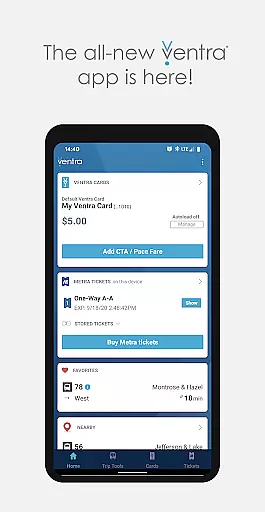
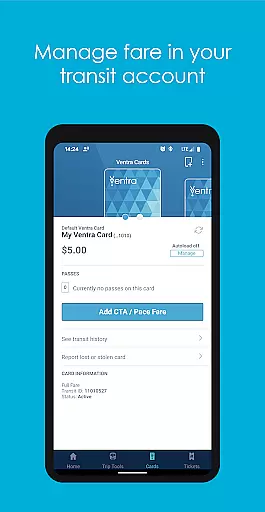
Ventra is a comprehensive transit management app designed specifically for the Chicago metropolitan area. It allows users to manage and pay fares across all major transit systems including CTA, Metra, and Pace buses and trains. With its intuitive interface, Ventra makes it easy to check account balances, load value or passes instantly, and toggle autoload settings.
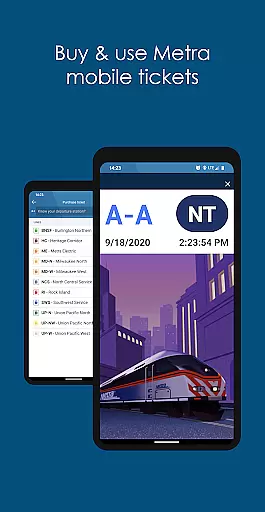
One of the standout features of Ventra is its mobile ticketing capability for Metra trains, which eliminates the need for physical tickets. Additionally, users can access real-time notifications and arrival/departure information from multiple transit services in one place. Whether commuting to work or exploring the city, Ventra ensures seamless travel experiences by keeping users informed and prepared at all times.
Ventra offers an array of robust features tailored to enhance the transit experience in Chicago. Users can effortlessly check their Ventra Card's balance and available passes directly within the app. The ability to instantly load value or passes provides unparalleled convenience, ensuring that commuters never run out of fare when they need it most.
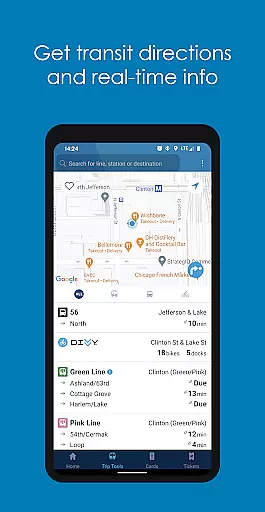
The app also supports mobile ticketing for Metra trains, allowing users to purchase and store tickets digitally. Real-time account notifications keep users updated on when to reload fare or buy additional tickets. Furthermore, Ventra consolidates real-time arrival and departure information from CTA, Metra, and Pace into a single platform, making trip planning efficient and straightforward. These features collectively contribute to a smoother, more reliable daily commute.
Map accuracy is crucial for any navigation app, and Ventra excels in this area by providing precise location data for transit users in Chicago. The app aggregates real-time information from CTA, Metra, and Pace, ensuring that users have access to the most accurate transit maps available.
Ventra's mapping feature goes beyond just showing stops; it provides live updates on arrival and departure times, helping commuters plan their journeys more effectively. This level of detail ensures that users can rely on the app for timely and accurate navigation throughout the city.
By integrating multiple transit services into a single map interface, Ventra simplifies the process of navigating Chicago's complex transit network. Whether you're a daily commuter or a first-time visitor, the app's accurate mapping capabilities ensure you'll always know where you are and where you need to go.
Effective route planning is essential for efficient travel, and Ventra offers robust tools to help users navigate Chicago's transit system. The app allows users to input their desired destinations and receive optimized route suggestions based on current transit schedules and real-time conditions.
Ventra's route planning feature stands out by offering multiple options for each journey, including different modes of transportation and alternative routes. This flexibility enables users to choose the most convenient or fastest path to their destination, whether they prefer buses, trains, or a combination of both.
The app also provides real-time updates on service disruptions and delays, allowing users to adjust their plans accordingly. With Ventra's comprehensive route planning tools, navigating Chicago's transit network becomes a seamless and stress-free experience for all users.
User-friendly interface
Instant fare loading
Comprehensive transit info
Mobile ticketing option
Real-time notifications
Limited to Chicago area
Occasional bugs
Requires internet
No offline mode
Metra only tickets

Explore the world with Live Satellite View, 3D Maps, GPS Navigation & Earth Map.
 2.90
2.90
Explore a light pollution map to find suitable dark sky locations for observing.
4.30
Turn your tablet or Android powered unit into a full blow Android Auto headunit.
2.30
Order a cab online. An affordable taxi ride and driver in no time. What a bolt!
4.80
Get directions, Maps, GPS navigation & GPS Maps using GPS App
4.10
GPS Speedometer & Odometer: Track car, bike, truck speed & distance in real-time
4.70
Affordable rides and food delivery with incredible discounts in just one app.
4.50
Get route, find shortest path, near by places and weather update
3.90
GPS navigation offers route finder, compass, translator, currency converter, etc
4.30
Bolt is a ride-hailing app for requesting fast, safe, and affordable transport
4.80
Offline maps & GPS for hiking, travel, fieldwork & outdoor adventures
4.70
Find EV & Tesla charging stations with PlugShare
4.70
Explore with GPS Navigation with GPS offline, voice GPS, speed camera radar
4.60
Discover over 800 points of interest along the canal.
3.70
Get route map navigation with 3D satellite view, and live earth camera streaming
3.70
Live Satellite view app for find GPS navigation Direction and live location map
3.70
Explore Earth with live GPS, satellite view & street navigation
3.60
Your real-time window to the world. Explore anywhere, anytime.
3.30
Compass is an accurate compass and a great tool for any outdoor activities
4.5


User Reviews