

PayByPhone is a leading mobile parking payment solution that simplifies the parking experience for millions of drivers worldwide. With over 95 million users trusting the app for their parking payments, it has become an essential tool in urban mobility. Available in 10 languages and used across more than 1,300 locations globally, including cities and private operators in the UK, North America, France, Germany, and Switzerland, PayByPhone offers a seamless way to manage parking sessions directly from your phone.
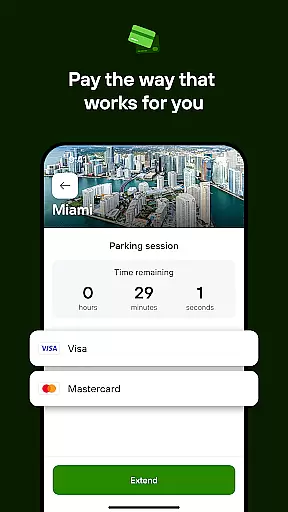
The app allows users to start and extend parking sessions remotely, ensuring convenience and saving time. By simply entering or scanning the location code, choosing the duration, and paying through preferred methods such as credit/debit cards, Google Pay, Apple Pay, or PayPal, users can enjoy a quick and secure parking experience. Additional features like SMS or push notifications before session expiry, emailed receipts for expense tracking, and the ability to pin parking locations make PayByPhone an indispensable tool for modern drivers.
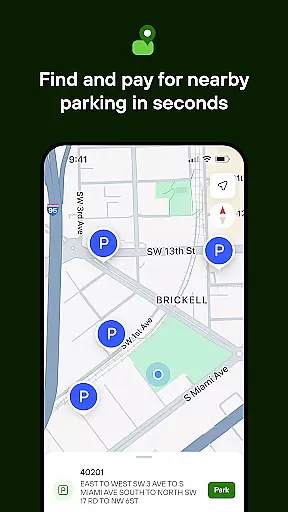
PayByPhone stands out with its comprehensive set of features designed to enhance user convenience and streamline the parking process. One of its key features is the ability to start and extend parking sessions remotely, allowing users to manage their parking without needing to return to their vehicle. The Today View widget provides a quick overview of active parking sessions, while Maps and Nearby functionalities help users locate available parking spots efficiently.
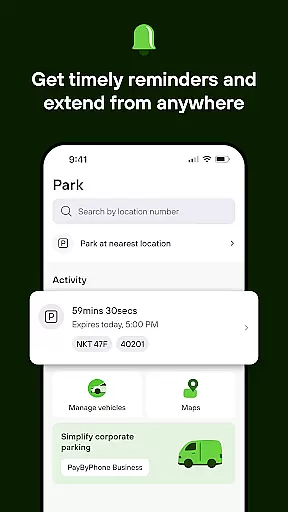
Users receive timely SMS or push notifications alerting them before their parking session expires, ensuring they can extend their time if needed. The app also maintains a detailed parking history, enabling users to review past sessions and track expenses easily. For those who frequently forget where they parked, the app offers a feature to pin the parking location, making it easier to find the vehicle later. Additionally, emailed receipts provide a convenient way to keep records for expense tracking, enhancing the overall user experience.
When it comes to managing parking sessions through the PayByPhone app, having access to detailed vehicle information is crucial. This feature allows users to input and save specifics about their vehicles, such as license plate numbers and car models, ensuring that parking transactions are associated with the correct vehicle. This not only streamlines the payment process but also aids in organizing parking sessions for users who may have multiple vehicles.
The PayByPhone app takes vehicle management a step further by enabling users to easily switch between different vehicles within the app during parking sessions. This means that if a user has more than one vehicle, they can effortlessly select which one they are parking, eliminating confusion and potential parking violations due to incorrect vehicle details being logged.
For users, this level of detail in vehicle information provides peace of mind. They know that their parking sessions are accurately recorded under the right vehicle, making it easier to manage payments and review past parking activities. Additionally, having detailed vehicle information stored in the app saves time, as users do not need to re-enter their vehicle details every time they park, thus enhancing the overall user experience.
Price transparency is a cornerstone of the PayByPhone app's value proposition. The app ensures that users are fully aware of the costs associated with their parking sessions before confirming any payments. By displaying clear pricing structures, including hourly rates and any additional fees, PayByPhone empowers drivers to make informed decisions regarding the duration and location of their parking.
Moreover, the PayByPhone app offers various options for viewing costs, such as estimated charges for different parking durations and real-time updates on expenses incurred. This openness about pricing not only builds trust with users but also enhances their ability to control their parking budgets effectively.
Users benefit significantly from this transparency as it eliminates unexpected charges and facilitates better financial planning. Whether opting for short-term or long-term parking, drivers can anticipate their expenses accurately, thanks to the upfront and clear price communication provided by PayByPhone. This commitment to clarity underscores the app's dedication to providing a seamless and trustworthy parking payment solution.
User-friendly interface
Wide global coverage
Multiple payment options
Remote session management
Convenient receipt tracking
Limited offline functionality
Occasional service fees
Dependent on network connectivity
Location-specific features
Premium feature costs


Theme for Car Launcher
 4.5
4.5
DIY Vehicle Wheel Alignment
4.0
Theme for Car Launcher
4.0
Autolist - The Largest Selection of Local Used Cars and Trucks
4.50
Control maps, media and messaging, with the Google Assistant while you drive
4.10
Monitor your behind-the-wheel behavior to become a safer driver and save.
4.10
Find Your Local Store or Shop Online for the Car, Truck, or SUV Parts You Need
4.70
Autotrader is your online solution for buying and selling new and used cars.
4.40
Shop, finance, or sell today.
4.80
Marathon ARCO Rewards members earn rewards & apply the rewards for fuel savings!
4.80
MySubaru: Download. Connect. Love.
4.70
Easy connect & control your cars from afar. Remote Lock & unlock car and carplay
4.60
Realtime Charts is a plugin for the Torque Pro App (OBD 2 & Car)
4.20
Car Sounds Engine Sounds app welcomes Auto Lovers to feel Car Simulator Sound
4.20
Take state-specific DMV permit tests and ace the exam.
3.90
Mobile Phone Parking - So easy to park
3.70
Wonder how much horsepower and torque your car/truck makes? Look no further.
3.40
App Mirroring for Tesla Car's Browser
2.80
Ferrari inspired analog & digital watch face with quick access and premium style
4.3


User Reviews