

Flowbird Parking is a mobile application designed to simplify the parking experience for users. With this app, you can pay for parking directly from your smartphone, eliminating the need to visit physical parking meters. One of its standout features is the ability to receive notifications when your parking time is about to expire, allowing you to extend your parking duration remotely. This functionality varies by location, ensuring flexibility and convenience tailored to local regulations.
In addition to mobile payments, Flowbird Parking offers a Parking Pressure display for select locations, helping users identify areas with available parking spaces. The app also includes a 'Find my car' feature for those who tend to forget where they parked, as well as a fingerprint login option for quick and secure access. Registration is free, and once you create an account, you can use the app in any eligible location that supports Flowbird services. This makes it an ideal tool for drivers who frequently travel and park in various cities.
The app ensures ultra-secure payment processing, protecting user data through third-party audits against Payment Card Industry Data Security Standards. By integrating advanced security measures, Flowbird Parking provides peace of mind while managing parking transactions. Whether you're a daily commuter or occasional traveler, this app streamlines the parking process, saving time and reducing stress associated with traditional parking methods.
Flowbird Parking boasts a range of innovative features designed to enhance the parking experience. One of its core functionalities is mobile payment, allowing users to pay for parking directly from their smartphones or via the web. This eliminates the hassle of searching for coins or visiting parking meters. Additionally, the app provides a Parking Pressure display for select locations, offering real-time insights into parking availability and helping users make informed decisions about where to park.
Another notable feature is the 'Find my car' functionality, which assists users in locating their vehicles after a busy day. This is particularly useful in large parking lots or unfamiliar areas. The app also supports fingerprint login, ensuring quick and secure access without the need to remember complex passwords. These features collectively contribute to a seamless and user-friendly experience, making parking more convenient than ever before.
Flowbird Parking prioritizes security, employing third-party audits to ensure compliance with Payment Card Industry Data Security Standards. This certification guarantees that user data is protected during all transactions. By combining practical features with robust security measures, Flowbird Parking sets itself apart as a reliable and efficient solution for modern parking needs. Its comprehensive feature set caters to both everyday users and frequent travelers, providing a versatile tool for managing parking activities.
Having access to detailed vehicle information is crucial for ensuring a seamless parking experience. The Flowbird Parking app provides essential details that help users manage their parking sessions effectively.
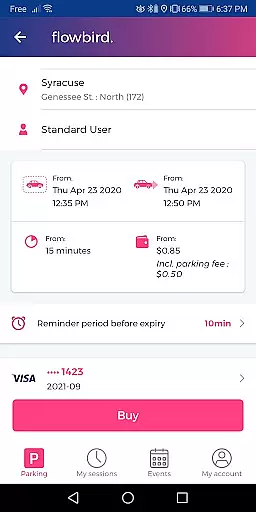
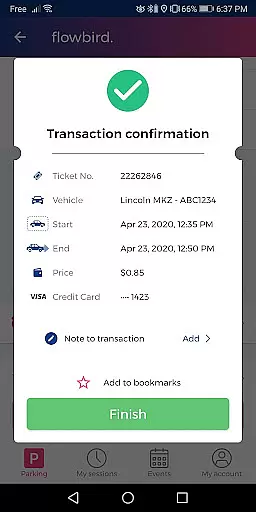
Upon registration, users can input and save multiple vehicle license plates, streamlining the process when selecting a vehicle for parking. This feature eliminates the need to manually enter license plate details each time, saving valuable time and reducing errors.
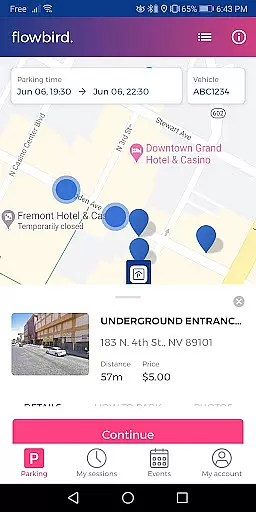
The app also supports various parking locations, allowing users to select their specific location on a map. This ensures accurate and detailed information about where the vehicle is parked, which is especially helpful in large or complex parking areas.
By providing these detailed vehicle information features, Flowbird Parking enhances user convenience and peace of mind, making sure that users can park and manage their sessions without hassle.
Price transparency is a key factor in user satisfaction, particularly in applications dealing with payments and services. Flowbird Parking excels in this area by offering clear and upfront pricing information.
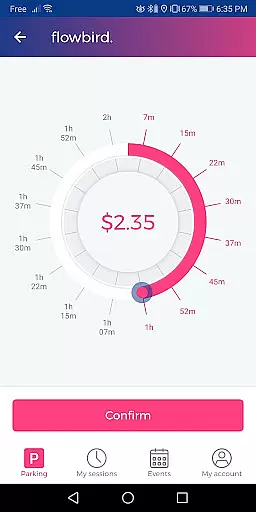
Users are informed of parking fees before confirming their payment. The app displays the cost associated with the selected duration, ensuring there are no hidden charges. This straightforward approach builds trust and allows users to make informed decisions.
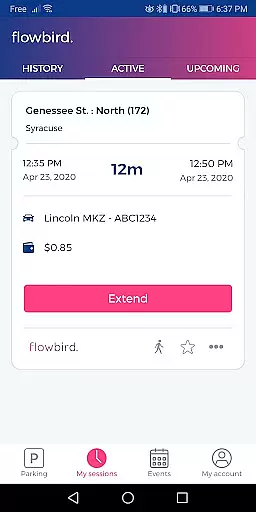
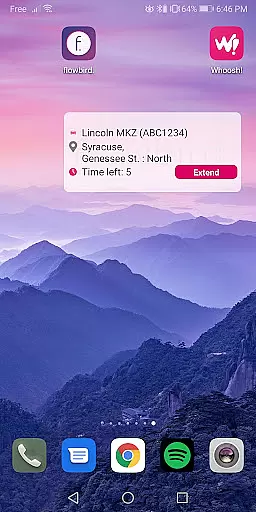
In addition to displaying initial costs, Flowbird Parking provides notifications about time running out. Users can extend their parking session directly through the app, with all additional charges clearly communicated beforehand.
This commitment to price transparency not only enhances the user experience but also aligns with industry standards for secure and reliable mobile payment solutions.
User-friendly interface
Secure payment processing
Real-time parking updates
Free registration
Multi-location support
Limited location availability
Requires internet connection
Notifications may fail
No offline mode
Parking rules vary

Easily notify car owners in urgent situations, safe, fast, multilingual.
 4.5
4.5
OBD2 car scanner and diagnostics: read Check Engine, DTC, economy....
4.30
Attention! This is the theme for the Car Launcher app
4.5
MySubaru: Download. Connect. Love.
4.70
Trip computer+car diagnostic tool with widest variety of features and dashboard!
4.70
Your go-to app for car, truck & SUV parts, DIY tools, and expert repair help.
4.70
O'Reilly Pro will streamline your parts lookup and ordering process!
3.20
Quick and easy car diagnostics to get you the right fix.
4.70
Easy connect & control your cars from afar. Remote Lock & unlock car and carplay
4.60
Practice the drills within MotoJitsu Master Riding Program Volume 1 & 2!
4.80
Shop, finance, or sell today.
4.80
Find Your Local Store or Shop Online for the Car, Truck, or SUV Parts You Need
4.70
Find Fast EV Chargers | Charge Your Vehicle at 1,100+ Fast Car Charging Stations
4.60
Autotrader is your online solution for buying and selling new and used cars.
4.40
OBD diagnostics, Live Data, DPF regeneration for BMW
4.00
By enthusiasts, for enthusiasts
4.00
Simplify your drive
3.90
Theme for Car Launcher
4.0
Theme for Car Launcher
4.0


User Reviews