
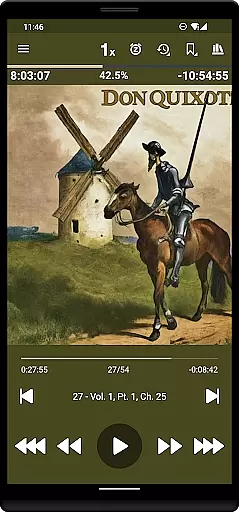
Listen Audiobook Player is a feature-rich audio player designed specifically for audiobook enthusiasts. This app allows users to play DRM-free audiobooks from various sources, including popular platforms like Librivox, Downpour, and Loyalbooks. With support for multiple audio formats such as MP3, M4B, and FLAC, it ensures compatibility with a wide range of audiobook files.
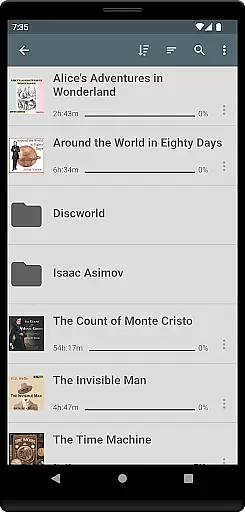
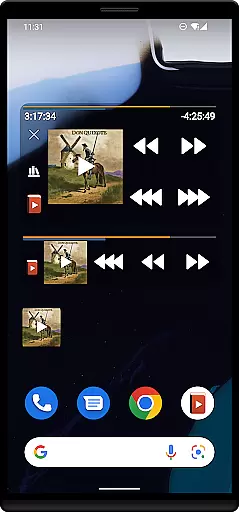
The app offers advanced playback features including variable speed control, pitch adjustment, and an equalizer for personalized listening experiences. Its folder-based library system automatically syncs with the user's audiobook folder, making organization and access seamless. Additionally, Listen Audiobook Player provides integration with Android Auto and services like Plex and Audiobookshelf, enhancing its usability across different devices and environments.
One of the standout features of Listen Audiobook Player is its comprehensive library management system. Users can organize their audiobooks into individual folders, allowing for easy navigation and access. The app supports embedded chapters in most audio codecs and includes options for cover art from embedded images or downloadable sources within the app.
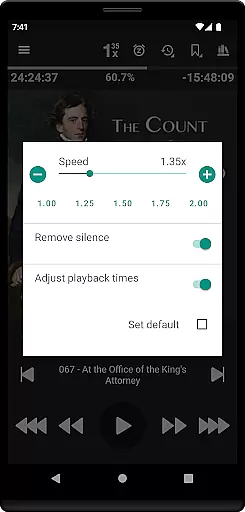
Listen Audiobook Player also boasts robust customization options. Users can adjust playback speed from 0.5x to 4x, trim silence, and apply a volume boost. It includes advanced functionalities like bookmarking, position history, and Bluetooth controls. Moreover, the app offers unique features such as converting books to Opus format for reduced file size without compromising sound quality, and synchronizing playback positions and bookmarks across multiple devices.
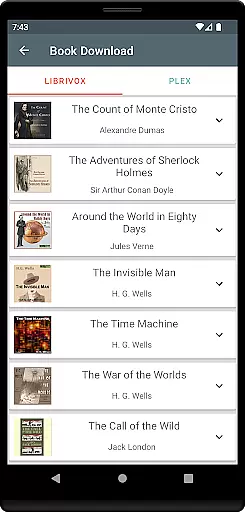
When evaluating a music and audio application like Listen Audiobook Player, the size and authenticity of its music library are crucial factors. This app allows users to import DRM-free audiobooks from various sources, including popular platforms such as Librivox, Downpour, and Loyalbooks. The extensive range of supported content ensures that users have access to a vast array of audiobooks, from classic literature to philosophical texts.
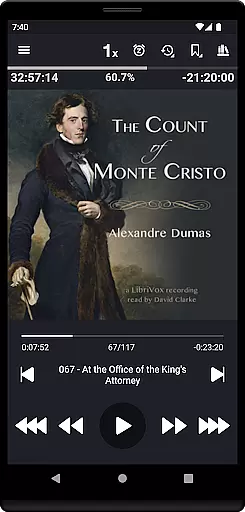
The app's ability to download curated books directly from Librivox enhances its library size significantly. Users can enjoy renowned titles like 'The Count of Monte Cristo' and 'Pride and Prejudice,' among many others. This wealth of content is not limited to just books; it also includes religious texts and historical documents, providing an extensive resource for knowledge seekers.
Regarding copyright authenticity, Listen Audiobook Player emphasizes the use of DRM-free content, ensuring that all materials are legally accessible. By supporting formats like mp3, m4b, and flac, the app guarantees that users can enjoy their personal collections without legal concerns. This commitment to copyright compliance builds trust with users who want assurance that their listening habits are within legal boundaries.
Ultimately, the combination of a vast music library and stringent copyright adherence makes Listen Audiobook Player a reliable choice for audiobook enthusiasts. Its dedication to offering a wide selection of legitimate content ensures that users can explore diverse genres and titles confidently.
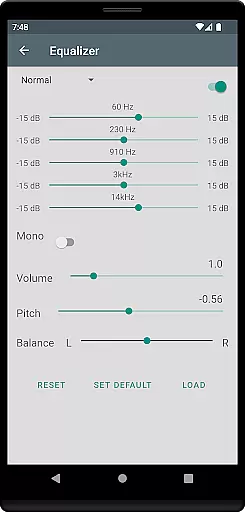
Audio quality is paramount in any music and audio application, and Listen Audiobook Player excels in this area by offering numerous features that enhance the listening experience. One standout feature is the variable playback speed, which ranges from 0.5x to 4x, allowing users to adjust the tempo according to their preference or comprehension level. This flexibility is particularly beneficial for those who wish to consume content more efficiently or need a slower pace for better understanding.
In addition to playback speed, the app provides advanced audio controls such as pitch control, volume boost, and an equalizer. These tools enable users to fine-tune their listening experience, ensuring optimal sound quality tailored to individual preferences. Whether you're looking to emphasize bass tones or clarify speech, these settings offer the precision needed to achieve your desired audio output.
Listen Audiobook Player also supports high-quality audio formats like FLAC and AAC, preserving the integrity of the original recordings. This support for superior formats means that users can enjoy audiobooks with minimal loss of quality, making each listening session immersive and enjoyable. Furthermore, the option to convert books to Opus format ensures smaller file sizes without compromising sound quality, which is ideal for storage-conscious users.
Overall, the comprehensive audio quality options provided by Listen Audiobook Player make it a top choice for discerning listeners. With features designed to enhance every aspect of audio playback, the app delivers a premium listening experience that caters to both casual listeners and audiophiles alike.
User-friendly interface
Wide format compatibility
Advanced playback controls
Sync across devices
No ads or in-app purchases
No automatic library updates
Limited customer support hours
Complex settings for beginners
Occasional bugs reported
Refund policy limitations

Turn your phone into a musical instrument from the future!
 3.90
3.90
Control your MIDI USB or Bluetooth devices in app and avoid some trampling
3.30
The Cubase remote control app
3.60
Taal player that lets you sing any Indian & Western song with Tabla & Tanpura
4.60
Most Advanced AI Song Generator and Music Creator. Rap, Pop, Rock, Gospel & more
4.70
Walkout Song DJ is the most intuitive app to manage your sports music.
4.70
Learn to play the piano using falling notes!
3.80
MilkDrop for Android TV
3.00
Get alarms that fit your lifestyle and wake up to the sounds you love.
4.80
Tune in to the greatest hits on UK Radio | The home of Capital, Smooth & Heart.
4.90 4.70
4.70
Offline Music Player&MP3 Player with themes, equalizer, lyrics, music play mode
4.60
DJ Music Mixer Pro is a real DJ controllers and DJ Music Studio to remix DJ.
4.40
Play KORG’s revolutionary touch-based instrument on a variety of devices.
4.40
Learn and play 2M+ music tabs & chords on guitar, ukulele, bass, and more
4.30
Powerful 10-Band equalizer pro with sound booster improves Android audio quality
4.30
Master Salsa Rhythm quickly and with a lot of fun!
4.30
Turn your Android phone into a professional audio analyser with up to 120 bands.
4.00
Slow music down without changing pitch.
3.70

User Reviews