

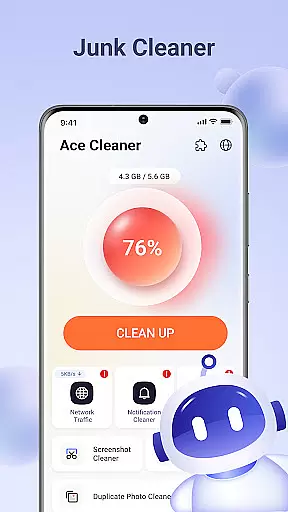
Ace Cleaner is a comprehensive file management tool designed to help users efficiently manage their device storage. The app focuses on cleaning junk files, organizing apps, and managing multimedia content like photos and videos. With its intuitive interface, Ace Cleaner makes it easy for users to free up space by removing unnecessary files while ensuring complete privacy protection.
The app's standout features include a junk file cleaner that removes temporary files and cached data, an App Organizer that provides detailed insights into app storage usage, and tools for managing large files and tidying up media galleries. All operations are performed locally on the device, guaranteeing user privacy. Whether you need to declutter your phone or optimize storage, Ace Cleaner offers a reliable solution.
Ace Cleaner stands out with its diverse range of practical features tailored for efficient device management. One of its core functionalities is the junk file and cache cleaner, which scans for unnecessary temporary files and allows users to review and remove them safely. This feature ensures devices run smoothly without wasting valuable storage space.
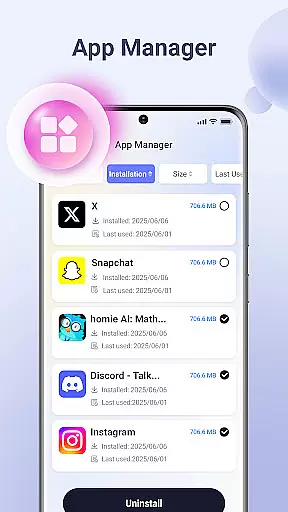
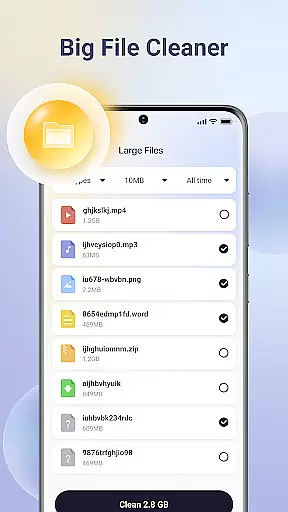
In addition to cleaning, Ace Cleaner includes an App Organizer that lets users view installed apps, check their storage consumption, and uninstall unwanted ones. Another notable feature is the Photo & Video Tidy-Up tool, which helps users organize their media library by identifying duplicates and old files. For those dealing with large files, the Large File Finder simplifies locating and managing bulky content. These features combine to create a seamless experience focused on simplicity, transparency, and privacy.
Ace Cleaner excels in delivering precise and effective core functions that users expect from a cleaning and file management tool. The app performs thorough scans to identify junk files, cache data, and temporary files that accumulate over time, ensuring that no unnecessary data is left behind. This meticulous scanning process guarantees that users can reclaim the maximum possible storage space on their devices.
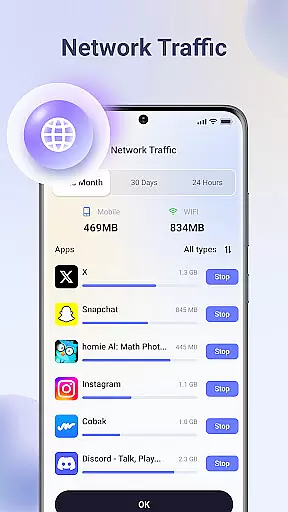
With its App Organizer feature, Ace Cleaner provides detailed insights into installed applications, displaying exact storage consumption and data usage for each app. Users can make informed decisions about which apps to keep or remove based on this accurate information. The Large File Finder further enhances the precision of storage management by pinpointing sizable files that may otherwise go unnoticed, allowing users to prioritize what stays and what goes.
The effectiveness of Ace Cleaner extends beyond just identifying unwanted files; it empowers users with complete control over their device's storage without compromising privacy. All operations are executed locally, reinforcing the commitment to user security while maintaining optimal performance levels. By combining these powerful features, Ace Cleaner ensures an efficient and reliable tool for managing digital clutter.
Ace Cleaner boasts an interface designed for simplicity and ease of use, making file management accessible even to those who aren't tech-savvy. Upon opening the app, users are greeted with a clean layout where all primary functionsu2014junk cleaning, app organization, photo tidyingu2014are easily accessible from the main screen. This straightforward design eliminates any learning curve typically associated with new software tools.
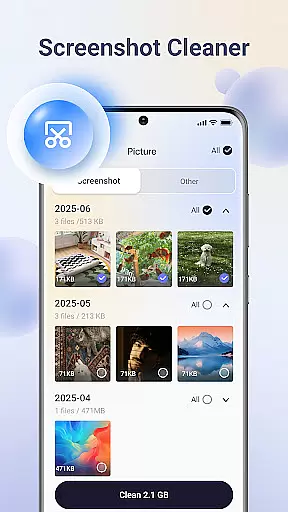
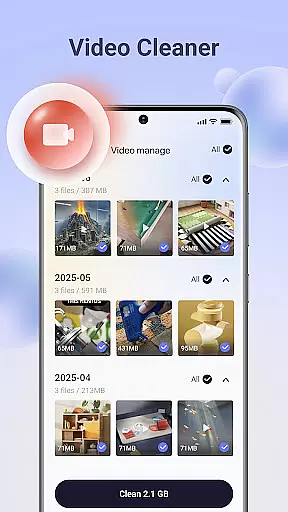
The intuitive nature of Ace Cleaner allows users to execute complex tasks like organizing apps or reviewing large files with minimal effort. Each feature is presented with clear options and visual cues that guide users through the process seamlessly. For instance, when using the Photo & Video Tidy-Up function, individuals can effortlessly browse through images and videos, choosing what to retain or discard without any confusion.
Moreover, transparency in actions taken within the app reassures users about their choices. Every decision regarding file deletion or app removal comes with explicit confirmation prompts, preventing accidental loss of important data. By focusing on clarity and user-centric design principles, Ace Cleaner delivers an experience that feels both familiar and empowering, enhancing overall usability while maintaining high standards of functionality.
User-friendly interface
Effective junk cleaning
On-device privacy protection
Comprehensive app management
Multimedia organization tools
Limited advanced options
No cloud backup feature
Basic design aesthetics
Few customization settings
Occasional slow performance

Change your GPS location instantly. Simulate routes anywhere in the world.
 4.90
4.90
Easily install aab(Android App Bundle) files on your Android device with our app
4.80
A convenient photo, video, and file recovery tool.
4.00
Extremely fast, secure, and protects your privacy
4.80
Save any video in HD - paste the link, download fast and watch offline.
4.3
Canon PRINT is a companion app for your Canon printer.
4.60
Amateur Radio app for APRS: Track friends, exchange messages, get tactical info.
3.90
MS-DOS in your pocket. Play old DOS games anywhere you are ;)
4.10
With videos, electrical calculators, and built-in ebook, Ugly’s has your answer.
4.50
Connect wirelessly to your computer to watch movies, browse the web, play games
5.00
Enjoy smooth gameplay with Game Booster
4.90
Connect instantly to a fast, encrypted VPN with one tap
4.60
Mirror your screen to Chromecast and Android TV - Super fast and simple
4.60 4.50
4.50
The Ultimate Bluetooth Keyboard & Mouse. Securely control your PC, Mac, and more
4.50
Screen Mirroring for Roku Sticks, Roku TCL TV and Roku Hisense TV
4.50
Pro Emulator is an easy to use game console emulator for a range of consoles.
4.40 4.10
4.10
This app unlocks the Pro features of the Central for DayZ app
3.60

User Reviews