

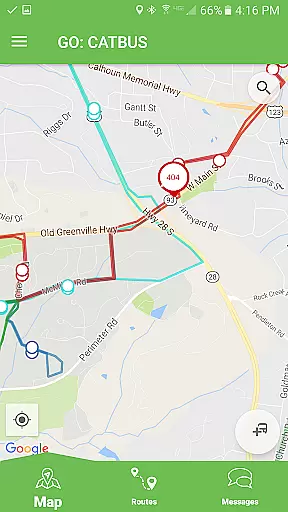
Passio GO! is a comprehensive transit tracking application designed for seamless public transportation management. The app allows users to track and view all available routes simultaneously, providing real-time updates on bus schedules and locations. With its intuitive interface, users can easily select individual routes or focus on specific stops, ensuring accurate navigation and timely arrivals.
A key feature of Passio GO! is its ability to provide detailed information about upcoming buses, including arrival times and stop locations. Additionally, the app enables users to receive important alerts and directly submit feedback, enhancing their overall transit experience. Whether commuting daily or exploring new areas, Passio GO! ensures that users stay informed and connected throughout their journey.
Passio GO! offers an array of features tailored to enhance the public transit experience. One standout capability is the simultaneous tracking of multiple routes, allowing users to monitor various transit options at once. This feature is particularly useful in urban environments where multiple routes may be relevant to a user's commute.
In addition to multi-route tracking, Passio GO! provides detailed schedule information and real-time updates on bus locations. Users can navigate to specific stops or follow individual buses, ensuring they never miss their ride. The app also includes an alert system that notifies users of any disruptions or changes in service, while its feedback mechanism allows users to communicate directly with transit authorities, fostering a more responsive and user-centric transit system.
Access to detailed vehicle information is crucial for users who want to make informed decisions about their transportation needs. Passio GO! provides comprehensive data on all available routes, allowing users to track and view multiple transit options simultaneously. This feature ensures that commuters have a complete overview of the transit network.
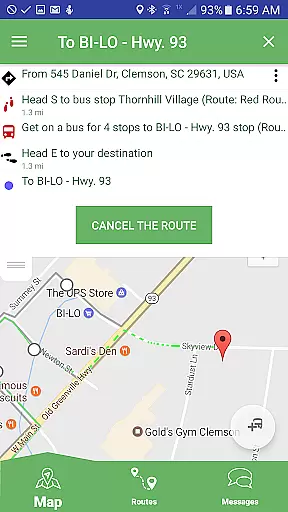
The app enables users to select individual routes and access specific details such as schedule information and real-time updates. By offering insights into each route's schedule and stop locations, Passio GO! empowers users to plan their journeys with precision. The ability to follow an individual bus or navigate to specific stops enhances the user's control over their travel plans.
With Passio GO!, users can see the next bus arriving along with essential details about that stop location. This functionality not only aids in time management but also improves the overall transit experience by keeping users informed and prepared for their commutes.
Price transparency is vital for commuters to understand the cost associated with their transit choices. Passio GO! offers clear information regarding any expenses related to using different transit routes. This transparency allows users to budget effectively and avoid unexpected costs during their travels.
In addition to providing fare details, Passio GO! ensures that users are aware of any discounts or special offers available. By highlighting these opportunities, the app helps users make economical decisions while planning their trips. Such openness fosters trust between service providers and passengers.
Moreover, Passio GO! facilitates direct feedback from users concerning pricing and other aspects of the service. This communication channel encourages continuous improvement and adaptation based on user input, ensuring that the app remains responsive to its users' needs and expectations.
User-friendly interface
Real-time tracking
Detailed schedule info
Alert notifications
Direct feedback option
Limited to transit use
Dependent on network
Occasional inaccuracies
Drains battery life
Not all cities supported

Theme for Car Launcher
 4.2
4.2
Practice the drills within MotoJitsu Master Riding Program Volume 1 & 2!
4.80
Launcher for use in the car
4.40
Boost profits and hit your goals faster with GigU's amazing tools for gigworkers
4.00
Control maps, media and messaging, with the Google Assistant while you drive
4.10
Instant diesel savings. No credit checks or fees. Nationwide growing network.
4.40
Instantly redesign your car with AI. From sporty to futuristic, try it all.
4.50
Your Path to Driving Licensing Success Begins Here! Develop your driving skills.
4.40
Shop cars & see your financing
4.60
Marathon ARCO Rewards members earn rewards & apply the rewards for fuel savings!
4.80
Trip computer+car diagnostic tool with widest variety of features and dashboard!
4.70
DMV Test Pro offers all the updated FREE DMV tests online.
4.60
Autotrader is your online solution for buying and selling new and used cars.
4.40
Your car is talking. Start listening.
4.30
Get your personalized financing options and shop for used cars today!
4.20
Car Sounds Engine Sounds app welcomes Auto Lovers to feel Car Simulator Sound
4.20
By enthusiasts, for enthusiasts
4.00
AlfaOBD software for Fiat Group cars native diagnostic
3.70
O'Reilly Pro will streamline your parts lookup and ordering process!
3.20


User Reviews