

Capital One Auto Navigator is a comprehensive car shopping app designed to streamline the vehicle purchasing process. The app provides users with access to millions of new and used cars for sale across the nation, allowing them to filter searches by make, model, year, price, and more. This ensures that users can efficiently find vehicles that match both their preferences and budget.
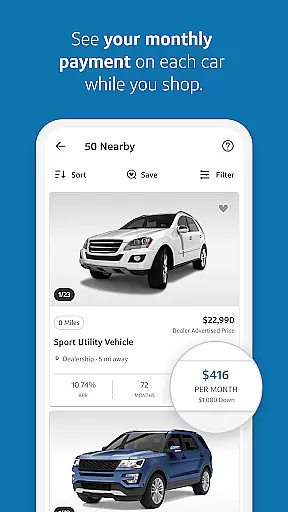
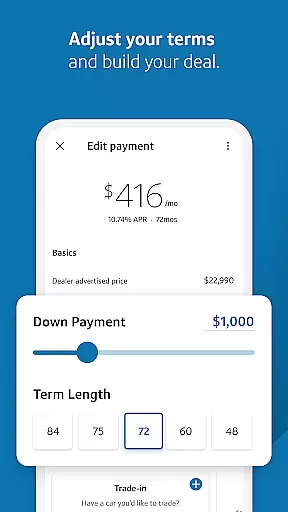
A standout feature of Auto Navigator is its financing tools. Users can pre-qualify for an auto loan quickly without affecting their credit score, view real monthly payments while browsing, and customize down payments and loan terms. This empowers buyers to make informed decisions about their finances before visiting a dealership. Additionally, the app allows direct communication with dealers, saving time during the negotiation process.
Whether you're a first-time car buyer or looking for a family vehicle, Capital One Auto Navigator simplifies the journey from search to purchase. By combining powerful search capabilities, transparent financing options, and seamless dealer integration, this app is an essential tool for anyone navigating the modern car-buying landscape.
Capital One Auto Navigator offers several key features that enhance the car-buying experience. First, its extensive inventory database includes millions of vehicles, providing users with a wide selection of cars tailored to their needs. Advanced filtering options allow customization by criteria such as fuel economy, mileage, body style, and other important factors, ensuring users can refine their search effectively.
The app's financing tools are particularly innovative. Users can pre-qualify for loans within minutes, gaining access to personalized rates and monthly payment estimates without impacting their credit score. Furthermore, the ability to adjust variables like down payment amounts and loan durations enables users to create financial plans that suit their unique situations. These features eliminate uncertainty and help buyers focus on cars within their budget.
Another notable aspect is the app’s dealer connectivity. By enabling direct calls to dealerships and offering pre-qualification verification at the dealership, Auto Navigator reduces friction in the buying process. Overall, these functionalities combine convenience, transparency, and practicality, making it easier than ever to shop for your next vehicle confidently.
When it comes to purchasing a new or used car, having access to detailed vehicle information is crucial for making an informed decision. Capital One Auto Navigator provides comprehensive data on millions of cars nationwide, ensuring you have all the necessary details at your fingertips.
The app allows users to filter their search by various parameters such as make, model, year, body style, price, mileage, and fuel economy. This level of detail helps buyers narrow down their options quickly and efficiently, ensuring they find a vehicle that meets both their needs and budget constraints.
Each vehicle listing includes essential specifications and performance data, giving users a clear understanding of what to expect from their potential purchase. Whether you're looking for your first car or need a family-friendly option, the app ensures you have all the relevant information to make a confident choice.
By offering such extensive vehicle details, Capital One Auto Navigator empowers users to save time and make more informed decisions, ultimately leading to a more satisfying car-buying experience.
One of the most significant advantages of using Capital One Auto Navigator is the transparency it offers regarding pricing. Understanding the cost associated with purchasing a vehicle is vital, and this app ensures that users have a clear picture of their financial commitment from the start.
Users can pre-qualify for an auto loan within minutes without impacting their credit score. Once pre-qualified, they receive real rates and monthly payments while browsing through cars. This feature eliminates the guesswork involved in determining whether a car fits within your financial plan.
In addition to viewing monthly payments, users can adjust variables like down payment and term length to customize their financing options. The ability to compare different monthly payments side by side further enhances transparency, allowing buyers to select the best deal tailored to their financial situation.
This transparent approach not only builds trust but also simplifies the car-buying process, making it easier for users to find a vehicle that aligns perfectly with their budgetary requirements.
User-friendly interface
Extensive car inventory
Quick loan pre-qualification
Transparent pricing details
Direct dealer communication
Limited to Capital One customers
Requires personal data
Dealer availability varies
No test drive scheduling
Occasional app glitches




DIY Vehicle Wheel Alignment
 4.5
4.5
Launcher for use in the car
4.40
Discover new and used cars in Syria easily! Browse ads and connect with sellers.
3.70
myAudi offers users services and Audi connect services for Audi drivers
4.10
Get your personalized financing options and shop for used cars today!
4.20
Blink Charging Mobile app makes finding an EV charger an intuitive experience.
3.80
Trip computer+car diagnostic tool with widest variety of features and dashboard!
4.70
Autotrader is your online solution for buying and selling new and used cars.
4.40
Browse millions of cars, track vehicle listings or sell your car today
4.70
1M+ high-quality auto parts at your fingertips. Fitment guaranteed.
4.70
CVT diagnostics with ELM327 for Nissan-based vehicles
4.40
Digital Car Key/Launcher, Screen Mirror, Android Dashboard, Remote Wireless Link
4.40
Secure mobile payments & fuel savings at Phillips 66®, Conoco® and 76® stations
4.40
AI Powered - Automotive Mechanic Assistant
4.30
Simplify your drive
3.90
The Smarter Way Forward
3.30
Theme for Car Launcher
4.5
Ferrari inspired analog & digital watch face with quick access and premium style
4.5
Theme for Car Launcher
4.3


User Reviews