

EasyTether Pro is a communication app designed to share your smartphone's Internet connection with other devices, such as computers or tablets. It supports USB tethering for Windows, Mac OS X, Linux, and Android 4.x tablets, as well as Bluetooth tethering for Windows computers and Android 4.0.3+ tablets. The app does not require root access or special tethering plans, making it accessible to a wide range of users. With EasyTether Pro, you can also share your Internet connection with gaming consoles like PS3, Xbox, and Wii through Internet connection sharing on Windows or Mac.
This app is particularly useful for users who need to connect their devices to the Internet in areas where Wi-Fi is unavailable or unreliable. Its one-time fee structure provides an affordable solution without recurring charges. EasyTether Pro offers a seamless setup process, allowing users to quickly establish a stable Internet connection across multiple devices.
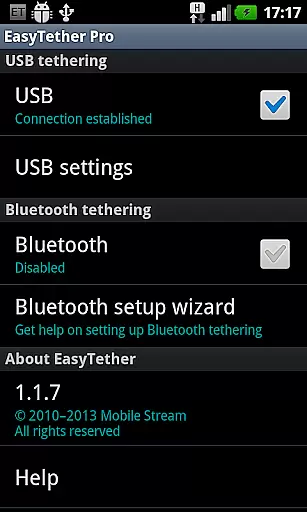
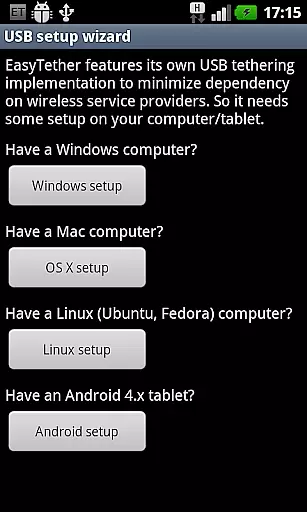
EasyTether Pro stands out with its versatile tethering options, supporting both USB and Bluetooth connections. For USB tethering, it is compatible with major operating systems including Windows, Mac OS X, and Linux, as well as Android 4.x tablets. Bluetooth tethering is available for Windows computers and Android 4.0.3+ tablets, providing flexibility depending on the user’s setup. The app ensures that no root access or special tethering plans are required, which simplifies the tethering process significantly.
Another notable feature is its ability to support Internet connection sharing with gaming consoles such as PS3, Xbox, and Wii. This is achieved through the Internet connection sharing feature on Windows or Mac, allowing gamers to enjoy online play without needing direct Wi-Fi access. Additionally, EasyTether Pro operates on a one-time fee model, ensuring users aren’t burdened by subscription costs. The app’s compatibility with various devices and straightforward installation process makes it a reliable choice for tethering needs.
Real-time messaging speed and reliability are crucial for seamless communication in any app. EasyTether Pro excels in this area by ensuring that your internet connection is shared instantly and consistently between devices.
The app employs advanced tethering technology, allowing users to share their smartphone's internet with computers or tablets via USB or Bluetooth. This ensures a stable connection without the need for root access or special tethering plans.
EasyTether Pro supports multiple platforms including Windows, Mac OS X, Linux, and Android 4.x tablets, making it versatile and accessible. Whether you're working on a laptop or using a tablet, the app guarantees fast and reliable internet sharing.
With its one-time fee model, users can enjoy uninterrupted service without worrying about recurring charges. The app also supports PS3, Xbox, and Wii tethering through Internet connection sharing on Windows or Mac, enhancing its utility for gamers and multimedia enthusiasts.
Media sharing support is an essential feature for users who need to transfer files between devices seamlessly. EasyTether Pro offers robust media sharing capabilities, allowing users to share various types of content effortlessly.
By utilizing USB or Bluetooth tethering, the app facilitates the transfer of media files such as images, videos, and documents. This ensures that users can access their media on different devices without any hassle.
EasyTether Pro is compatible with a wide range of operating systems, including Windows, Mac OS X, Linux, and Android 4.x tablets. This cross-platform support makes it easy for users to share media regardless of their device preferences.
In addition to basic media sharing, EasyTether Pro also supports PS3, Xbox, and Wii tethering through Internet connection sharing on Windows or Mac. This feature enhances the user experience for gamers and multimedia enthusiasts, providing them with more options for content sharing and enjoyment.
User-friendly interface
No root access needed
One-time payment
Wide device compatibility
Supports gaming consoles
Limited free features
Bluetooth tethering limited
Carrier restrictions may apply
Removal of older versions required
Setup wizard could be improved

Pure modern IRC experience for Android
 3.70
3.70
Messenger for SMS - texting message app, faster, simpler & safer, for you.
4.70
SMS & MMS Messaging App to easily send messages or schedule SMS on Chat
4.10
Connect and browse the internet with a fast VPN proxy server and IP blocker.
4.50
Official NDI app: turn your phone into a professional live-streaming IP camera.
3.20
Fast, Simple And Secure Application That Provides SMBv3 Server On Your Device
3.30
Auto Reply SMS, Text Messaging, Away SMS Response, Busy SMS messages, Block Text
3.10
A browser that does more than load page, like keeping your privacy safe.
4.70
Fast internet with AI, Adblock & VPN. Browse on a safe, incognito web browser.
4.70
Identify unknown numbers, block spam calls, customize calls with cool themes.
4.60
Save 10% automatically on your first international mobile top up.
4.60
Manage BoostMobile Account
4.60
Fast and mini browser with Ad Blocker,Video Downloader and Video Player
4.40
Federated instant messaging for your mobile device (Jabber, XMPP, Snikket)
4.10
Threema is the messenger with the most consistent focus on security and privacy.
4.00
SMS Messenger ensures that communication become effortless and accessible.
3.80
Secure Messaging App to Enhance Messenger Texting Experience and Organize SMS.
3.50
Weargram is an unofficial Telegram Client for Wear OS.
3.50
Enables Plus features of Quick Search.
4.4

User Reviews