
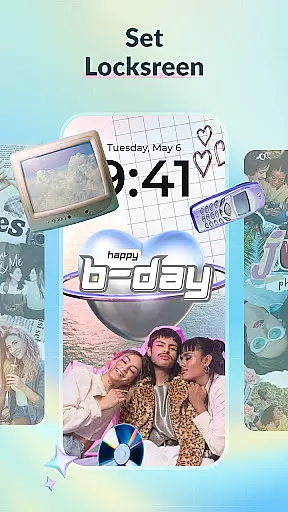
DIY Wallpaper & Collage Craft is a powerful personalization app that allows users to create unique, customized wallpapers for their mobile devices. With its three main features - DIY Frame Wallpaper, Collage Wallpaper Craft, and Curated Wallpaper Gallery - the app offers limitless creative possibilities.
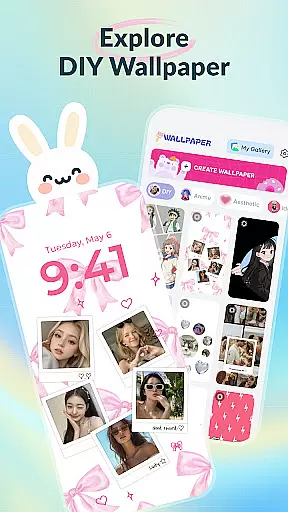
The DIY Frame Wallpaper feature provides stylish frames and templates to transform personal photos into captivating wallpapers. The Collage Wallpaper Craft offers complete creative freedom to design photo collages from scratch with tools like stickers, text, and artistic filters. Additionally, the Curated Wallpaper Gallery offers a diverse selection of ready-to-use wallpapers updated with the latest trends.
This app is perfect for those looking to express their individuality and keep their device screens fresh and trendy.
DIY Wallpaper & Collage Craft stands out with its comprehensive suite of creative tools. The DIY Frame Wallpaper section includes dynamic and static frames, easy photo import options, customizable backgrounds, and a vast library of stickers.
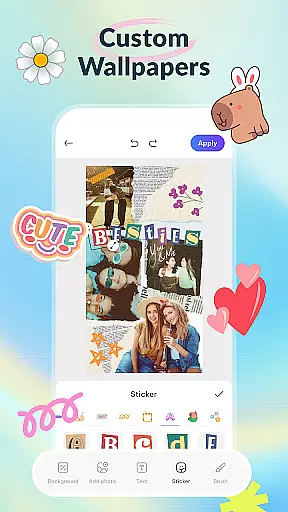
In the Collage Wallpaper Craft section, users enjoy complete creative control with features like freeform photo arrangement, trendy stickers, custom text options, a creative brush tool, and artistic filters. This ensures every collage is a unique masterpiece.
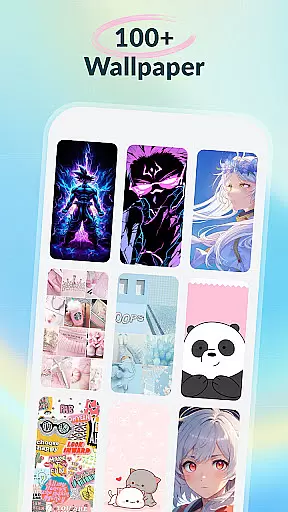
Moreover, the Curated Wallpaper Gallery is regularly updated with trendy and diverse wallpapers spanning various themes such as aesthetics, anime, animals, dark mode designs, and fun memes. All these features are offered for free, ensuring creativity knows no bounds.
Customization is at the heart of DIY Wallpaper & Collage Craft, offering users a vast array of options to personalize their device's appearance. With features like DIY Frame Wallpaper, users can choose from dynamic and static frames, custom backgrounds, and an extensive sticker library to create unique designs.
The app provides complete creative freedom through its Collage Wallpaper Craft section. Here, users can import unlimited photos, arranging and editing them with precision. The addition of trendy stickers, custom text options, and artistic filters ensures that every creation is as individual as the user.
For those seeking ready-to-use yet stylish options, the Curated Wallpaper Gallery offers diverse themes ranging from aesthetic vibes to anime magic. This gallery is regularly updated with trending designs, ensuring users always have fresh and relevant choices at their fingertips.
DIY Wallpaper & Collage Craft excels in theme compatibility, ensuring that all created or selected wallpapers fit perfectly on any device screen. Whether using the DIY Frame feature or selecting from the Curated Wallpaper Gallery, users can expect their chosen designs to display seamlessly without distortion.
The app supports various themes including dark mode delights, cute animals, and iconic anime scenes. Each theme is crafted to maintain visual integrity across different devices and resolutions, providing a cohesive look that enhances the overall user experience.
Moreover, regular updates ensure ongoing compatibility with new device models and operating systems. This commitment to compatibility means users can enjoy consistently high-quality wallpapers regardless of technological advancements or changes in personal devices.
User-friendly interface
Extensive customization options
Vast library of stickers and frames
Free to use
Regular updates with new content
May overwhelm new users
Ads can be intrusive
Limited advanced editing tools
Some features may require in-app purchases
Performance may vary on older devices

Adult video chat, dating, making friends, random matching
 4.20
4.20
Customizable screen pets that play, climb, and keep you company.
4.50
Ultimate Gallery Lock App - Hide Pictures, Videos and Lock Apps Instantly!
4.60
Zip lock screen with magic wallpaper to decorate your phone with fun zipper lock
4.60
Nothing Icon pack with more than 3750+ highly crafted icons.
4.70
Embrace the Night. Unleash the power of darkness with Raven Dark Icon Pack
4.60
300+ Beautifully crafted widgets inspired by OneUI.
4.60
Customize phone with anime themes, 3D icons, aesthetic widgets & wallpapers
4.80
Cool custom fonts & keyboard themes! Symbols & font changer for Instagram
4.50
Personalize your phone with stunning HD and 4K wallpapers!
4.70
Icons made of colorful linear lines
4.60
Beautiful realistic hybrid watch face with numerous customization options.
4.50
Try creating your own keyboard with "Keyboard theme for android" app now!
4.50
Color phone with cool effects for call screen, flash alert & ringtones music
4.50
Realistic animated snow on your wrist, with 10 images landscapes to choose from
4.00
Create unique, fun emojis with Funny Emoji Maker! Unlimited creativity!
4.00
Customize glowing edges, wallpapers, and caller screen with EdgeAura.
3.50 3.50
3.50
HappyLighting is a Bluetooth lamp control software.
3.40


User Reviews