

Daily Running Tracker with GPS is a comprehensive fitness application designed to enhance your running experience. This app serves as a personal running companion, offering features such as real-time GPS tracking, calorie counting, and detailed performance statistics.
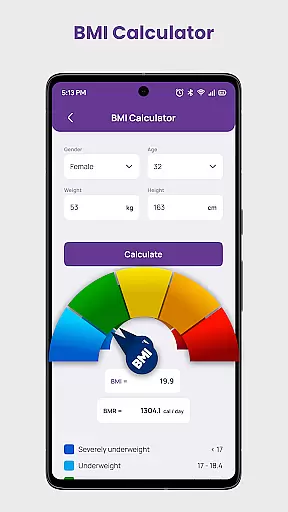
With its user-friendly interface, the app caters to runners of all levels, from beginners to marathon enthusiasts. Users can set personalized goals, access tailored training plans, and participate in community challenges. The inclusion of a BMI calculator and various tracking metrics ensures a holistic approach to health and fitness.
Whether you're jogging casually or training for a race, Daily Running Tracker with GPS supports your journey by providing essential tools to monitor progress and stay motivated. Its offline functionality ensures that you can track your runs anytime, anywhere, making it an indispensable tool for achieving your fitness objectives.
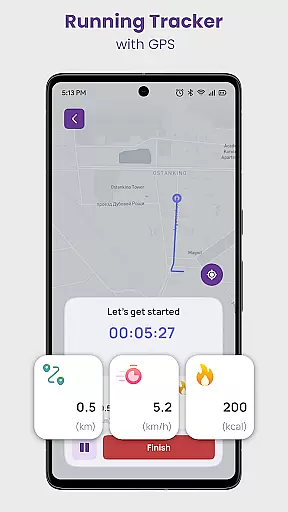
The Daily Running Tracker with GPS stands out with its robust feature set tailored for runners. One of its core functionalities is the GPS-powered tracking system, which accurately maps your route, measures distance, and monitors pace in real-time, ensuring precise performance tracking.
Beyond basic tracking, the app offers advanced features like a calorie counter, goal setting, and training plans designed by fitness experts. These elements work together to provide a personalized running experience, helping users achieve specific fitness targets while avoiding injury through structured workouts.
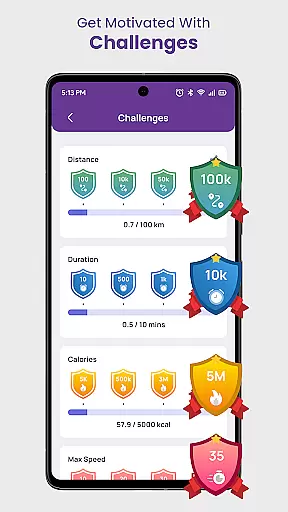
Additionally, the app fosters a sense of community by enabling users to engage in challenges and virtual races. With motivational tools such as achievements and records of personal bests, it encourages consistent progress. The built-in BMI calculator further enhances the app's utility, offering insights into overall health beyond just running metrics.
Personalized planning in the Daily Running Tracker with GPS app is a game-changer for users seeking tailored fitness solutions. This feature leverages advanced algorithms to create customized running plans based on individual goals, current fitness levels, and past performance data.
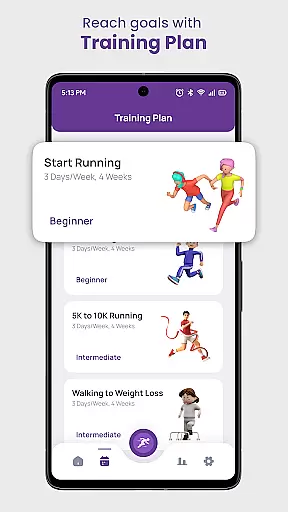
The app's personalized planning tool begins by assessing various user inputs such as desired running distance, target pace, and weekly frequency. It then generates a detailed, adaptive training schedule that evolves as the user progresses. Whether preparing for a 5K or a marathon, runners receive structured workouts designed by experts to ensure steady improvement while minimizing injury risks.
Users benefit from this feature through enhanced motivation and goal achievement. By following a plan specifically crafted for their needs, they experience increased engagement and measurable progress. The app's intelligent adjustments to training intensity and volume keep users challenged yet within safe limits.
This level of personalization sets the Daily Running Tracker apart from generic fitness apps. Its sophisticated algorithm considers multiple variables including weather conditions, terrain, and personal recovery rates, ensuring that each workout recommendation is both realistic and effective.
Progress visualization in the Daily Running Tracker with GPS app provides users with clear, actionable insights into their running journey through intuitive graphical representations. This essential feature transforms raw data into meaningful visual formats that help runners understand their performance trends and achievements.
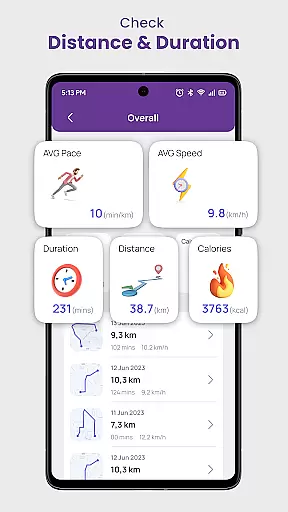
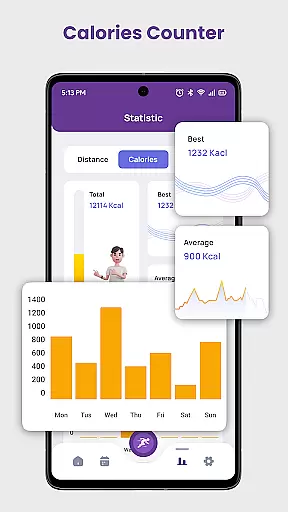
The app presents various visualization tools including detailed charts and graphs that display key metrics such as distance covered, calories burned, and pace improvements over time. Users can view their longest runs, fastest speeds, and most calories burned through easy-to-understand infographics. These visual elements make it simple to track milestones and recognize patterns in their running behavior.
Through these visualizations, runners gain valuable motivation as they witness tangible evidence of their progress. Seeing personal records broken and goals achieved creates a powerful psychological boost that encourages continued commitment to their fitness routine. The app also highlights areas needing improvement, helping users adjust their training strategies effectively.
What makes this progress visualization system unique is its integration with the app's other features. Real-time updates and historical comparisons provide comprehensive tracking capabilities, while customizable views allow users to focus on their preferred metrics. This sophisticated approach to data presentation helps runners maintain long-term engagement with their fitness goals.
User-friendly interface
Accurate GPS tracking
Comprehensive training plans
Motivational challenges
Offline functionality
Limited social features
No live coaching
Premium subscription required
Occasional GPS inaccuracies
Basic UI design

HRV4Training helps you optimize goals and improve performance. No sensors needed
 3.30
3.30
Get alert about getting out of desired heart rate zone.
4.10
Use your watch as a bike computer, heart rate monitor and cycling power meter
2.50
A brain game that moves you
4.70
Walk. Earn: Get rewarded for every step! Walk, move, and earn real rewards.
4.70
Fast Body building & Weight Loss. Home Workouts with Daily Coach, No Equipment.
4.30
Looking to take control of your health? Our psychology-based programs can help.
4.10
Pedometer that gives you sweatcoins for steps. It pays to walk!
4.10
Mood journal, habits, self-care tracker, self-love
4.90
Weight loss app: home workout for women to lose weight & burn calories.
4.80
Easy to use step counter, calorie counter helps lose weight, count steps offline
4.80
You deserve easy access to important insurance information. Download for FREE.
4.70
The OFFICIAL Couch to 5K® running training app! A 9 week walk-run workout plan.
4.50
Memory, mind & logic exercises. Puzzle games, IQ & brain test for kids & adults
4.50
FODMAP, Gluten, Allergy, Vegan
4.50
Chair Workout: Women's Edition for safe, flexible, and personalized fitness.
4.40
For Absolute Novices to Strength Training. Simple. Effective.
4.40
Blood Pressure Log, HRV & Heartbeat Tracker. Pulse Checker.
4.40
“Overcoming pain based on EMDR” helps you to alleviate chronic pain and stress.
4.10

User Reviews