

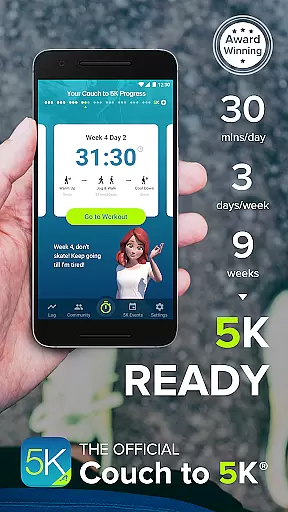
Couch to 5K is an official training app designed to help new runners transition from being inactive to completing a 5K race. The program spans nine weeks, requiring only 20 to 30 minutes of your time, three times a week. It has already helped thousands of users achieve their fitness goals.
With features like virtual coaching, audio cues, and GPS support, the app provides a comprehensive running experience. Users can track their progress, map routes, and even engage with a supportive community. Whether you're aiming for your first race or looking to improve your running, Couch to 5K offers the tools needed to succeed.
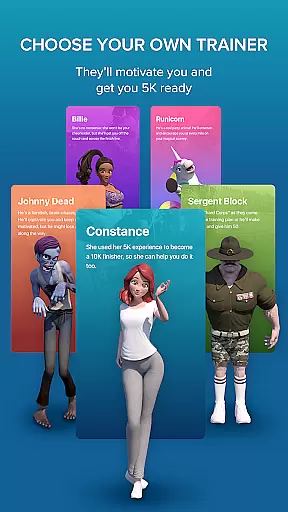
The Couch to 5K app boasts a variety of features that enhance the user's training experience. A key highlight is the choice of four virtual coaches who provide motivation during workouts. Additionally, human audio cues guide you through each session, ensuring proper pacing and technique.
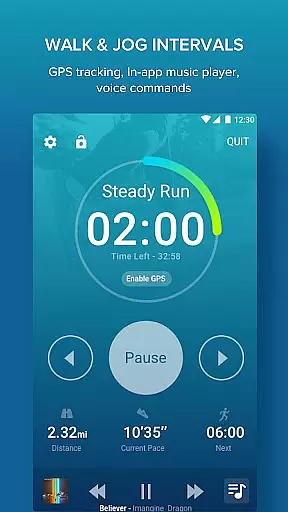
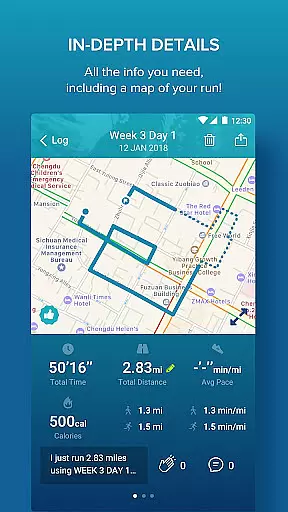
Integration with an in-app music player allows users to listen to their favorite playlists while they train. The app also supports GPS functionality for mapping runs and tracking performance metrics such as distance and pace. With options for treadmill workouts and detailed graphs for analyzing progress, Couch to 5K stands out as a versatile fitness tool.
Personalized planning in fitness applications refers to the ability to create tailored workout schedules that adapt to individual needs and progress. Couch to 5K excels in this area by offering a structured nine-week program designed by Active.com trainers.
The app provides users with a clear path from being inactive to completing a 5K run, ensuring that each user's journey is broken down into manageable increments. This approach not only helps prevent injury but also keeps new runners motivated as they see tangible progress.
With features like repeat workouts and performance tracking, users can adjust their training based on personal performance, making each plan truly unique to the individual's pace and goals.
This level of personalization ensures that users remain engaged and committed, increasing the likelihood of achieving their fitness milestones.
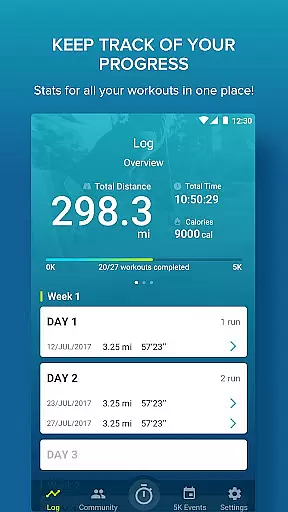
Progress visualization is crucial for maintaining motivation and tracking improvement over time. The Couch to 5K app offers various tools to help users visualize their running journey effectively.
One key feature is the ability to calculate distance and pace using free GPS support, allowing runners to map their routes and monitor their advancement in real terms. Additionally, the app includes graphs for workouts, enabling users to compare their distance and pace across different sessions.
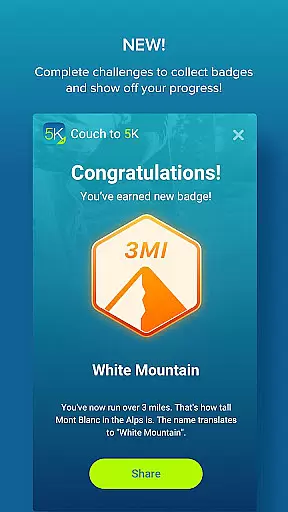
By logging workouts and sharing progress on platforms like Facebook, users can also gain social support, which is vital for sustaining long-term commitment. These visual cues and social elements work together to reinforce positive behavior and celebrate milestones.
Ultimately, these visualization tools empower users to take ownership of their fitness journey, providing both immediate feedback and long-term insights into their progress.
User-friendly interface
Comprehensive training plan
Motivating virtual coaches
Integrated music player
Supportive running community
Premium price point
Limited advanced features
No video tutorials
Occasional bugs reported
Requires consistent commitment

Period Tracker, the easiest way to track your periods!
 4.50
4.50
Effortlessly and naturally release anxiety by harnessing the power of your brain
4.60
Binaural Beats - Fully Customizable Waves - Pure Sound - No Loops
4.50
Get lasting results with Chair Yoga, Wall Pilates, and Walking workouts!
4.60
Track heart rate & HRV in 30s! Get live health insights and anomaly alerts
4.40
beat yesterday.
4.00
Point, scan, and unlock truth in every bite.
4.50
Lazy home workouts with your virtual fitness coach for weight loss.
4.30
Comprehensively record and manage your health
4.50
Walk. Earn: Get rewarded for every step! Walk, move, and earn real rewards.
4.70
Eat smarter with Eato, your personal calorie counter and nutrition tracker!
4.40
Pack of 66 calming lullabies for smooth fall asleep and relaxation
4.10
Pedometer that gives you sweatcoins for steps. It pays to walk!
4.10
Track sleep cycle, relax with white noise, sleep sounds & smart alarm clock
3.80
Focus on BP & Health
3.80
3D Body Measurement System
3.60
GloryFit is a companion app for the smart bracelet.
3.60
The app helps you address digestive symptoms based on the Fast Tract Diet.
3.50
Optimization for TRT & Enhanced Athletes
4.4


User Reviews