

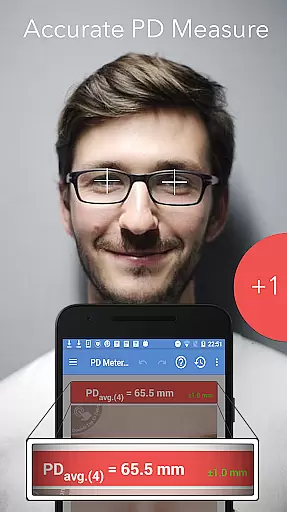
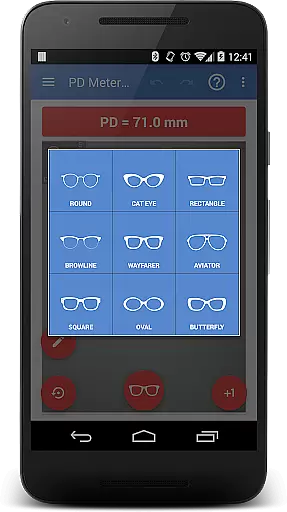
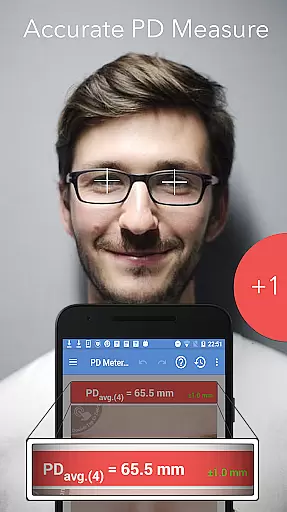
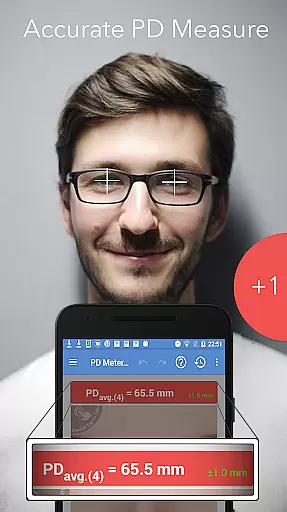
Pupil Distance PD Meter Pro is a specialized mobile application designed for accurate pupillary distance (PD) measurement using your smartphone's camera. This Health & Fitness tool allows users to conveniently measure their interpupillary distance (IPD), which is crucial when purchasing eyeglasses, sunglasses, or VR headsets. The app stands out by offering a bonus feature that lets users try on basic eyeglass frames virtually, enhancing the buying experience.
With its user-friendly interface and reliable measurement capabilities, this app ensures precise results without the need for visiting an optician. Whether you're shopping for eyewear online or calibrating your VR headset, Pupil Distance PD Meter Pro provides the essential measurements needed for optimal fit and comfort. Its commitment to authenticity and user satisfaction makes it a trustworthy choice in the crowded marketplace of health and fitness apps.
Pupil Distance PD Meter Pro offers several distinctive features that set it apart from other measurement apps. First and foremost, the app utilizes advanced camera technology to provide accurate pupillary distance measurements. Users can easily capture their PD with guided instructions, ensuring precision even for those unfamiliar with such measurements.
In addition to PD measurement, the app includes a virtual try-on feature for basic eyeglass frames, allowing users to preview how different styles might look on them. This feature enhances the online shopping experience by helping users make informed decisions. Furthermore, the app prides itself on ethical practices, abstaining from purchasing fake reviews to inflate its ratings. Instead, it relies on genuine user feedback to build credibility and trust within the community.
The developers are committed to addressing any issues promptly and offer refunds if necessary, showcasing their dedication to customer satisfaction. With reliable support and regular updates, Pupil Distance PD Meter Pro ensures a seamless user experience while maintaining high standards of quality and integrity.
Pupil Distance PD Meter Pro offers personalized measurement solutions tailored to individual needs. The app uses advanced camera technology to accurately measure pupillary distance (PD) and interpupillary distance (IPD).
Through its intuitive interface, users can easily capture images and receive precise measurements. This feature is particularly beneficial for those purchasing eyeglasses, sunglasses, or VR headsets, ensuring a perfect fit based on their unique facial structure.
The personalized planning function not only enhances user experience but also eliminates the guesswork involved in online purchases. By providing accurate measurements, the app helps users make informed decisions, saving both time and money.
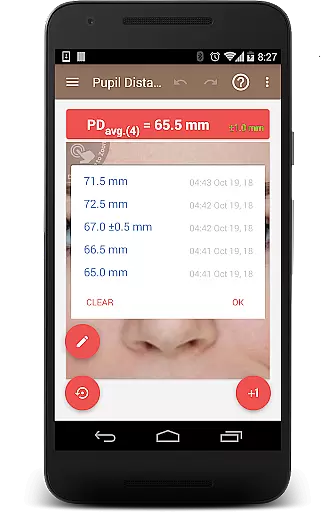
One of the standout features of Pupil Distance PD Meter Pro is its ability to visualize progress over time. Users can track their measurement history, allowing them to monitor any changes in their pupillary distance.
This progress visualization is presented through easy-to-understand graphs and charts. Such data representation helps users understand trends and patterns, which can be crucial when consulting with eye care professionals.
Additionally, this feature fosters a sense of achievement as users see improvements or consistency in their measurements. It adds an interactive element to the app, making it more engaging and encouraging regular use.
Accurate PD measurement
User-friendly interface
Virtual frame try-on
Ethical business practices
Responsive customer support
Limited frame styles
Requires good lighting
Occasional measurement errors
No iOS version available
Basic design options

Text notifications, button control, heart monitor & more for your Amazfit.
 2.40
2.40
Relax to calm sounds, white noise, music, guided meditation and bedtime stories
4.40
Easy reconstitution calc for mixing peptides and creating protocols
4.70
Period Tracker, the easiest way to track your periods!
4.50
Measure real-time wrist & ambient temperature with your Galaxy Watch (Wear OS)
3.20
Wall Pilates at home & Pilates workout for beginners for core and weight loss.
4.80
Memory, mind & logic exercises. Puzzle games, IQ & brain test for kids & adults
4.50
You deserve easy access to important insurance information. Download for FREE.
4.70
GloryFit is a companion app for the smart bracelet.
3.60
sobriety counter app to help and motivate people to stop drinking alcohol.
4.90
Show your support for the development of FitNotes - Gym Workout Log
4.90
Protect your healthy sleep
4.80
Walk. Earn: Get rewarded for every step! Walk, move, and earn real rewards.
4.70
Drink water reminder app. Track water intake. Smart simple hydration tracker.
4.70
See what's really going on inside your head! Real time EEG graphs from your Muse
4.40
Blood Pressure Log, HRV & Heartbeat Tracker. Pulse Checker.
4.40
Walk, track, and burn calories with step counter & GPS walking tracker
4.20
Get alert about getting out of desired heart rate zone.
4.10
Transform your body and soul with DBFFitness, with a 40-day fitness journey.
4.4

User Reviews