

Video Meeting is a cutting-edge video conferencing app designed to enhance virtual communication and collaboration. It offers seamless HD video calls, real-time interaction, and secure meeting environments for both professional and personal use. The app supports various meeting formats including one-on-one chats, group hangouts, and large-scale webinars.
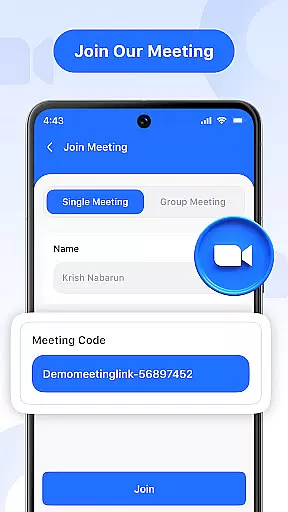
Key features include instant meeting hosting, quick join via secure codes, real-time chat, audio and video controls, screen sharing, and multi-language support. These functionalities ensure smooth, productive online connections for business meetings, educational sessions, or casual social interactions. With its user-friendly interface and robust security measures, Video Meeting stands out as an essential tool for modern remote communication.
Video Meeting boasts an array of sophisticated features that cater to diverse communication needs. The app allows users to host meetings instantly and join them effortlessly using shared links or secure codes. Its real-time chat function enables continuous interaction without disrupting the ongoing call, while audio controls permit muting and unmuting with ease.
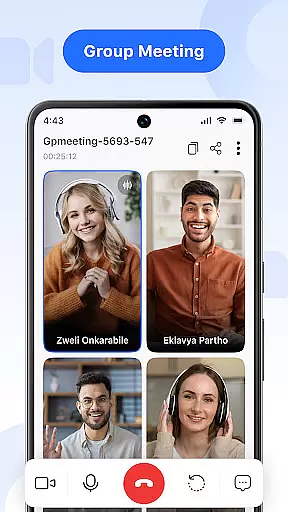
Additionally, the app provides video toggle options for privacy, screen sharing capabilities for presentations, and easy exit options for participants. The 'End for All' feature ensures session conclusion with a single click. Multi-language support further enhances accessibility, breaking down language barriers and making global communication more inclusive. These comprehensive features collectively deliver a superior virtual meeting experience.
Real-time messaging is a critical feature in modern communication applications, ensuring that messages are delivered instantly and reliably. In Video Meeting, this functionality allows users to communicate seamlessly without delays, enhancing the overall meeting experience.
The app employs advanced algorithms and optimized server infrastructure to ensure message delivery within milliseconds. This guarantees that participants can engage in real-time conversations, making discussions more dynamic and productive.
Users benefit from reliable messaging that maintains conversation flow without interruptions. Whether it's a quick question or an important update, participants can rely on the app to deliver messages promptly, keeping everyone aligned and informed.
This robust messaging system adds significant value by enabling efficient communication, which is essential for successful virtual meetings. Users can focus on collaboration without worrying about technical glitches, making Video Meeting a dependable tool for all their communication needs.
Media sharing support is vital for collaborative environments where participants need to exchange files such as images, documents, or presentations during a meeting. Video Meeting offers comprehensive media sharing capabilities that enhance user interaction and streamline workflows.
The application supports various file formats, allowing users to share different types of media effortlessly. With intuitive controls, participants can upload and distribute files quickly, ensuring that everyone has access to necessary resources at the right time.
This feature significantly improves productivity by reducing the need for separate file-sharing platforms. Participants can view shared media directly within the app, facilitating immediate feedback and discussion. This integrated approach saves time and enhances the clarity of communication.
By providing reliable media sharing support, Video Meeting empowers teams to collaborate effectively, regardless of geographical barriers. The ability to share and discuss media in real-time fosters a more engaging and interactive meeting environment, driving better outcomes for all participants.
User-friendly interface
HD video quality
Secure meeting codes
Real-time chat functionality
Multi-language options
Limited free features
Occasional connectivity issues
High resource consumption
Ads in free version
Complex settings for beginners






 3.90
3.90
Browse fast on Opera Mini, with Data Saving, News, Football Scores, and Download
4.60
The ultimate productivity solution for all your email communication needs.
4.40
SMS & MMS Messaging App to easily send messages or schedule SMS on Chat
4.10
At select facilities, you now have an easy way to video visit your loved ones!
3.30
Messenger app for faster and simpler SMS text messaging, and personalized themes
4.10
Message and video call your family and friends in HD!
3.80
TeamSpeak - Secure Chat for Gaming & Business
3.10
Fast internet with AI, Adblock & VPN. Browse on a safe, incognito web browser.
4.70
Enhance browsing with AI-powered features and Copilot.
4.70
Connect and browse the internet with a fast VPN proxy server and IP blocker.
4.50
Talk & text free with a second phone number plus unlimited 5G data, no fees.
4.50
Smart and simple anti-wiring application - IMSI-catchers catcher
4.40
Simple tool for businesses to talk to their customers.
4.40
Use this SMS app standalone or as a TREK: Total Interface companion.
4.30
A customizable phone number in the cloud
4.20
Send SMS and chat messages easily with a fast text messaging app for Android.
4.10
Messages: Fast, simple SMS app with scheduling and smart features.
4.00
A Browser with powerful ad blocker to help focus on what really matters.
3.00

User Reviews