

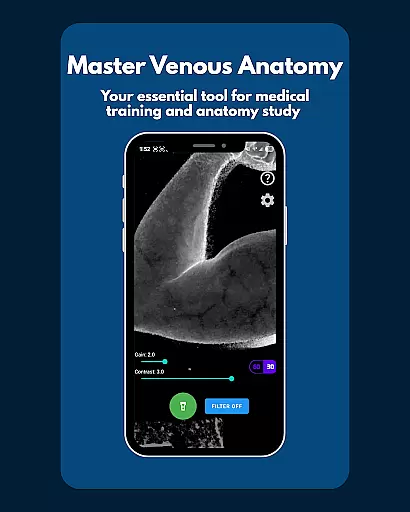
VeinFinder is an innovative educational tool designed to assist medical students and educators in mastering venous anatomy. Using advanced GPU-accelerated image processing, the app enhances vein visibility directly through your device's camera, eliminating the need for additional hardware. This makes it an ideal solution for practical learning and teaching scenarios.
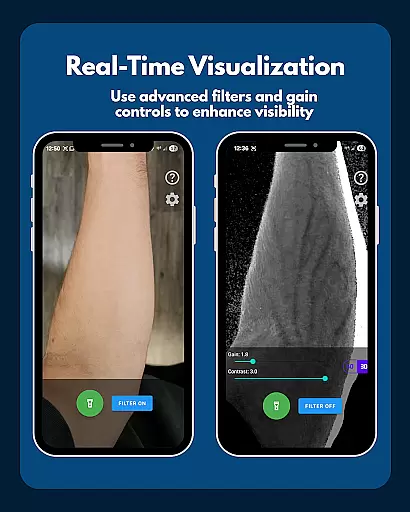
The app offers precise control over gain and contrast settings, ensuring optimal vein visualization across various skin tones and lighting conditions. With integrated flashlight support and instant filter toggling, VeinFinder provides a reliable and adaptable study aid for anatomy exams, venipuncture training, and IV access procedures.
Whether preparing for exams or conducting classroom demonstrations, VeinFinder bridges the gap between theoretical knowledge and hands-on application, making complex venous structures easier to understand and visualize.
VeinFinder stands out with its specialized features tailored for medical education. The app's core functionality lies in its ability to process images in real-time using GPU acceleration, providing enhanced vein visualization without requiring external devices. This feature is particularly beneficial for students and educators seeking a practical understanding of venous anatomy.
One of the app's key strengths is its precision control options. Users can fine-tune gain and contrast settings to adapt to different skin tones and lighting environments. Additionally, the integrated flashlight ensures consistent performance even in low-light conditions. These features collectively enable clear and accurate vein mapping, which is crucial for studying phlebotomy techniques and IV access procedures.
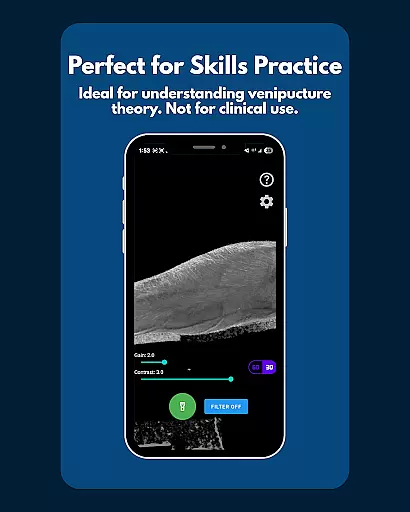
VeinFinder also emphasizes privacy and security by processing all data locally on the device. This ensures that sensitive information never leaves the user's phone, making it a trustworthy tool for educational purposes. While not intended for clinical use, these features create a safe and effective learning environment for medical professionals in training.
VeinFinder stands out in the realm of educational tools by providing highly accurate and authoritative content for students and educators focused on anatomy and physiology. The app leverages advanced GPU-accelerated image processing to enhance the visibility of veins, ensuring that users receive precise representations of venous structures directly through their device's camera. This technological approach eliminates the need for additional hardware, making it an accessible tool for learners at different stages of their medical education.
The precision control feature allows users to fine-tune gain and contrast settings, optimizing vein visibility across diverse skin tones and lighting conditions. This ensures that the visual information provided is not only accurate but also adaptable to various learning environments. By offering instant comparison between enhanced views and raw camera feeds, VeinFinder enables users to verify the authenticity of the processed images, reinforcing the reliability of the educational content.
Moreover, VeinFinder emphasizes privacy and security, as all image processing occurs locally on the device. This guarantees that sensitive data never leaves the user's phone, maintaining confidentiality while delivering trustworthy educational material. With ongoing updates aimed at improving performance across different devices, VeinFinder continues to solidify its position as a credible resource for anatomy study.
One of VeinFinder's key strengths lies in its ability to support personalized learning paths tailored to individual needs within the field of anatomy and physiology. Whether you are a student preparing for exams or an educator seeking effective teaching aids, VeinFinder adapts to your specific requirements. The app offers practical insights into venipuncture and phlebotomy site mapping, allowing users to bridge the gap between theoretical knowledge and hands-on application seamlessly.
VeinFinder provides precision control over image settings such as gain and contrast, enabling users to customize their learning experience based on unique factors like skin tone and environmental lighting. This level of personalization ensures that each user can optimize their study sessions according to their preferences and challenges, enhancing overall comprehension and retention of complex venous anatomy concepts.
Additionally, the app includes integrated flashlight control for consistent performance in low-light conditions, further supporting varied learning scenarios. By focusing on user-centric features and emphasizing educational use without clinical applications, VeinFinder creates a flexible and secure platform for exploring venous structures. This adaptability makes it an invaluable tool for anyone looking to advance their understanding of anatomy through customized learning experiences.
Enhanced vein visibility
Real-time image processing
Precise control options
Privacy-focused design
Educational versatility
Device performance varies
Not for clinical use
Dependent on lighting
Limited refund window
Skin tone sensitivity

One of the most engaging and innovative ABC apps on the market.
 4.30
4.30
Short Lessons for Better Finances, Health, Skills, Jobs & Relationships.
4.80
Experience the sky, planet earth and the solar system like never before
4.90
Quiz App to help case managers studying for CCMC Certification, 200+ Questions
3.40
Our most popular app series returns, better than ever!
3.90
Discover Your Place in the Universe
4.70
Learn & Speak New Languages
4.70
Memorize anything efficiently with AnkiDroid! Many pre-built decks available.
4.80
Cool math games & learn to read activities- loved by kids, approved by teachers.
4.50
Prepare for the BCBA / BCaBA exam. Study ABA with the ABA Wizard app.
4.60
Intuitive Transformer Lab - By a Lineman, For Linemen & Apprentices
4.50
Professional Award-Winning Astronomy Star Map App With Telescope Control
4.40
Ignite curiosity, spark learning: All babybus videos &games
4.30
Learn to make peaceful contact with extraterrestrial civilizations
4.10
Master note reading with StaffWars….
4.00
FAR/AIM, FAR for Flight Crew and FAR for Aviation Maintenance Technicians
3.80
Deal Craps (Practice Craps Payouts)
3.80
Make your own game and world. Draw and animate characters
3.70
Your best partner for learning Japanese words. Based on a best-selling textbook.
2.80
User Reviews