

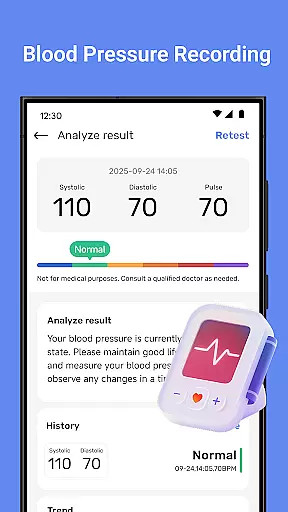
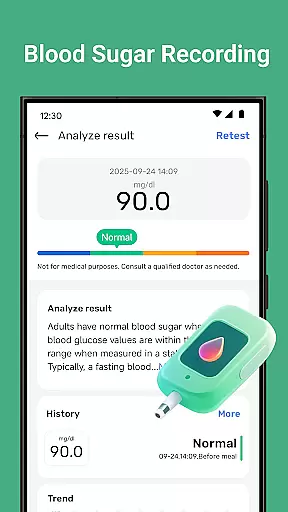
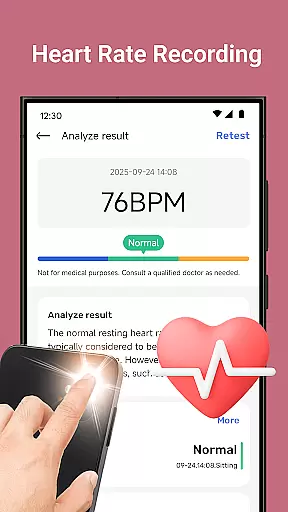
Blood Pressure Tracker is a comprehensive health companion app designed to help users monitor and manage their heart rate, blood pressure, and blood sugar levels. With smart trend analysis and visual charts, the app provides clear insights into your health patterns over time.
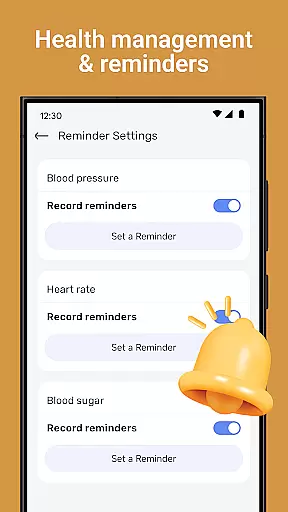
The app goes beyond basic tracking by offering wellness reminders, weight management tools, nutrition tips, and mindfulness exercises. These features work together to support a holistic approach to health management. Whether you're looking to track daily fluctuations or seeking personalized recommendations for lifestyle improvement, Blood Pressure Tracker serves as a valuable tool in maintaining overall well-being.
Blood Pressure Tracker stands out with its robust feature set tailored for health-conscious individuals. The app allows effortless logging of heart rate, blood pressure, and blood sugar readings, presenting the data through intuitive visual charts that make it easy to understand health trends at a glance.
In addition to tracking vital signs, the app offers wellness reminders for hydration, exercise, and rest, alongside weight management tools and dietary insights. Users can also engage in guided meditation and breathing exercises to reduce stress. Personalized recommendations based on individual health metrics further enhance the user experience, making this app a versatile choice for anyone focused on improving their overall health.
Personalized planning in health applications refers to the ability to create tailored health strategies based on individual user data. Blood Pressure Tracker exemplifies this by offering personalized recommendations that stem from the unique health metrics recorded by users.
The app allows you to log heart rate, blood pressure, and blood sugar levels, providing a comprehensive approach to managing your well-being. With smart trend analysis, it visualizes your health patterns over time, empowering you with insights into your personal health trends.
By tracking daily fluctuations and combining this with wellness reminders for hydration, exercise, and rest, the application supports a holistic view of your health. This ensures that each user's plan is specifically suited to their lifestyle and health objectives.
Ultimately, personalized planning within Blood Pressure Tracker equips users with the tools needed to make informed decisions about their health, ensuring they can adjust their lifestyle with guidance that is as unique as their fingerprint.
Progress visualization is an essential feature in health apps, transforming raw data into understandable and actionable insights through graphical representation. Blood Pressure Tracker leverages this by presenting users with visual charts that depict their health patterns over time.
Users of Blood Pressure Tracker can effortlessly record various health metrics such as heart rate, blood pressure, and blood sugar levels. The real power lies in the app's ability to convert these entries into easy-to-read graphs and charts, offering instant clarity on personal health trends.
This form of data presentation not only makes it simpler to grasp complex information but also motivates users by highlighting improvements and milestones achieved in their health journey. It provides a clear picture of where they stand and what might need attention.
In essence, progress visualization within Blood Pressure Tracker ensures that users are not just collecting data, but are gaining valuable insights that encourage proactive management of their health, leading to better outcomes and peace of mind.
User-friendly interface
Comprehensive health tracking
Smart trend analysis
Personalized recommendations
Guided mindfulness exercises
No direct measurement capability
Limited medical advice
Premium features may require subscription
Dependent on manual data entry
Not a diagnostic tool

Control your sleep in real-time wearing Garmin device
 3.60
3.60
a fun app full of surprises :)
4.70
Get alert about getting out of desired heart rate zone.
4.10
The Sleep Miracle Sound Machine: Soothes baby to sleep with a gentle "Shhh"
3.00
A brain game that moves you
4.70
Relax. Sleep Better. Feel Better.
4.50
Find Paid Clinical Trials In Your Area
3.70
Mood journal, habits, self-care tracker, self-love
4.90
Control your blood pressure, heart rate and blood sugar in a fast way.
4.00
Beauty Care, Makeup & Skin Care Scanner | Pregnancy App For A Mom | Healthy Baby
5.00
Load the bar with this barbell & plate calculator. It's leg day, not brain day!
4.70
The simplest way to track your 21 Day Program containers, exercises, and water.
4.50
Pilates, Calisthenics, Yoga
4.50
This is an application that serves as a companion app for smart watch.
4.20
“Overcoming pain based on EMDR” helps you to alleviate chronic pain and stress.
4.10
FitCloudPro takes care of your health every minute.
3.70
The app helps you address digestive symptoms based on the Fast Tract Diet.
3.50
Your plan in your pocket 24/7
3.00
Insanity blocks of intense physical activity, short breaks of 30 seconds.
4.2

User Reviews