

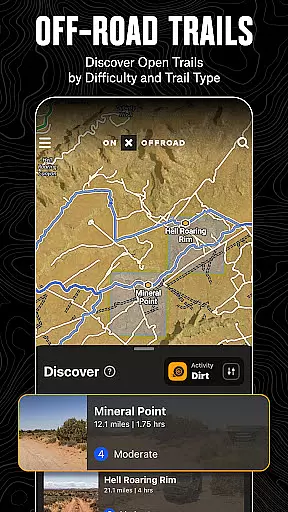
onX Offroad is a premier off-road navigation app designed for outdoor enthusiasts. It offers advanced GPS mapping, 3D trail maps, and compass navigation to help users discover trails suited for various activities like 4x4, SxS, dirt bikes, and more. The app provides crucial information such as property lines, private landowner details, and wildfire activity, ensuring safety and compliance while exploring remote areas.
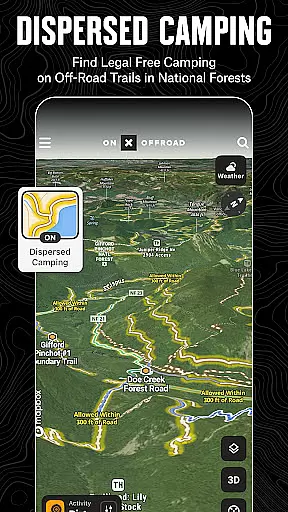
One standout feature is the Motorized Dispersed Camping Layer, which identifies legal, free camping spots in National Forests using verified USFS data. Additionally, the app includes cell coverage layers for major carriers, helping users stay connected even in off-grid locations. With offline map capabilities and Android Auto integration, onX Offroad ensures reliable navigation regardless of cellular service availability.
Whether planning a weekend adventure or embarking on an extended expedition, onX Offroad equips users with the tools needed to navigate confidently and return safely. Its comprehensive features cater to both casual explorers and seasoned off-roaders, making it an indispensable companion for any outdoor journey.
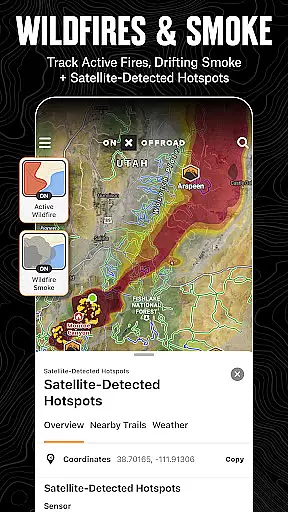
onX Offroad stands out with its robust set of features tailored for off-road enthusiasts. The app includes detailed OHV Trails & Map Layers that allow users to filter trails by vehicle type, toggle layers for weather and land boundaries, and monitor wildfires with real-time data from NIFC and NOAA. This ensures users have the most up-to-date information for safe and enjoyable adventures.
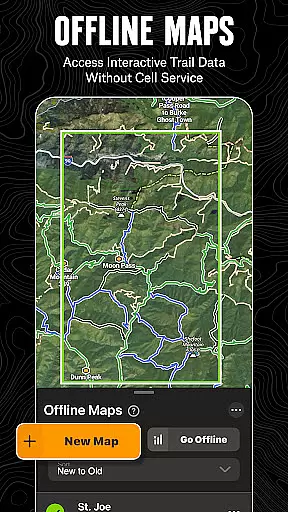
Offline Navigation & Route Builder capabilities enable users to save maps without losing interactive data, view trail conditions, and receive turn-by-turn directions with voice commands. Integration with Android Auto enhances the driving experience by providing seamless navigation. The Trip Tracker & Recreation Points feature allows users to mark important locations, track trip statistics, and share experiences with friends.
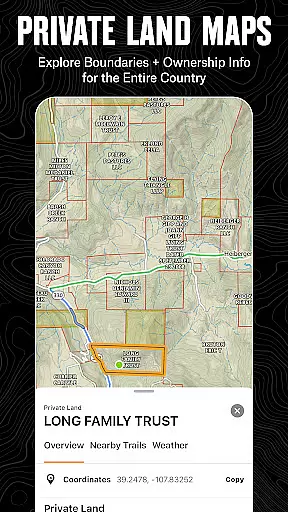
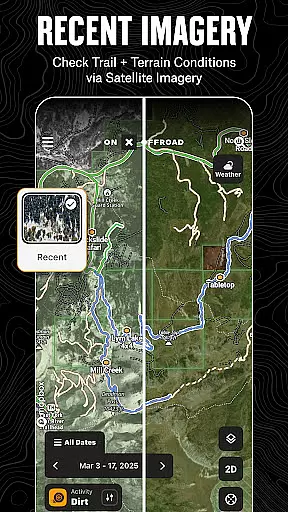
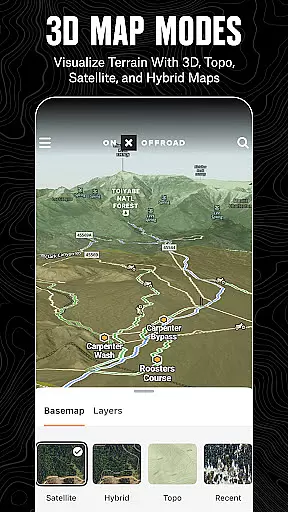
For those seeking extensive land information, the Nationwide Property Lines feature offers access to public and private land ownership details across the U.S., including BLM, National Park lands, and more. With 24K topographic maps and 3D imagery, users can plan routes through diverse terrains with confidence. These features collectively empower users to explore vast expanses while staying informed and safe.
Map accuracy is essential for any navigation app, and onX Offroad excels in this area. The application provides users with 3D trail maps, topographic details, and satellite imagery that ensure precision when exploring off-road terrains. This level of detail helps adventurers to not only find their way but also to understand the landscape they are traversing.
The app's mapping feature goes beyond basic navigation by offering property lines and private landowner information directly on the map. Users can view acreage and boundaries, which is crucial for respecting private properties and staying within legal areas while enjoying outdoor activities. With verified data from sources like the US Forest Service, onX Offroad ensures that its maps are reliable and up-to-date.
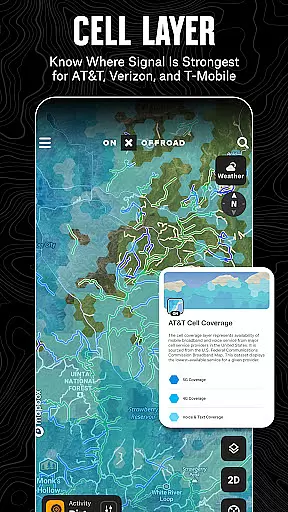
For those concerned about connectivity, onX Offroad includes Cell Coverage Layers displaying current coverage for major carriers such as AT&T, Verizon, and T-Mobile. This allows users to anticipate where they might lose service and plan accordingly. By providing these comprehensive layers, onX Offroad empowers users to navigate confidently even in remote locations.
Effective route planning is a cornerstone of successful off-road adventures, and onX Offroad offers tools that make this process seamless. Users can filter trails based on vehicle accessibility, including options for 4x4, SxS, dirt bikes, and more. This ensures that each journey is tailored to the user's specific needs and equipment capabilities.
The Route Builder feature enables adventurers to create detailed itineraries with turn-by-turn GPS directions. These routes automatically snap to existing roads and trails, ensuring accuracy and ease of use. Additionally, syncing with Android Auto provides voice-guided navigation, allowing drivers to focus on the path ahead without distraction.
onX Offroad also supports saving Offline Maps, which retain interactive land and trail data. This means users can access critical information without needing cell serviceu2014a vital feature for remote exploration. Whether finding trailheads or locating non-ethanol fuel stations, onX Offroad equips users with everything needed to plan and execute safe, enjoyable trips.
User-friendly interface
Comprehensive trail data
Offline map functionality
Real-time wildfire updates
Cell coverage indicators
Premium features require subscription
Limited international support
Occasional syncing issues
High data usage for maps
Steep learning curve

Find trails, organize your locations and navigate with offline maps.
 4.60
4.60
Complete offline 1:50k South Island topo map including DOC Hunting Permit Areas
4.60
Your guide to the recreational opportunities of the Bureau of Land Management!
3.40
Parcel map, property lines, owner, acres, land use, zoning and more from Regrid.
4.60
Get directions, Maps, GPS navigation & GPS Maps using GPS App
4.10
Drive safe with real-time speed camera radar, police, and traffic alerts
3.80
Route Planner is travel map to get turn by turn navigation & driving directions
3.90
Park in Chicago, NYC, Boston, SF, Houston & more!
4.70
Rideshare, taxi cabs, and more for your airport travels and everyday trips.
4.50
Find AI powered cameras, ALPRs, and other surveillance infrastructure near you
4.70
The fastest and most convenient way to pay for parking on our lots.
4.40
CamSam PLUS - The speed and red light camera warning system!
4.40
Get matched with a nearby driver — you’ll be on your way in minutes.
4.30
Phone Tracker and GPS Location Sharing
4.20
GPS phone tracker, family locator, secure location sharing app
4.20
MapQuest is your go-to app for maps, GPS, voice navigation & live traffic.
3.80
Discover over 800 points of interest along the canal.
3.70
Ride CTA, Metra & Pace: Manage your fares, buy Metra tickets, get arrivals.
3.00
Compass is an accurate compass and a great tool for any outdoor activities
4.4

User Reviews