
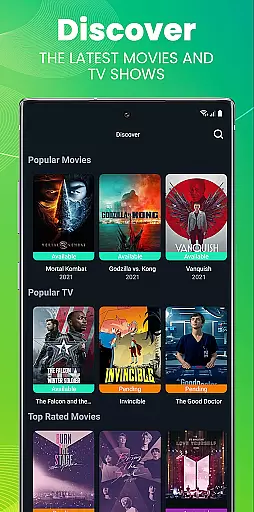
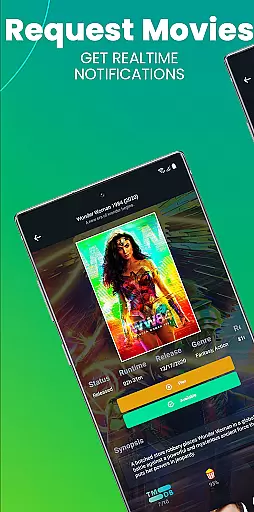
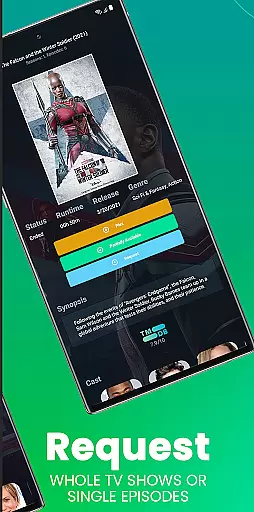
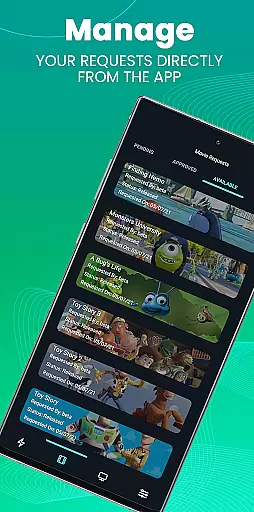
Ombi is a self-hosted entertainment management app that allows users to request content for Plex, Emby, or Jellyfin libraries. Designed for home media enthusiasts, it streamlines the process of requesting movies and TV shows by integrating with DVR tools.
With Ombi, administrators can manage user requests efficiently while providing a seamless experience for shared library users. Its compatibility with popular media servers makes it an essential tool for collaborative entertainment ecosystems.
Ombi stands out with its ability to integrate with multiple media servers like Plex, Emby, and Jellyfin. This feature ensures that all user requests are synced across platforms, creating a unified system for content management.
The app also supports QR code authentication, making it easy to connect to your Ombi server. Additionally, its modular design allows for future updates, ensuring that the app evolves with new functionalities and an improved user interface over time.
Ombi offers a diverse range of content options by integrating with Plex, Emby, and Jellyfin, allowing users to request TV shows and movies directly. This self-hosted web application bridges the gap between users and content providers, ensuring that your entertainment library stays up-to-date with the latest releases.
The app's seamless integration with multiple DVR tools creates an end-to-end experience for users, making it easy to manage and request new content. By linking Ombi to your existing media server, you can provide your shared users with the ability to independently request their favorite shows and movies, enhancing their overall entertainment experience.
With its evolving feature set, Ombi promises continuous updates and improvements, ensuring that users always have access to fresh and varied content. The platform is designed to adapt and grow with your needs, offering more functionality over time and keeping your media library engaging and relevant.
Ombi enhances user engagement by providing a platform where users can actively participate in curating content. By allowing shared users to request their preferred TV shows and movies, Ombi increases the time users spend interacting with the application, thus boosting overall engagement duration.
The simplicity of scanning a QR code to log into the app ensures that users remain connected and engaged without facing complicated login procedures. This ease of access encourages regular use, contributing to higher retention rates as users become more invested in the content they have requested.
As Ombi continues to evolve and introduce new features, it fosters a dynamic environment that keeps users coming back. Continuous updates ensure that the platform remains fresh and exciting, promoting long-term user retention through an ever-improving interface and expanding feature set.
User-friendly interface
Multi-platform support
Seamless integration
Self-hosted solution
Active development
Requires technical setup
Dependent on third-party services
Limited offline functionality
No built-in media player
Premium features gated

Create, chat & bond with AI souls who truly listen.
 4.50
4.50
Simulation of Dashboard / Touch Screen for Tesla. (Works without actual Tesla).
4.2
Music visualizer and party effects for your Nanoleaf devices
4.2
Journey to the world’s oldest rainforest and meet its Indigenous Custodians.
4.1
Stream Online TV - Watch Live IPTV Playlist & Channel with Built-In Player
4.50
Practice and master your ESP and intuition with five mode trainer.
4.20
Colorful flows will relax and calm you down, or get you trippy and creative!
4.90
Create and play realistic-looking mock Emergency Alert System messages.
4.30
Bold original series & hit movies that don't hold back.
4.40
Watch Reels, Drama Shorts & TV Series Anytime. Download DramaWave Now!
4.70
Live TV, sports & holiday movies — stream on phone, tablet & TV
4.60
* Multiple Matches * Intuitive UI * Scoring Made Easy!
4.40
Earn gift cards for playing games. Become a real game tester!
4.40
Atomus is a 10-finger multi-touch interactive visualizer.
4.30
Start EVP/Spirit Box tonight: real EMF, offline, recording. One-time purchase.
4.10
Exclusive Short Drama Video! All in HD. Bringe trending reels & enjoy drama time
3.80
With the Steam Mobile App, you can take Steam with you anywhere.
3.00
Disney Stickers: Zootopia 2
4.3
EVP Recorder / Voice Recorder for ghost hunting, to communicate with ghosts.
4.1


User Reviews