

Microsoft Family Safety is a comprehensive parenting app designed to help families develop healthy digital habits while ensuring children's safety online. The app offers parental controls that allow filtering of inappropriate content, setting screen time limits across devices, and providing activity reports for better understanding of children's digital behavior.
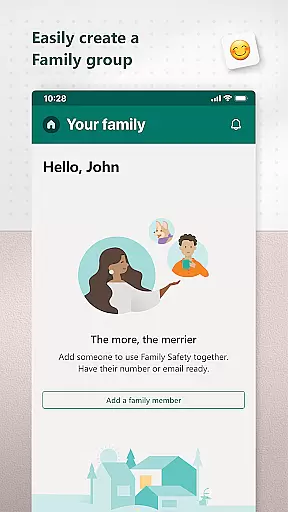
This app is suitable for both parents and kids, creating a balanced approach to digital usage. Parents can manage their children's access to apps, games, and websites while kids benefit from age-appropriate content. With features like web filters, app blocking, and weekly activity summaries, Microsoft Family Safety ensures a safer digital environment for the whole family.
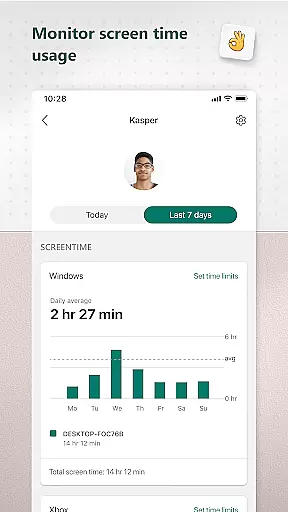
Microsoft Family Safety provides an extensive set of features to support modern parenting needs. Key functionalities include detailed activity reporting, allowing parents to track screen time and online usage through logs and weekly email summaries. This helps initiate meaningful conversations about digital habits.
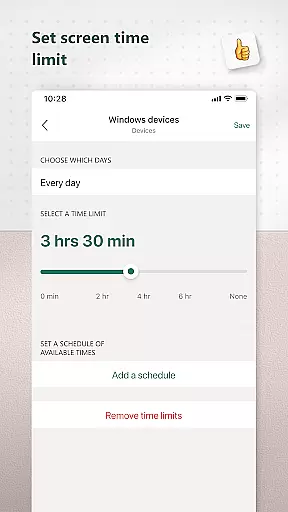
The app excels in screen time management, enabling parents to set specific time limits for apps, games, and devices across Android, Xbox, and Windows platforms. It also includes robust content filters that ensure safe browsing on Microsoft Edge and block inappropriate apps and games, creating a secure online space for children to explore.
When it comes to parenting apps, content credibility is paramount. Microsoft Family Safety ensures that all information and guidance provided are backed by experts in child psychology and digital safety. This means parents can trust the app to offer reliable advice on managing their children's online activities.
The app includes features developed with input from child development specialists, ensuring that the controls and reports offered are not only effective but also supportive of healthy family dynamics. For instance, activity reports are designed to foster open conversations between parents and children about digital habits.
Moreover, Microsoft adheres to strict privacy standards, reinforcing the credibility of its content. The company does not sell or share user data with third parties, which assures parents that their family's information remains confidential and secure.
By combining expert-backed content with robust privacy protections, Microsoft Family Safety provides a trustworthy solution for modern families navigating the digital landscape.
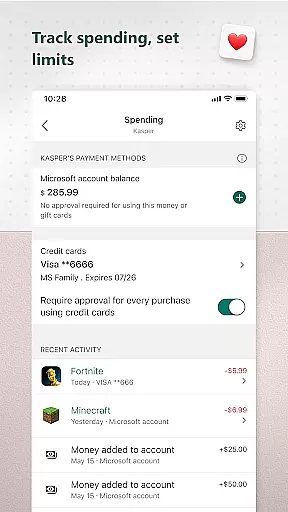
Tracking a child's growth in the digital world involves more than just monitoring screen time. Microsoft Family Safety offers precise tools that help parents understand how their children interact with technology. Detailed activity reports provide insights into app usage, game time, and browsing habits across multiple devices.
Parents can set specific limits for individual apps and games on platforms like Android, Xbox, and Windows. These granular controls allow for accurate tracking of how much time children spend on different activities, helping maintain a balanced lifestyle. Notifications alert parents when children request additional time, enabling real-time adjustments.
In addition to setting limits, the app supports device management features that enforce screen time restrictions across various devices. This ensures consistency in enforcing rules, whether at home or away. Such comprehensive tracking empowers parents to make informed decisions about their childrenu2019s digital consumption.
With these accurate growth tracking capabilities, Microsoft Family Safety equips parents with the necessary tools to guide their children towards responsible tech use while promoting independence within safe boundaries.
User-friendly interface
Multi-platform support
Comprehensive activity reports
Effective screen time controls
Robust content filtering
Limited third-party app control
Requires child's consent
Some features are platform-specific
Premium features may require subscription
Dependent on Microsoft ecosystem

Daily Routine & Timer for kids, ADHD, & Autism
 4.80
4.80
All-in-one pregnancy app, contraction timer, kick counter & due date calculator
4.40
Pregnancy and baby formula tips for moms, plus Enfamil coupons & cash back
4.10
Little loved one's monitoring, Sleep tracking and Parenting content.
3.80
Real-time family location with consent, check-ins & SOS—private by default.
4.40
Protect kids online safety through GPS tracking,screen time control,app blocking
4.20
3D Baby size, Fruit comparisons, Smart Checklist, Trending Names & Training.
4.90
Track your labor contractions
4.90
Parental control: child monitoring app, screen time control, GPS child tracker
4.40
Advanced baby tracking, expert sleep help & parenting support for every stage.
4.80
Sleep better with white noise app! Discover rain sounds, fan noise and more.
4.70
It is a screen time management tool for games and mobile applications
4.50
App/Game blocker & GPS tracker
4.50
Keep track of your stored breastmilk
4.40
GeoLog - Real-Time Location Tracker
4.40
Find unique + popular baby names for your little peanut.
4.30
Cherish every beat - capture your baby's heart sounds with our app
4.30
Watching baby, helping parents
4.10
Happiest Baby App replaces the SNOO App (the mobile companion to SNOO & SNOObie)
3.20

User Reviews