

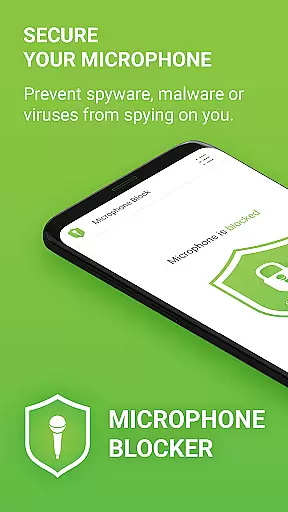
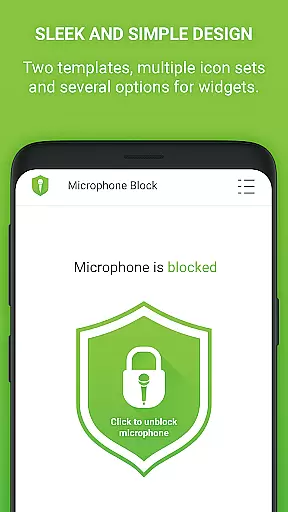
Microphone Blocker is a privacy protection app designed to secure access to your device's microphone. The app allows users to block, disable, and monitor apps that have access to the microphone with a single click, preventing potential eavesdropping or unauthorized recording. It is particularly useful for individuals who are concerned about spyware, malware, or surveillance apps secretly using their device’s microphone.
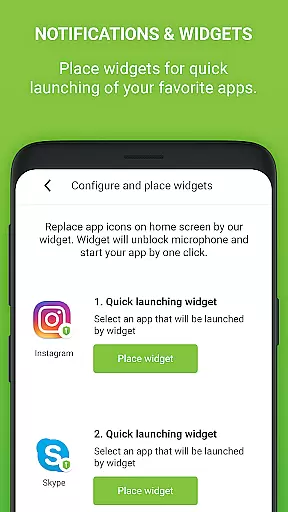
With over 6,000 five-star ratings, Microphone Blocker offers features such as automatic blocking schedules, a microphone detector, and a microphone guard. These tools help increase user awareness of Android permissions while providing simple tutorials to enhance protection levels. Additionally, the app includes convenient functionalities like home screen widgets and notifications for quick access to microphone blocking controls.
This app is ideal for users seeking to protect their privacy without requiring root access, ensuring that phone calls remain uninterrupted while securing the device against unwanted audio surveillance.
Microphone Blocker comes equipped with several advanced features that make it a reliable choice for privacy-conscious users. One of its standout capabilities is the 'One Button Microphone Blocker,' which lets users instantly disable microphone access across all applications. This feature is crucial in preventing spyware, malware, and other malicious software from secretly recording audio.
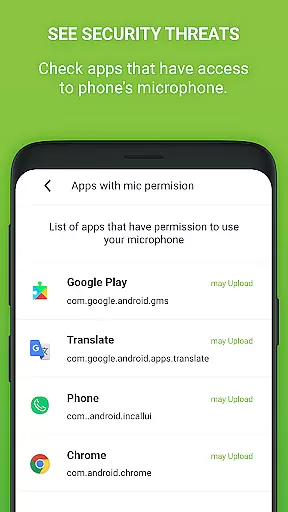
The app also provides a comprehensive monitoring system where users can view and manage which apps have permission to access the microphone. With options to set automatic blocking times and choose from various icon sets and dark mode, the app ensures both usability and personalization. Furthermore, the built-in microphone detector and guard actively monitor and notify users when new apps gain microphone access, adding an extra layer of security.
For those seeking additional benefits, the PRO version offers unlimited 24-hour protection, removes ads, and ensures no internet access or private data collection, making it a robust solution for complete privacy protection.
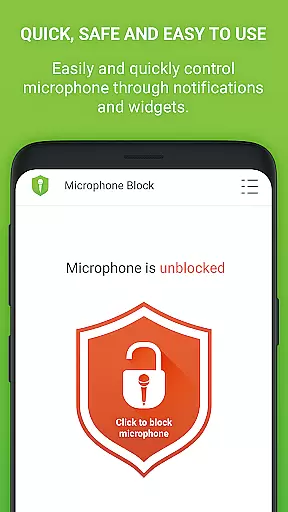
Microphone Blocker offers comprehensive functionality to secure your device's microphone access effectively. The app provides a one-click solution to block, disable, and deactivate microphone access, ensuring that spyware, malware, and viruses cannot secretly record or listen to you. This simplicity in operation ensures that even users with minimal technical knowledge can protect their privacy without hassle.
Beyond basic blocking, the app monitors and manages apps that request microphone access, giving users control over their privacy settings. It features a microphone detector and guard, which actively monitor apps permitted to access the microphone. If any new app gains access, the user receives notifications, adding an extra layer of security.
The application also includes advanced options like setting automatic blocking times and providing a home screen widget for quick access. These features ensure that users have flexible yet robust tools to maintain their privacy. With both free and PRO versions available, users can choose unlimited 24-hour protection, enhancing the app's overall functionality and coverage.
Microphone Blocker is designed with usability in mind, offering a straightforward interface that makes it easy for users to operate. Its clear design incorporates dark mode and several icon sets, catering to user preferences and ensuring comfortable use in different lighting conditions. This attention to detail enhances the overall user experience, making daily interactions with the app smooth and enjoyable.
In addition to its aesthetic appeal, the app provides practical features such as a home screen widget and notifications for quick access to blocking functions. These elements streamline the process of managing microphone access, allowing users to activate or deactivate permissions swiftly. Such operational efficiency is crucial for maintaining privacy without disrupting the user's routine.
Furthermore, Microphone Blocker includes tutorials and suggestions on Android permissions, guiding users through steps to increase protection levels. By educating users on managing app permissions, the app not only secures their devices but also empowers them with knowledge. This blend of usability and educational content ensures that Microphone Blocker remains a reliable tool for safeguarding personal data.
Easy-to-use interface
Effective privacy protection
No root access required
Automatic blocking schedule
Real-time monitoring alerts
Limited free version
Requires constant updates
Occasional false alarms
Premium version costs money
Dependent on Android permissions


Game Booster GFX for smoother gaming experience. Enjoy 120 FPS and 4x Game Space
 4.20
4.20
Collection of high-quality, trendy skins and outfits!
4.2
Android secret code for smart phone, mobile codes, with secret codes app
4.20
Popular mods fnaf mods for melon playground
4.50
Enjoy hours of entertainment with our Roblox mobile games app
4.3
a wireless controller that provides a seamless and gaming experience for players
3.80
Mirror Link Car Display to share your screen with car dashboard wirelessly
4.1
Mirror phone to TV effortlessly! Stream, share & connect with Airplay ease.
3.60
Expo is a free & open source platform to build apps using JavaScript and React.
4.70
Study Bible King James Version: the correct way to learn the Bible with audio
4.80
TV USB connector app provides you a seamless cast option from your phone to tv.
4.70
Block, disable and secure phone camera from secretly taking photos by spyware.
4.50
MirrorLink for connecting your Android phone to your car’s infotainment screen.
4.50
Enjoy Minecraft Mod Scary Neighbor Granny for Minecraft PE.
4.30
use your smartphone as Remote control drones .
4.20
The best PS2 games from your childhood come to life in their mobile version!
4.00
Connect your phone to any endoscope camera, USB camera, or borescope with ease.
3.70
With Endoscope Camera Connector you can connect your phone with endoscope cam
3.70
CloudEye 365 is a easy-handling APP
3.60

User Reviews