

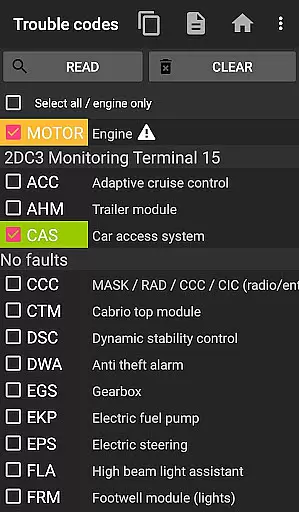
bimmer-tool is a comprehensive diagnostic application designed specifically for BMW car owners and enthusiasts. This app allows users to read and clear fault codes, request DPF regeneration, and access real-time engine data in compatible BMW models. With support for a wide range of OBD adapters, it provides an invaluable toolset for maintaining and troubleshooting vehicles.
The application's functionality varies depending on the vehicle's model year, with full features available for cars from 2008 onwards. For older models, a K+DCan USB cable connection is recommended to ensure optimal performance. Whether performing routine maintenance or diagnosing complex issues, bimmer-tool delivers essential functionalities that empower BMW owners to better understand and manage their vehicle's health.
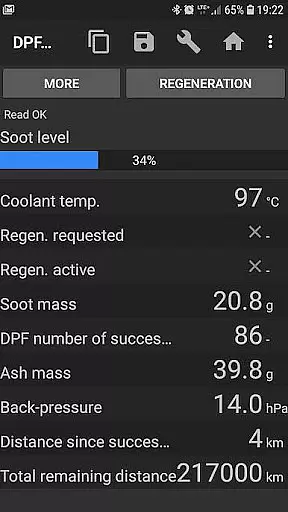
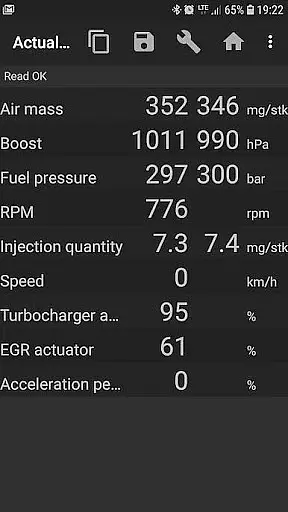
bimmer-tool stands out with its extensive diagnostic capabilities tailored for BMW automobiles. The app supports critical functions such as reading DPF regeneration status, resetting DPF adaptation values, and monitoring various engine parameters like air mass and fuel pressure. Users can log this data into CSV files for further analysis, making it an indispensable tool for both professional mechanics and DIY enthusiasts.
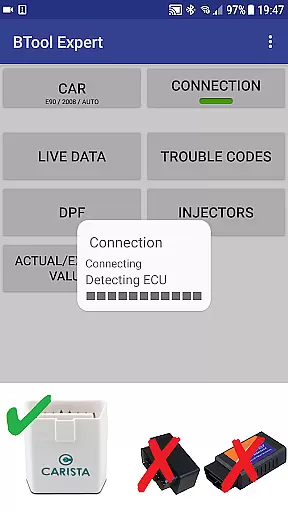
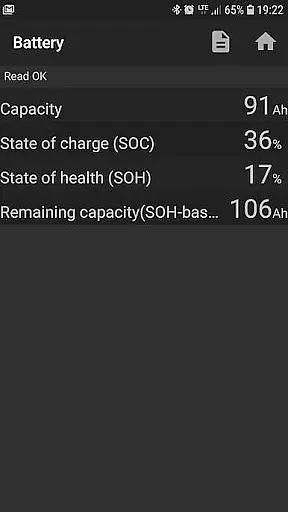
Compatibility is key, and bimmer-tool works with several types of OBD adapters including K+D-Can USB, ENET cables, and select Bluetooth/WiFi ELM327 adapters. Each adapter type offers different advantages; for instance, USB connections are noted for reliability while wireless options provide convenience. Additionally, the app facilitates battery replacement registration and service interval resets, ensuring all maintenance records are accurately updated within the vehicle's system.
Detailed vehicle information is crucial for any car owner, especially when it comes to maintaining and diagnosing issues in BMW vehicles. bimmer-tool provides comprehensive data access that allows users to understand their car's health at a granular level.
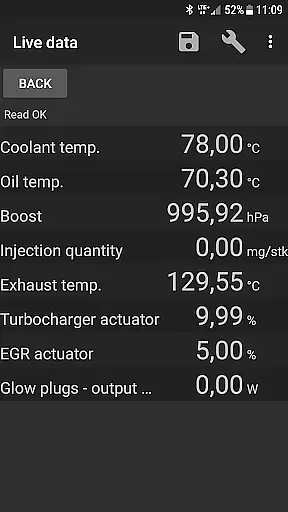
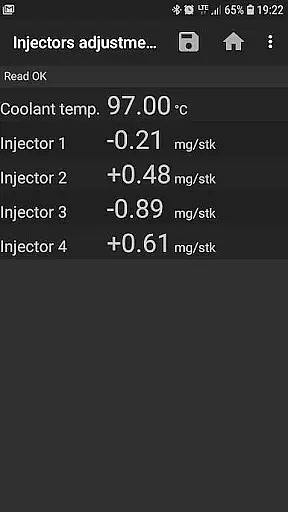
With this application, you can read engine live data such as DPF regeneration status, exhaust fumes pressure, injectors adjustments, and more. This feature empowers BMW owners with the knowledge of their vehicle's performance metrics which are typically only accessible to professional mechanics.
The app supports logging data to a CSV file for further analysis, making it an indispensable tool for those who prefer a hands-on approach to car maintenance. Whether you're diagnosing a problem or just keeping tabs on your car's condition, bimmer-tool ensures you have all the necessary information at your fingertips.
Price transparency in automotive tools is essential for users to understand the cost associated with maintaining their vehicles. bimmer-tool offers clear information about what is needed to use the app effectively, ensuring there are no hidden costs for BMW owners.
The application outlines compatible OBD adapters and cables, providing links and specific models that are recommended for optimal performance. By detailing these requirements, users can make informed decisions about additional equipment purchases without unexpected expenses.
Moreover, bimmer-tool does not hide behind premium features; instead, it lays out its capabilities clearly from the start. Users know exactly what they are getting, from reading fault codes to requesting DPF regenerations, thus allowing them to budget accordingly for their car care needs.
User-friendly interface
Wide adapter compatibility
Comprehensive diagnostic tools
Data logging to CSV
Regular feature updates
Limited functionality for older models
Requires specific adapters
Wireless connection instability
Advanced features need expertise
Separate purchase of hardware

Take Control of Your Car
 4.80
4.80
OBD2 car scanner and diagnostics: read Check Engine, DTC, economy....
4.30
OBDII - ELM327 Terminal tool for 96-00 Volvos
4.50
AlfaOBD software for Fiat Group cars native diagnostic
3.70
Oil change service & coupons for car maintenance at Valvoline Instant Oil Change
4.70
Digital Car Key/Launcher, Screen Mirror, Android Dashboard, Remote Wireless Link
4.40
Car Sounds Engine Sounds app welcomes Auto Lovers to feel Car Simulator Sound
4.20
1M+ high-quality auto parts at your fingertips. Fitment guaranteed.
4.70
Shop, finance, or sell today.
4.80
MySubaru: Download. Connect. Love.
4.70
Shop cars & see your financing
4.60
Find, search, and browse 40,000+ used cars, SUVs, and trucks.
4.50
Taximeter; the professional's choice
4.30
myAudi offers users services and Audi connect services for Audi drivers
4.10
Boost profits and hit your goals faster with GigU's amazing tools for gigworkers
4.00
Read and delete OBD codes with any ELM327 OBD scanner. Coding functions included
3.40
O'Reilly Pro will streamline your parts lookup and ordering process!
3.20
Easily notify car owners in urgent situations, safe, fast, multilingual.
4.0
Theme for Car Launcher
4.2

User Reviews