

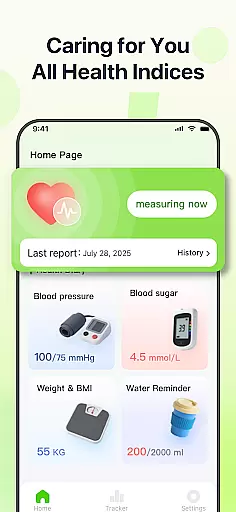
PulseSense is a comprehensive health tracking app designed to simplify wellness management. It allows users to effortlessly log key metrics such as blood pressure, glucose levels, and heart rate while providing intelligent reports and personalized recommendations based on the logged data.
With its sleek trend visualizations spanning days to years, PulseSense helps users uncover patterns and track progress over time. The app also emphasizes privacy, keeping all health data encrypted and stored locally on the device without requiring cloud accounts or logins.
Whether managing chronic conditions like hypertension or diabetes, building healthier routines, or assisting seniors, PulseSense serves as a secure and dependable health companion.
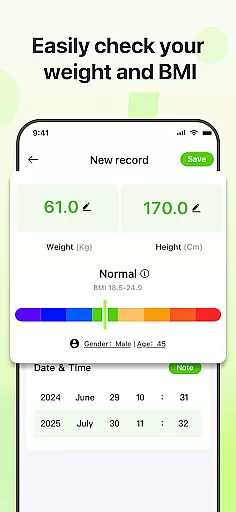
PulseSense offers a robust set of features tailored for health-conscious individuals. Its effortless logging system supports metrics like blood pressure, glucose levels, and heart rate, allowing users to input data quickly and efficiently.
The app provides intelligent health reports with actionable insights rather than just raw numbers. Personalized lifestyle recommendations are generated based on user data, helping individuals make informed decisions about their wellness journey.
Additional standout features include customizable reminders to reinforce healthy habits, personal notes and tags for contextual entries, and end-to-end encryption ensuring complete privacy. All data remains on the device, making PulseSense a secure option for managing sensitive health information.
Personalized planning in PulseSense is a standout feature that tailors health tracking to individual needs. This functionality leverages intelligent algorithms to analyze your logged data, such as blood pressure, glucose levels, and heart rate, providing customized lifestyle recommendations.
The app's ability to generate intelligent health reports means users receive actionable insights rather than just raw numbers. These reports help uncover patterns and track progress over time, spanning days, weeks, months, and even years, ensuring a comprehensive view of your wellness journey.
Users benefit from personalized advice aimed at improving their health metrics. Whether managing chronic conditions like hypertension or diabetes, or working towards fitness milestones, PulseSense adapts its suggestions to align with personal health goals, empowering users to make informed decisions about their well-being.
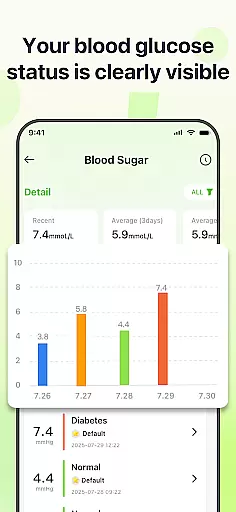
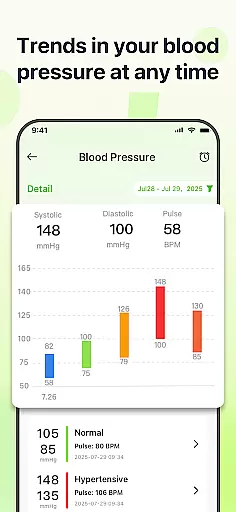
Progress visualization in PulseSense offers sleek trend visuals that make it easy to monitor health metrics over time. By presenting data through intuitive graphs and charts, users can quickly identify trends and fluctuations in their blood pressure, glucose levels, and heart rate.
This feature supports the consolidation of all health metrics in one place, eliminating the need to switch between different tools. The visualizations span various timeframesu2014days, weeks, months, and yearsu2014providing a holistic view of oneu2019s health journey and enabling users to stay consistent with their monitoring routines.
With reminders to reinforce healthy habits, users can set notifications to log their data regularly. This ensures continuous tracking and helps maintain the consistency needed to uncover meaningful patterns, ultimately leading to better health management and improved overall wellness.
User-friendly interface
Comprehensive health metrics
Advanced trend analysis
Strong privacy controls
Actionable health insights
No direct measurement tools
Limited to manual data entry
No cloud backup option
Premium features may require payment
Not a medical diagnostic tool

Create powerful subliminal audio with custom affirmations and background music.
 4.00
4.00
Control your sleep in real-time wearing Garmin device
3.60
a fun app full of surprises :)
4.70
Beauty Care, Makeup & Skin Care Scanner | Pregnancy App For A Mom | Healthy Baby
5.00
Using Recognise™ has been shown to reduce pain and improve performance
4.0
The Official Blood Type Diet® App - know your categorized foods anytime.
4.50
Grow with self-tests and personal routine.
4.30
Your personal BP tracking companion, focus on helping you achieve wellness goal.
4.10
Looking to take control of your health? Our psychology-based programs can help.
4.10
sobriety counter app to help and motivate people to stop drinking alcohol.
4.90
Personal Measurements - Track your gains!
4.50
“Overcoming pain based on EMDR” helps you to alleviate chronic pain and stress.
4.10
Pedometer that gives you sweatcoins for steps. It pays to walk!
4.10
Histamine intolerance, low FODMAP diet and irritable bowel syndrome (IBS)
4.00
Your Health Assistant
3.90
Make sense of your health data.
3.80
Live Heart Rate Pro - Real Time Heart & Workout Data For Wear OS & Bluetooth BLE
3.20
Measure real-time wrist & ambient temperature with your Galaxy Watch (Wear OS)
3.20
Insanity blocks of intense physical activity, short breaks of 30 seconds.
4.2

User Reviews