

VR Player Plus - Movie Theatre is a premium virtual reality movie player that recreates the IMAX theater experience in your VR headset. Designed for immersive entertainment, this app allows users to watch videos, movies, and mobile content like WhatsApp videos with stunning clarity and spatial surround sound.
The app stands out with its advanced features such as seat selection, 4K video support, and compatibility with various VR headsets including Google Cardboard, Irusu VR, and Shinecon VR. Whether you're looking to enjoy a personal home cinema or explore different virtual environments, VR Player Plus delivers an unparalleled level of control and immersion.
Perfect for VR enthusiasts who want to elevate their viewing experience, this app combines cutting-edge technology with user-friendly controls, making it easy to enjoy high-quality VR content anytime, anywhere.
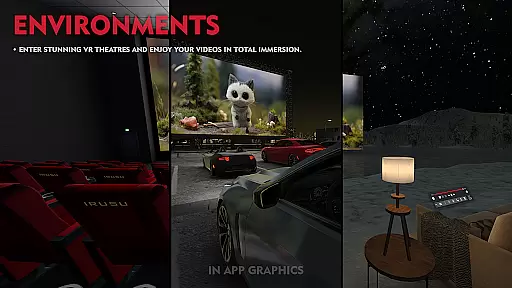
VR Player Plus offers an impressive range of features designed to enhance your virtual reality movie experience. One standout feature is the ability to select from multiple virtual environments, ranging from serene lake views to classic cinema theaters, allowing users to customize their viewing atmosphere.
In addition to supporting regular, side-by-side, and top-bottom VR video formats, the app includes advanced video rendering algorithms that ensure smooth playback even for 4K and 2K videos. The inclusion of spatial audio technology creates a breathtaking 3D surround sound experience, further enhancing immersion when using headphones.
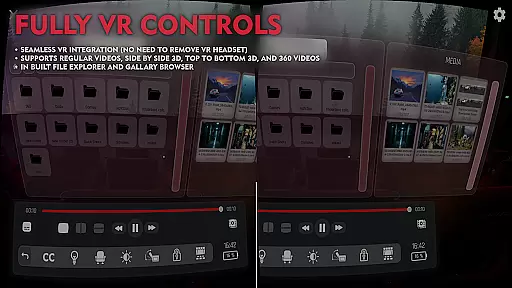
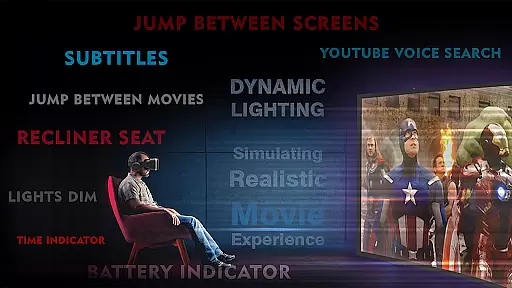
Other notable features include seat recliner functionality, a video seek bar for easy navigation, and an intuitive GUI that simplifies media management. With full VR controls and an in-built file browser, VR Player Plus ensures seamless access to all your favorite content while delivering a truly cinematic VR experience.
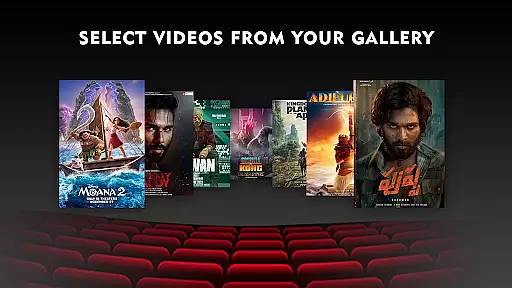
VR Player Plus - Movie Theatre offers a diverse range of content options that cater to various entertainment preferences. The app allows users to select from different virtual environments, ranging from a serene lake view to a classic cinema theatre setting. This feature ensures that users can customize their viewing experience according to their mood or preference.
In addition to environment selection, the app supports multiple video formats including regular, side by side, and top-bottom VR videos. With compatibility for 4K and 2K video resolutions, it delivers high-quality visuals that enhance the sense of presence in virtual reality. The automatic aspect ratio adjustment and advanced video rendering algorithms ensure smooth playback without lag, provided the user's smartphone has adequate processing power.
The application also stays fresh and engaging by implementing user feedback and planning future updates. Continuous improvements aim to refine the graphical user interface and expand control features, ensuring that the content remains up-to-date with technological advancements and user expectations.
User engagement is a critical factor for any entertainment platform, and VR Player Plus - Movie Theatre excels in this area through its immersive features. One standout element is the seat selection option, which allows viewers to choose different angles and screen sizes for watching movies. This unique feature enhances user involvement by providing a more interactive and personalized cinema experience.
Another aspect contributing to prolonged engagement is the spatial audio technology integrated into the app. By delivering 3D surround sound through headphones, users are fully immersed in the virtual environment, encouraging longer viewing sessions. Additionally, convenient controls such as the video seek bar make navigation effortless, while the simple GUI ensures easy management of playback settings.
To further boost retention rates, the developers actively seek user feedback for future enhancements. Regular updates based on customer input demonstrate the company's commitment to maintaining user interest and satisfaction over time. These combined features create an engaging experience that encourages users to return frequently to the application.
Immersive IMAX-like screen
Supports 4K video playback
Wide VR headset compatibility
Customizable theater environments
Spatial surround sound technology
Requires compatible VR headset
May lag on low-end devices
Premium version costs extra
Limited free features
Steep learning curve

Exclusive Short Drama Video! All in HD. Bringe trending reels & enjoy drama time
 3.80
3.80
Music visualizer and party effects for Hue
3.90
Create and play realistic-looking mock Emergency Alert System messages.
4.30
Chat with AI characters! Anime, games, roleplay & more.
4.50
Experience the video editing experience brought by our intuitive interface
4.10
Browse popular images and videos from Reddit on Android TV!
3.90
Geooh GO is the most feature rich geocaching app available today.
4.50
Catch the latest episodes of The Voice or live stream NFL games with The NBC App
4.20
World's largest dedicated anime collection
4.70
The OFFICIAL PeeWee Purpdrank Soundboard!
4.80
Find out if you're on Santa's Naughty or Nice List with this magical scanner!
4.60
Underrated short-drama gems that hit hard and keep your heart hooked.
4.50
Atomus is a 10-finger multi-touch interactive visualizer.
4.30
Best of icon for christmas
4.30
Fool your friends & Family with Fake ultrasound test report
3.60
A wonderful collection of the most beautiful sounds of animals and birds
4.3
See the frequencies! Watch the magic!
4.3
Neon Christmas Tree Animated: Festive Wear OS watch face with fitness info
4.3
Control your AWTRIX 3 easily
4.3

User Reviews