

Videous lite is a streamlined video management and editing application tailored for both casual users and professional creators. Its user-friendly interface allows for efficient video processing, making it simple to organize, edit, and enhance your video content. The app supports essential functions such as uploading, editing, and categorizing videos with custom tags, ensuring that users can easily manage their media libraries.
Designed for entertainment and professional use, Videous lite offers practical tools like chronological video arrangement, detailed metadata display, and customizable settings. Whether you're looking to trim clips, tag content for easy retrieval, or expand your video library, this app provides the necessary features in an intuitive package. It's particularly useful for those who need quick access to video properties and seek seamless editing capabilities.
The true value of Videous lite lies in its ability to simplify complex video tasks while maintaining high usability standards. By combining essential editing tools with robust organizational features, it empowers users to focus on creativity rather than technicalities. This makes it an ideal choice for anyone seeking an accessible yet powerful solution for video management and editing.
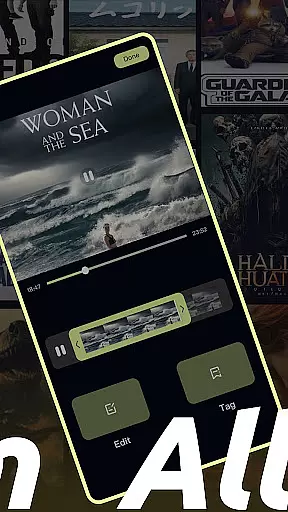
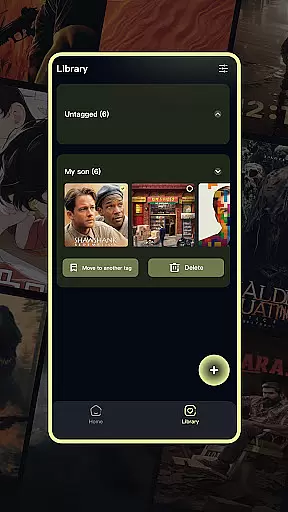
Videous lite stands out with its comprehensive set of features designed to streamline video management and editing. One of its core strengths is the intuitive video editing tool, which includes a progress bar for precise trimming and customization options for tagging videos. These features enable users to quickly create polished clips and efficiently organize their content through a logical categorization system.
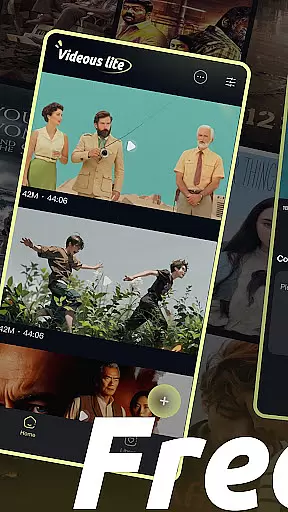
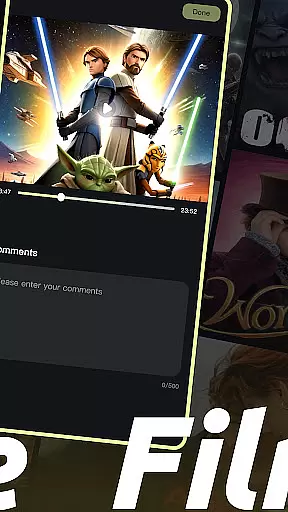
In addition to editing, the app excels in video library management. The home page displays videos in a clear chronological layout, complete with metadata such as length and size for each file. Users can also utilize advanced administrative functions via the more button, including batch deletion and comment viewing. Such tools ensure that managing large collections remains hassle-free.
Another notable feature is the seamless integration of upload capabilities. With a single click on the + button, users can expand their libraries by adding local videos. Combined with customizable settings and multi-select options in the Library Page, Videous lite delivers a versatile experience that caters to both personal entertainment and professional workflows.
In the realm of digital content, having a diverse and frequently updated library is essential. Videous lite-Made Easy offers an extensive array of video management and editing features that cater to both personal entertainment and professional creation needs. The application's intuitive interface allows users to effortlessly upload, edit, and manage their video collections.
One of the standout aspects of Videous lite is its ability to keep content fresh and engaging. Users can quickly upload local videos through the prominent + button on the homepage, instantly expanding their video library. This ease of adding new content ensures that users always have access to the latest videos, keeping their libraries up-to-date and vibrant.
Moreover, the app provides practical functions for video editing and categorization. With the ability to drag the progress bar for precise edits and customize tags for efficient organization, users can maintain a dynamic and varied video collection. These features not only enhance content variety but also ensure that users can easily retrieve and manage their videos, making Videous lite a powerful tool for unleashing creativity.
User engagement and retention are critical metrics for any entertainment application. Videous lite-Made Easy excels in these areas by offering a seamless and enjoyable user experience. Its straightforward design and robust functionality encourage users to spend more time interacting with their video content, thus enhancing engagement duration.
The app's efficient video processing capabilities play a significant role in retaining user interest. By providing an easy-to-navigate video library with clear layouts and chronological arrangements, users can quickly find and manage their videos. Features such as viewing comments and deleting videos via the more button contribute to a hassle-free administrative process, ensuring users remain engaged without unnecessary interruptions.
Additionally, Videous lite supports extended user sessions through its comprehensive editing tools and organizational options. Users can immerse themselves in creating and managing ideal clips, which fosters a deeper connection with the app. This sustained interaction not only boosts user engagement but also promotes long-term retention, making Videous lite a go-to solution for video enthusiasts looking to transform their creative visions into reality.
User-friendly interface
Efficient video editing
Customizable tagging system
Seamless upload functionality
Robust organizational tools
Limited advanced editing
Few transition effects
No cloud backup option
Basic audio tools
Occasional lag

Simulation of Dashboard / Touch Screen for Tesla. (Works without actual Tesla).
 4.2
4.2
Stream Online TV - Watch Live IPTV Playlist & Channel with Built-In Player
4.50
Real ghost box scanner with echo, reverb, EMF, & multi-stream channels.
3.80
Alice Box is an Instrumental Trans Communication app.
3.80
Start EVP/Spirit Box tonight: real EMF, offline, recording. One-time purchase.
4.10
Watch Reels, Drama Shorts & TV Series Anytime. Download DramaWave Now!
4.70
Your Avatar, Endless Fun
4.60
Everything FOX in one place. Watch FOX News, NFL, MLB, TV shows and more.
4.50
Stream, Watch, Chat. Live.
4.00
Open-source, fast, simple and powerful IPTV app
4.90
Hand-drawn, cartoon OC creator - original character creator
4.70
Chat with AI characters! Anime, games, roleplay & more.
4.50
Geooh GO is the most feature rich geocaching app available today.
4.50
Fire effects for your Philips Hue lights
4.20
Watch New Episodes & Live TV
3.80
With the Steam Mobile App, you can take Steam with you anywhere.
3.00
Disney Stickers: Zootopia 2
4.3
Journey to the world’s oldest rainforest and meet its Indigenous Custodians.
4.3
Neon Christmas Tree Animated: Festive Wear OS watch face with fitness info
4.0

User Reviews