

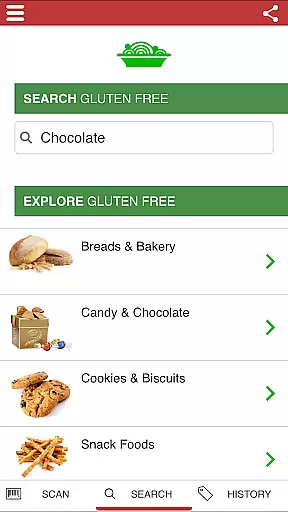
The Gluten Free Scanner is a comprehensive tool designed to assist individuals with gluten intolerance or celiac disease in making informed dietary choices. With access to an extensive database of over 500,000 products, including 80,000 gluten-free options, this app simplifies the process of identifying safe food items. Users can search by product name, brand, or category, ensuring they can quickly find the information they need.
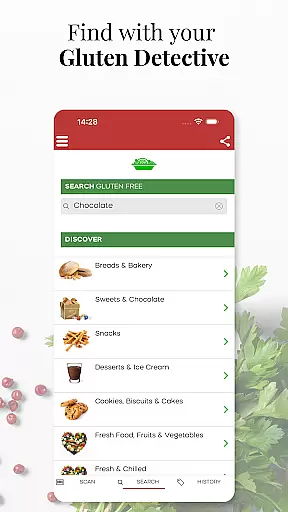
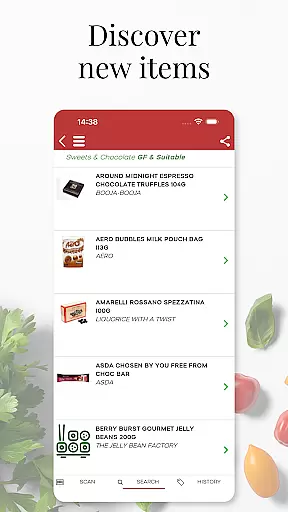
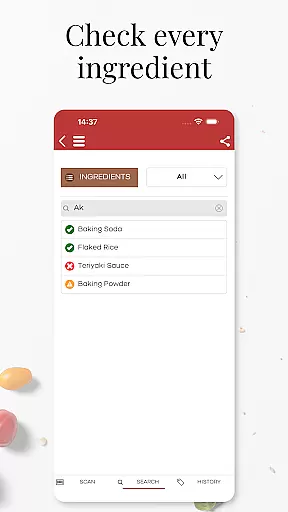
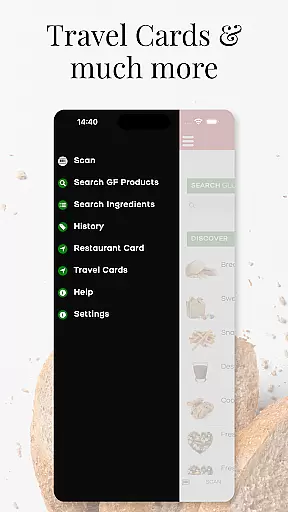
One of the standout features of the app is the 'DISCOVER GLUTEN FREE' option, which helps users explore new gluten-free favorites. Additionally, the inclusion of dining cards and travel cards provides peace of mind when eating out, both domestically and internationally. The app also offers a searchable list of safe and unsafe ingredients, empowering users with knowledge about what they consume.
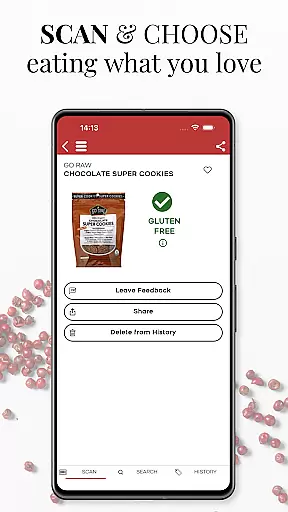
The Gluten Free Scanner utilizes the phone's camera to scan barcodes on products, delivering results swiftly and accurately. Each scan undergoes a four-level analysis to ensure maximum protection and information. This meticulous approach, maintained by a team of registered dietitians, nutritionists, and researchers, ensures that users receive reliable data to make safer dietary decisions.
The Gluten Free Scanner boasts a variety of features that cater specifically to the needs of those requiring a gluten-free lifestyle. One of its primary functionalities is the ability to perform unlimited scans using the phone's camera. This feature allows users to quickly determine the gluten status of over 500,000 products, providing immediate feedback and detailed analysis at four different levels.
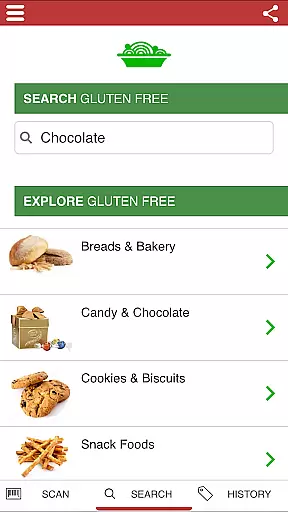
In addition to barcode scanning, the app includes a powerful search function. Users can look up products by name, brand, or category, accessing a vast database that is regularly updated for accuracy. The 'DISCOVER GLUTEN FREE' option further enhances the user experience by suggesting new gluten-free products, helping users expand their dietary options safely.
Another notable feature is the inclusion of dining and travel cards, which are invaluable when eating out. These cards provide essential information to restaurant staff, ensuring that meals are prepared safely. Furthermore, the app offers a comprehensive list of ingredients that are known to be safe or unsafe, giving users additional confidence in their food choices. All these features are meticulously curated and maintained by experts in nutrition and dietetics.
Personalized planning in The Gluten Free Scanner offers tailored solutions for individuals managing gluten intolerance. This feature leverages a vast database of over 500,000 products, including 80,000 gluten-free options, to recommend products that fit your dietary needs.
The app's search functionality allows users to filter by product name, brand, or category, ensuring that the recommendations are closely aligned with personal preferences and nutritional requirements. By integrating insights from registered dietitians, nutritionists, and researchers, the app ensures the accuracy and reliability of its personalized suggestions.
Users benefit from a streamlined shopping experience, where they can quickly identify gluten-free products through barcode scanning. Every scan is analyzed on four levels, providing comprehensive information that empowers users to make informed decisions about their purchases.
This personalized approach not only simplifies the process of finding safe food options but also enhances the overall quality of life for those with gluten intolerance by reducing the stress and uncertainty associated with grocery shopping.
Progress visualization in The Gluten Free Scanner helps users track their journey towards maintaining a gluten-free lifestyle. Through features like unlimited scans and detailed product analysis, users can monitor their choices and improvements over time.
The app provides clear feedback after each scan, categorizing products into safe and unsafe ingredients. This immediate insight allows users to visualize their progress in avoiding gluten, reinforcing positive habits and decisions.
Additionally, user reviews highlight the app's effectiveness in real-world scenarios, such as grocery shopping and dining out. These testimonials serve as motivational markers, showcasing how consistent use of the app leads to better health outcomes and increased confidence in managing dietary restrictions.
By offering tools like dining cards and travel cards, the app further supports users in safely navigating restaurants both domestically and abroad. This holistic approach to progress visualization ensures users feel supported and empowered in every aspect of their gluten-free journey.
Extensive product database
User-friendly interface
Accurate gluten detection
Helpful dining cards
Regular updates
Limited to US market
Premium version cost
No offline mode
Occasional bugs
Requires internet

Text notifications, button control, heart monitor & more for your Amazfit.
 2.40
2.40
The Sleep Miracle Sound Machine: Soothes baby to sleep with a gentle "Shhh"
3.00
Measure real-time wrist & ambient temperature with your Galaxy Watch (Wear OS)
3.20
Get lasting results with Chair Yoga, Wall Pilates, and Walking workouts!
4.60
Wall Pilates at home & Pilates workout for beginners for core and weight loss.
4.80
Your personal BP tracking companion, focus on helping you achieve wellness goal.
4.10
Your Health Assistant
3.90
Drink water reminder app. Track water intake. Smart simple hydration tracker.
4.70
beat yesterday.
4.00
Power-lifting, weightlifting and Wendler 531 app to track your workout program.
4.90
A brain game that moves you
4.70
Load the bar with this barbell & plate calculator. It's leg day, not brain day!
4.70
Build Healthy Habits!
4.60
Personal Measurements - Track your gains!
4.50
Your portable blood pressure tracker. Record, monitor, and analyze BP anytime.
4.30
Interval timer for High Intensity Interval Training, Tabata and Circuit Training
4.20
SportWerks - Workout Tracker for Wear OS Watches
3.90
A simple way to calculate peptide doses and also to convert different units.
4.0
Using Recognise™ has been shown to reduce pain and improve performance
4.4


User Reviews