

Peerspace is a leading platform for booking unique and inspiring spaces by the hour, designed primarily for events, meetings, and creative projects. The app provides access to an extensive selection of venues including photo studios, meeting rooms, galleries, lofts, and even backyards, spanning cities worldwide. Whether you're planning a corporate event, organizing a photoshoot, or hosting a personal gathering, Peerspace offers spaces that cater to both professional and personal needs.
One of the standout features of Peerspace is its dual-sided marketplace. Guests can easily browse through high-quality images and detailed descriptions of available spaces, while hosts have the opportunity to monetize their underutilized properties. Hosts set their own prices and availability, ensuring flexibility and control over how they rent out their spaces. This peer-to-peer model not only benefits guests seeking unconventional venues but also empowers property owners to generate additional income effortlessly.
Peerspace is ideal for freelancers, small business owners, event planners, and creatives who need distinctive locations for their projects. By offering a seamless booking process directly from your mobile device, Peerspace makes it easier than ever to find and secure the perfect venue for any occasion, all while fostering a community-driven approach to space sharing.
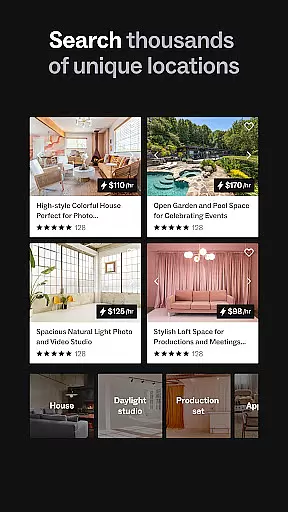
Peerspace stands out with its diverse range of features tailored to enhance user experience in finding and booking unique spaces. First and foremost, the app boasts an intuitive browsing system where users can filter spaces based on location, size, amenities, and intended use—whether it's for meetings, events, or creative productions. Each listing includes high-resolution photos, detailed descriptions, pricing information, and reviews from previous guests, ensuring transparency and informed decision-making.
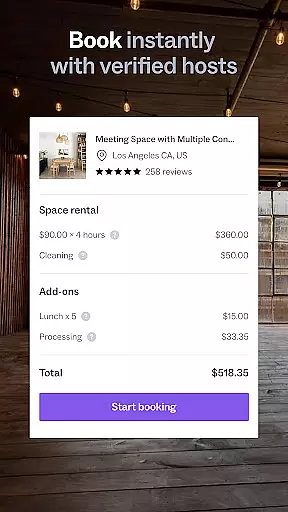
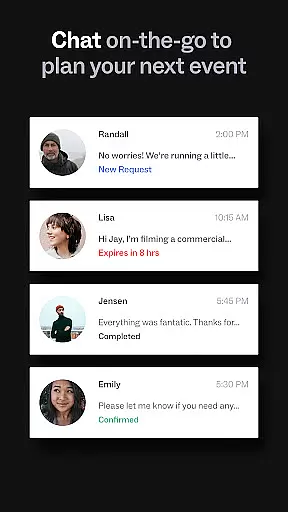
Another key feature is the built-in communication tool that allows guests to connect directly with hosts. This messaging system facilitates quick inquiries about specific requirements or custom requests, such as adjusting booking hours or arranging special setups. Additionally, Peerspace offers a secure payment gateway that simplifies transactions, enabling guests to book spaces instantly while ensuring hosts receive payments promptly into their bank accounts.
For those looking to become hosts, Peerspace provides a streamlined process to list spaces without any upfront costs. Hosts can customize their listings by setting hourly rates, specifying allowed activities, and uploading attractive visuals to showcase their properties. With automatic notifications for new messages and booking requests, managing listings becomes hassle-free. Overall, these features combine to create a robust ecosystem that supports both guests seeking extraordinary venues and hosts aiming to maximize their property's earning potential.
Task creation and detail customization are essential features for event planning applications like Peerspace. This functionality allows users to define specific requirements and preferences when booking unique spaces for meetings, events, and productions.
Peerspace offers a streamlined process where users can browse various venues, from photo studios to backyards, and customize booking details according to their needs. Users can specify the duration, time, and additional services required, ensuring that every event is tailored to perfection.
The value of this feature lies in its ability to provide a personalized booking experience. Whether it's a corporate meeting or a personal celebration, users can fine-tune every aspect of their reservation, making sure that the space aligns with the event's purpose and ambiance.
Ultimately, task creation and detail customization empower users to execute their vision without compromise. By facilitating detailed planning and offering diverse venue options, Peerspace ensures that each booking not only meets but exceeds user expectations.
Reminder settings play a crucial role in ensuring that users stay informed and organized throughout the event planning process. For an app like Peerspace, which facilitates the booking of unique spaces, reminders help users manage their schedules effectively.
Peerspace incorporates automatic notifications for new messages and booking requests directly within the app. This feature ensures that users never miss important updates or communications regarding their reservations. Additionally, users can manage bookings and respond to inquiries on the go, enhancing overall convenience.
The benefit of reminder settings extends beyond mere notifications; they contribute to a seamless planning experience. By keeping users updated on booking confirmations, upcoming events, and any changes, Peerspace enables planners to focus on other critical aspects of their events.
In summary, reminder settings enhance user engagement by providing timely updates and fostering efficient communication. This functionality not only simplifies event management but also reinforces Peerspace's commitment to delivering an extraordinary planning experience.
User-friendly interface
Wide variety of spaces
Flexible booking options
Secure payment system
Free listing for hosts
Limited rural availability
Variable quality of spaces
Service fees apply
No instant refunds
Dependent on host responsiveness


Here you can choose tickets for films, performances, concerts and other events
 4.60
4.60
Community for Mods, Addons, Melsaves, Melmods for Melon Playground
4.1
Find tickets to upcoming concerts, sports events, festivals, shows, attractions
4.70
Invitation card maker for birthday party & Wedding. Digital greeting card editor
4.90
The official app for Sched events! View your event schedule here.
4.20
Digital Income Wallet of the Final Libertadores 2025
4.5
Meet people over dinner
4.40
Freebie Games for Epic Games, Steam, Amazon, Rockstar etc.
4.40
Discover events & experiences in NYC, LA, Chicago, DC, Miami and more!
4.70
Birthday Greetings provides Birthday Card, Frames, Gifs & Father's day Wishes
4.80
Fast Scans. Happy Fans. For Every Hometown!
4.60
Wedding planner app with wedding venues, wedding checklist, countdown & budget.
4.60
Introducing the official Magic: The Gathering app for mobile.
4.20
Instant photo sharing for every occasion
3.80
Local events, contests, and giveaways for local dads
3.70
RAISE-365 makes fundraising easy and fun!
3.20
Some connections are better kept private
4.0
It is an Event Planning Application.
4.1
Thanksgiving Wishes, Thanksgiving Stickers & Animated GIF for Whatsapp Stickers
4.4

User Reviews