

Sched is a leading platform for session registration and attendance management, designed to streamline the organization of complex multitrack events. This app allows event planners and attendees to manage all event details in one place, offering a comprehensive solution for scheduling, personalization, and networking.
With features like a full schedule view, personalized user experiences, speaker directories, and offline caching, Sched ensures that users can efficiently navigate and engage with event content. Whether you're attending a conference, convention, or festival, Sched enhances your experience by providing key information at your fingertips, making events more enjoyable and productive.
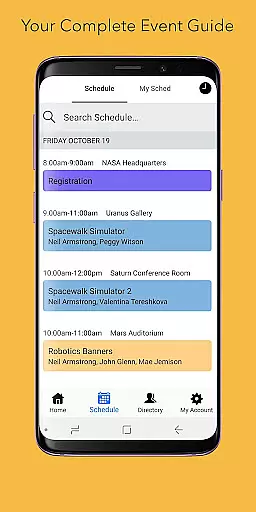
Sched offers a robust set of features tailored for event management and attendee engagement. Users can browse the entire event schedule conveniently, eliminating the need for physical event guides. The app's personalization capabilities allow attendees to log in and modify their schedules on-the-go, ensuring they never miss a session of interest.
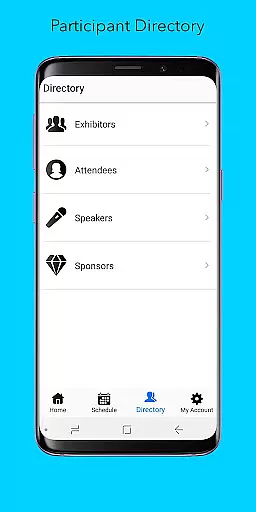
In addition to scheduling, Sched provides a directory of comprehensive professional profiles for speakers and exhibitors, enhancing networking opportunities. Its offline caching feature guarantees access to your schedule even without an internet connection, making it reliable in any situation. These features collectively ensure that Sched stands out as an innovative tool for maximizing event participation and enjoyment.
Task creation and detail customization are essential features for event management platforms like Sched. This functionality allows event organizers to create detailed sessions, workshops, or meetings with specific information such as time, location, and speaker details.
Sched offers an intuitive interface where users can easily input session specifics, attach relevant documents, and even set prerequisites for attendees. The platform supports rich formatting options, enabling the addition of multimedia content and interactive elements to session descriptions.
For users, this means they can expect a highly personalized and informative event experience. They can browse through well-organized schedules enriched with all necessary details, making it easier to plan their day and prioritize sessions that match their interests.
The value lies in the efficiency and clarity this feature brings to event planning. Attendees can make informed decisions about which sessions to attend, while organizers can track registration numbers and attendee feedback, ensuring a successful and smoothly run event.
Reminder settings play a crucial role in ensuring attendees do not miss out on important sessions at events managed through Sched. This feature allows users to set up timely reminders for upcoming sessions, ensuring they are always where they need to be.
Sched provides flexible reminder options, allowing users to customize notification times according to their preferences. Whether it's a push notification 15 minutes before a session starts or an email reminder the day before, users have complete control over how and when they are reminded.
This functionality significantly enhances the user experience by providing peace of mind. Attendees can focus on networking and learning, knowing they will be promptly reminded of their commitments, thus reducing the risk of missing key sessions.
Ultimately, reminder settings contribute to better time management and increased engagement at events. By keeping attendees punctual and prepared, Sched ensures that every participant maximizes their event experience, leading to higher satisfaction and more productive outcomes.
User-friendly interface
Comprehensive schedule management
Personalized event experience
Offline access to schedules
Extensive speaker directory
Limited free features
Requires account creation
Occasional sync issues
Advanced features need subscription
Interface can be complex for new users

The calendar app in this 2026 year see all dates.
 4.20
4.20
The Ultimate Tournament Hub
4.70
Here you can choose tickets for films, performances, concerts and other events
4.60
Track birthdays, habits & goals. Unlimited countdowns and count-ups
4.20
Everything you need for the Best Thursday Ever.
4.40
RAISE-365 makes fundraising easy and fun!
3.20
Microsoft Ignite is an event that showcases latest advancements in technology
4.00
Meet people over dinner
4.40
Discover events & experiences in NYC, LA, Chicago, DC, Miami and more!
4.70
TodayTix is the easiest way to get tickets to the best shows in your city.
4.90
Plan your wedding for free on the go: vendors, budget, website and checklists!
4.80
Events, Meetings, Photo Shoots
4.50
Buy and sell tickets to sports, concerts, theater, festivals, and comedy events
4.10
The world's largest selection of tickets is now at your fingertips
3.90
Watch live football matches and streaming events on our Arabic TV app!
3.50
ETH Mining provides secure way to mine Ethereum & earn ETH in Cloud mining app
3.50
TV Garden - World Live TV : Play & cast your videos seamlessly!
3.20
An App for Bhutanese
4.2
Buy event tickets easily with our user-friendly App. Stay updated on hot events
4.0

User Reviews