

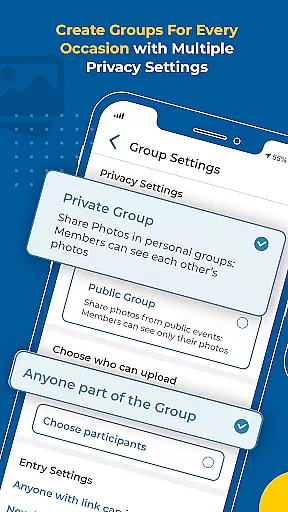
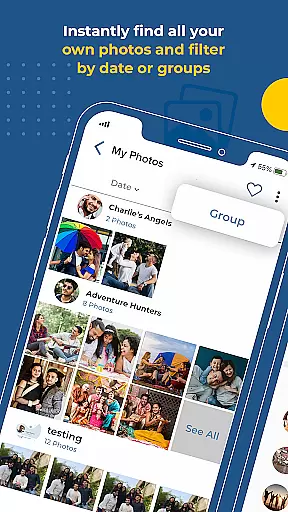
Kwikpic is an innovative photo management app designed specifically for events. The application leverages advanced AI technology to streamline the process of photo sharing and organization. Users can upload photos directly from their device or cloud storage platforms like Google Drive, and the app will instantly perform face matching to identify individuals in the images.
One of the standout features is its ability to tag people automatically and notify them about the new photos. This eliminates the tedious task of manually sorting through hundreds of event photos. Additionally, Kwikpic ensures no quality loss during uploads, preserving the integrity of your cherished memories. Whether it's a wedding, conference, or vacation, this app makes photo management effortless and efficient.
Kwikpic offers a comprehensive suite of features tailored for event photography. First and foremost, the app uses facial recognition technology to sort and deliver countless photos quickly. This feature alone saves users hours that would otherwise be spent organizing images manually.
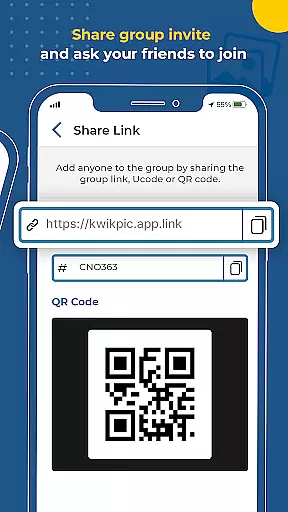
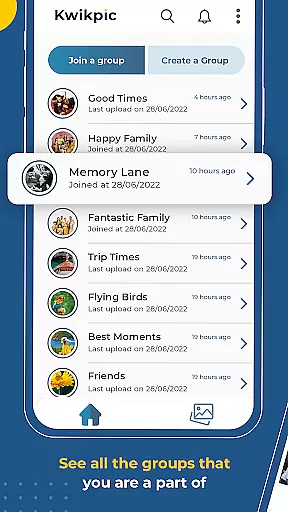
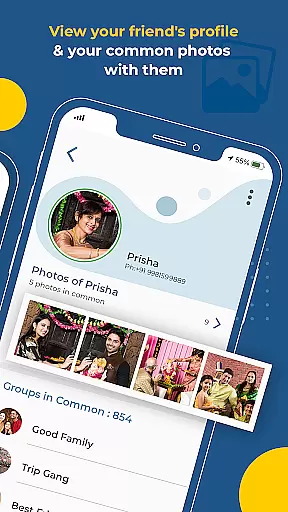
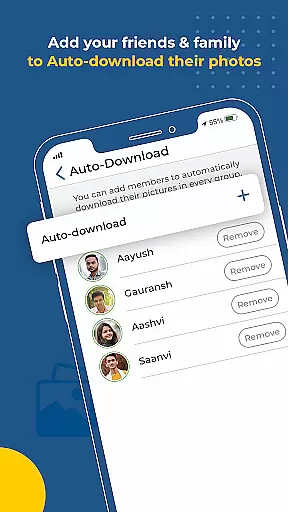
Beyond just sorting, Kwikpic allows users to share high-quality pictures with friends, family, and event guests seamlessly. It also provides analytics tracking, giving insights into metrics such as total impressions and downloads. Another notable capability is finding common photos among group members, making collaborative photo albums easier than ever before.
The app supports multiple upload sources including galleries and various cloud storage options, ensuring flexibility and convenience. With these robust features, Kwikpic transforms how event photographs are managed, shared, and enjoyed by all participants.
Task creation and detail customization are essential features for any event management app. Kwikpic excels in this area by offering users the ability to create tasks that streamline photo sharing and organization. This functionality allows users to upload photos from various sources, including their gallery and cloud storage platforms like Google Drive.
Kwikpic's task creation feature is designed to make photo management effortless. Users can instantly face match, tag, and notify individuals in the photos, ensuring that everyone receives their pictures without delay. The app uses AI technology to sort and deliver countless photos using face recognition, making it easy to manage large volumes of images from events such as weddings, conferences, or vacations.
The benefits of Kwikpic's task creation capabilities extend beyond just organizing photos. It also provides analytics tracking, allowing users to monitor total impressions, downloads, and more. This feature ensures that users have a comprehensive understanding of how their shared photos are being interacted with, adding an extra layer of engagement and insight into the photo-sharing process.
Reminder settings play a crucial role in ensuring that users stay on top of their photo-sharing tasks. Kwikpic offers robust reminder functionalities that help users manage their responsibilities effectively. By setting up reminders, users can ensure timely uploads and sharing of photos, which enhances the overall experience for friends, family, and guests involved in the event.
The app's reminder system is intuitive and flexible, catering to different user preferences. Whether you need a prompt to upload photos after an event or a nudge to review and share newly received images, Kwikpic has got you covered. These reminders contribute significantly to maintaining the flow of communication among group members, ensuring that no important moments are missed or forgotten.
Ultimately, Kwikpic's reminder settings enhance user engagement by keeping everyone informed and engaged throughout the photo-sharing journey. With timely notifications and updates, users can focus on enjoying their special moments while the app takes care of preserving and distributing those memories efficiently.
Effortless photo sorting
High-quality image uploads
Instant face matching
Comprehensive analytics
Multiple upload sources
Limited to event use cases
Potential privacy concerns
Requires internet connection
Subscription fees may apply
Dependent on AI accuracy



It is an Event Planning Application.
 4.4
4.4
Here you can choose tickets for films, performances, concerts and other events
4.60
Purchase line-skip passes, drinks, cover, and more at bars and clubs
3.50
Clubs, Festivals, Discounted Tickets, Guest Lists & VIP Tables
4.90
TV.Garden is a video player to play your own TV streams from around the world!
3.40
The official app for Sched events! View your event schedule here.
4.20
RAISE-365 makes fundraising easy and fun!
3.20
Introducing the official Magic: The Gathering app for mobile.
4.20
Connect with an ecosystem of 5M+ eventgoers and organizers.
4.50
Invitation card maker for birthday party & Wedding. Digital greeting card editor
4.90
The KRUU app - plan, celebrate, remember
4.80
Plan your wedding for free on the go: vendors, budget, website and checklists!
4.80
For weddings, parties & events
4.60
Text message invitations for birthday party, wedding, graduation, baby shower +
4.60
Manage all your events, leads, ticketing, payments and check-ins.
4.30
The calendar app in this 2026 year see all dates.
4.20
Track birthdays, habits & goals. Unlimited countdowns and count-ups
4.20
No invest, Easy way to earn USDT through crypto cloud mining
3.80
Soft Proxy for Your Online World
4.0


User Reviews