

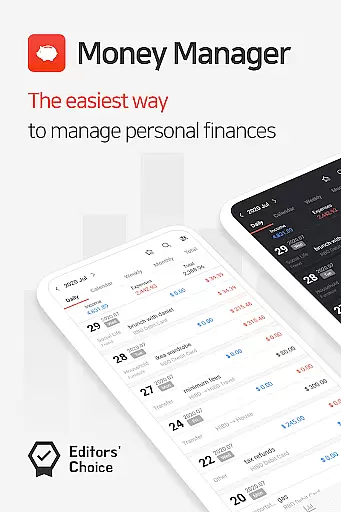
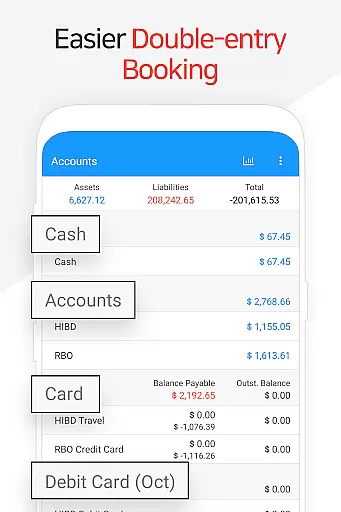
Money Manager is a comprehensive personal finance application designed to help users efficiently manage their assets and track financial activities. The app employs double-entry bookkeeping, ensuring accurate recording of income and expenses while automatically updating account balances. This feature provides users with a clear understanding of their financial status at all times.
In addition to basic accounting functions, Money Manager offers advanced tools such as budget tracking, credit card management, and automated transfers. Users can set budgets, monitor spending against those budgets through visual graphs, and manage credit card payments directly within the app. These features make it an ideal solution for individuals seeking better control over their financial health.
The application also supports secure data management through passcode protection and cloud backup options. With its user-friendly interface and powerful analytics capabilities, Money Manager is suitable for both personal and small business use, providing instant statistics and detailed reports that empower informed financial decisions.
Money Manager stands out with its robust feature set tailored for efficient financial management. One of its key strengths is the implementation of double-entry bookkeeping, which not only records transactions but also updates accounts in real-time, offering users a dynamic view of their financial status. This system ensures accuracy and transparency in managing income and expenses.
The app includes specialized tools like budget management, which allows users to set monthly budgets and compare them against actual spending through intuitive graphs. Additionally, the credit card management feature enables users to track payment schedules and outstanding balances, streamlining debt management. Automated transfers and recurring transactions further enhance convenience by reducing manual input.
For data security and accessibility, Money Manager offers passcode protection and cloud backup via Google Drive. Users can generate Excel backups, ensuring their financial data is safe and easily restorable. These features collectively create a reliable and versatile platform for maintaining organized and secure financial records.
Account and fund security is a critical aspect of any financial management application. Money Manager ensures the safety of user data through its passcode verification system, which provides an additional layer of protection against unauthorized access. This feature allows users to set up a secure passcode, ensuring that their sensitive financial information remains private and protected from potential threats.
The app also supports data encryption during transmission, particularly when users sync their information with the PC manager function over Wi-Fi. This means that personal asset details, transaction histories, and budgetary information are all transmitted securely, safeguarding against interception by malicious actors. By prioritizing security in both local device storage and network communications, Money Manager offers peace of mind for users who require confidentiality in their financial dealings.
Furthermore, the backup and restore functionality includes options for Google Drive, allowing users to maintain secure copies of their financial records. Backups can be made in Excel format, providing versatility and ease of access while maintaining high standards of data integrity. With these comprehensive security measures in place, Money Manager delivers robust protection for all aspects of personal finance management.
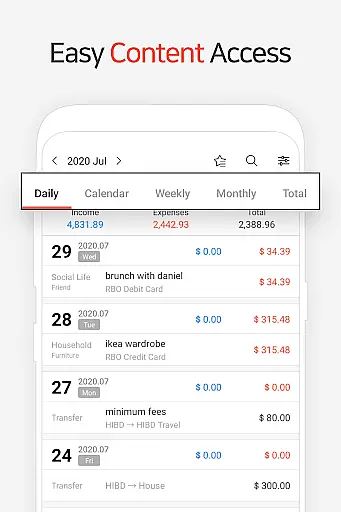
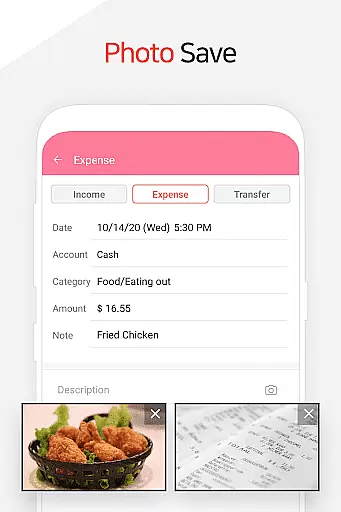
A seamless transaction experience is essential for effective personal asset management, and Money Manager excels in this area by offering intuitive tools designed to simplify financial tracking. The app facilitates efficient recording of income and expenses using double-entry bookkeeping principles, ensuring accuracy and consistency across all transactions. Users can easily input their financial activities, knowing that funds are deposited into or withdrawn from accounts automatically based on the entries made.
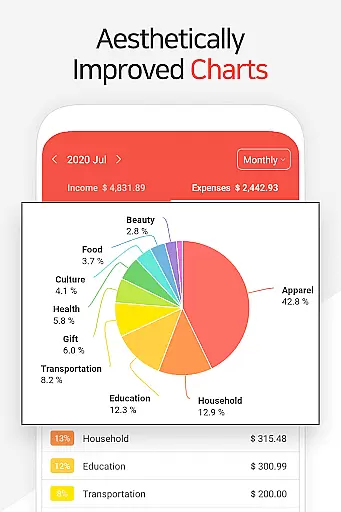
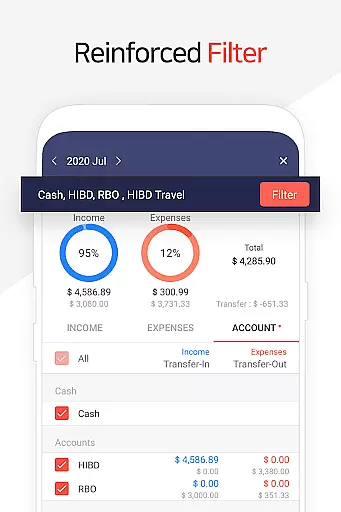
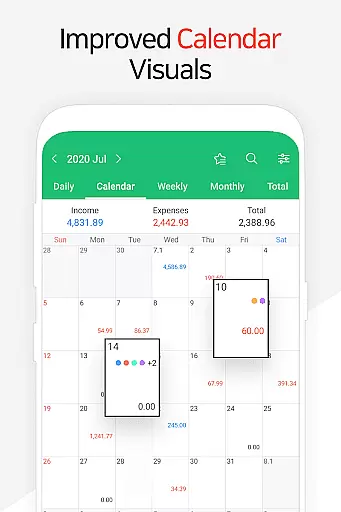
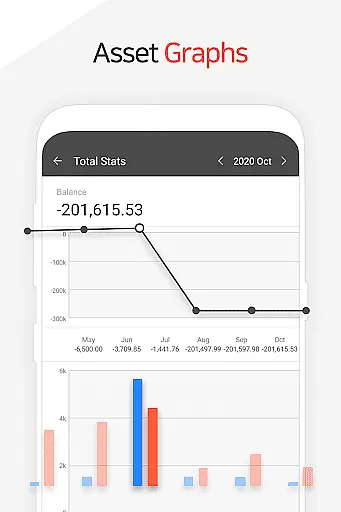
Money Manager enhances the transaction experience further with features like instant statistics and graphical representations of account fluctuations. These visual aids allow users to quickly grasp changes in their financial status, compare monthly expenditures, and monitor budget adherence. The ability to view detailed breakdowns by category empowers users to make informed decisions about their spending habits and overall financial health.
Additionally, the inclusion of advanced functions such as transfer, direct debit, and recurrence settings streamlines routine financial tasks. Whether managing salary deposits, insurance payments, or loan repayments, users benefit from automated processes that reduce manual input and minimize errors. This holistic approach to transaction management makes Money Manager a reliable companion for anyone seeking to maintain control over their financial life.
User-friendly interface
Real-time account updates
Comprehensive budget tracking
Secure passcode protection
Cloud backup support
Limited investment tracking
No multi-currency support
Occasional sync issues
Premium features require subscription
Complex for beginners

 4.50
4.50
Over 180 currencies conversion rates with live exchange rates and offline mode.
4.60
The simplest way to budget, bank, save and invest.
4.50
All your crypto & stocks in one secure and trusted app.
4.40
Simple & secure international money transfers - for personal & business needs.
4.80
Car Insurance Made For You.
4.50
Powerful Money Manager, Expense & Savings Tracker, Budget Planner - Pro Version
4.70
SuperQi, Your all-in-one Super App.
1.30
Banking with no monthly fees, fee-free overdraft, and early payday.
4.70
Secure, simple money transfer app. Send money to Mexico and worldwide fast.
4.80
No credit checked needed.
4.80
No credit check, no interest, no worries.
4.70
Military retirement pay estimation calculator
4.70
Play for fun, earn for real. Collect rent by owning virtual land & get cashback
4.60
Read and extract public data on NFC Contactless banking card (VISA, MasterCard
4.30
The PayPal app is the secure way to send and receive money, shop and pay in 4.
4.20
NFC mobile payment app Use your phone as a contactless bank card
4.00
View BSC Transactions for multiple accounts
3.90
StockTiles lets you view prices & charts of your favorite stock assets
2.30


User Reviews