

CleverBook Pro for MC is a premium upgrade to the CleverBook app, designed as a comprehensive reference guide for Minecraft players. This app acts as a license key that unlocks advanced features when installed alongside the base version of CleverBook.
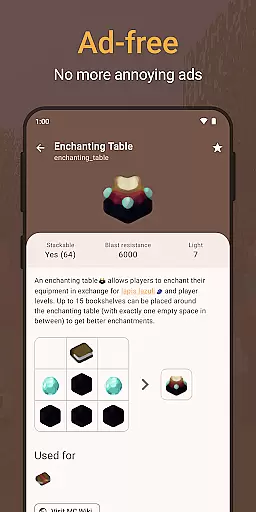
With CleverBook Pro, users gain access to enhanced functionalities such as Favorites, Filters for the ID list, and an ad-free experience. These features are tailored to provide a more streamlined and enjoyable user experience for those who want deeper engagement with the game's universe.
Whether you're looking to optimize your gameplay or simply enjoy an uninterrupted browsing experience, CleverBook Pro offers tools that cater to dedicated Minecraft enthusiasts.
CleverBook Pro for MC enhances the standard CleverBook application by adding exclusive pro features. Users can mark their favorite items using the Favorites feature, allowing quick access to commonly referenced content.
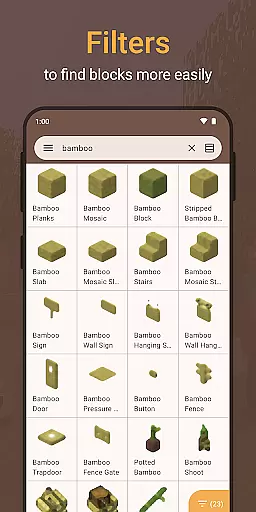
The app also includes Filters for the ID list, enabling players to sort and find specific blocks or items efficiently. Additionally, CleverBook Pro removes all advertisements from the interface, ensuring a seamless and distraction-free experience.
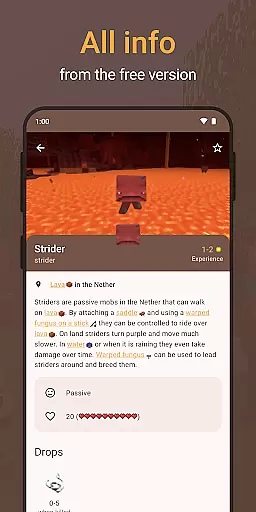
These premium capabilities complement the default features of CleverBook, which already include extensive information on every block and item, mobs, biomes, enchantments, potions, redstone circuits, commands, advancements, and more. The combination of these features makes CleverBook Pro an invaluable tool for serious Minecraft players.
CleverBook Pro for MC offers an extensive e-book library that covers all aspects of the popular survival game. The guide includes detailed information about every single block and item, providing users with a comprehensive resource for gameplay.
In addition to item details, the app also features information on mobs, biomes, enchantments, potions, redstone circuits, commands, advancements, and more. This ensures that players have access to the latest strategies and updates within the game.
Regarding copyright authenticity, CleverBook Pro is transparent about not being an official Minecraft product. It operates in accordance with Mojang's brand guidelines, ensuring that users receive content that respects intellectual property rights while enhancing their gaming experience.
The CleverBook Pro for MC app boasts impressive format compatibility, allowing it to seamlessly integrate with the main CleverBook application. Users need to have the latest version of CleverBook installed, as this app serves as a license key to unlock Pro features.
Once installed, users can expect a smooth transition into the Pro version after restarting the main app. This cross-compatibility enriches user experience by enabling advanced functionalities such as favorites and filters for the ID list without any hassle.
Moreover, CleverBook supports an optional dark theme and search functionality with filters, catering to user preferences and device settings. This flexibility in format compatibility ensures that players can customize their interface while accessing a wealth of gaming information efficiently.
Enhanced user experience
Ad-free browsing
Efficient filtering options
Quick access to favorites
Comprehensive game data
Requires base app
Separate purchase needed
Limited to Minecraft
No standalone use
Premium cost


Audiobook player with cross-device progress sync, playlists, and widget support.
 4.80
4.80
Zerobooks Light Novel Reader by GOLDENAGATO
4.20
Research your family history to explore ancestors and search for your heritage
4.50
What’s that bird? Just answer 5 questions, snap a photo, or record its song!
4.90
Read unlimited novels, audiobooks, stories & Unlock ebooks, fanfiction and more!
4.70
A lightweight reader for comics and mangas files (.cbr, .cbz, .cbt, .pdf, ...)
4.80
World's most comprehensive dictionary app: 13 languages, all online or offline!
4.80
A KJV Bible with Apocrypha and precept-based study concordance
5.00
Premium reader for ePub, PDF, and more. TTS and translation. Great on any screen
3.50
Daily thoughts, meditations, and prayers for living a sober life in recovery.
4.90
Track your Star Wars book collection across Canon & Legends
4.80
Learn Thai with 195,000+ entries, crisp Thai sounds, big text; works offline.
4.80
Scan. Price. Grade.
4.60
Master AKC Rally signs with in-depth hints, diagrams, and expert guidance.
4.50
Bible Spiritual Companion
4.40
Read the romance stories on the go. Take my breath away, The Spoiled Girl
4.30
A wonderful reader for good time spend.
4.20
Enjoy your favorite books
3.50
Fast loot guide for ARC Raiders. Simple tips, stats, maps, and item details.
4.0

User Reviews