

BlueDriver OBD2 Scan Tool is a professional-grade automotive diagnostic application that transforms your smartphone or tablet into an advanced scan tool. Designed for both professional mechanics and DIY enthusiasts, it works seamlessly with the BlueDriver Bluetooth Sensor to provide accurate vehicle diagnostics.
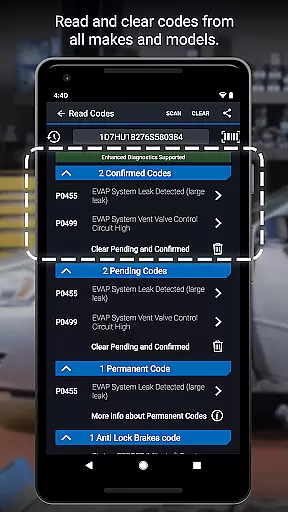
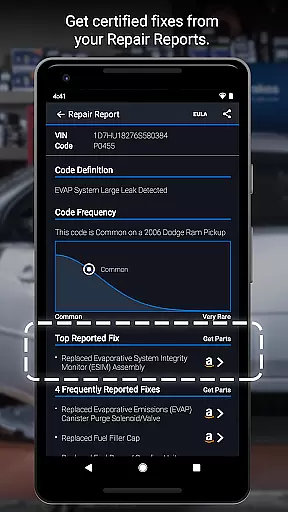
The app allows users to read and clear diagnostic trouble codes, generate detailed Repair Reports, and access advanced features like Mode 6 test results and live data graphing. Its wireless Bluetooth connectivity ensures a hassle-free experience while diagnosing issues related to engine, ABS, airbag, and more. With coverage for major car brands and support for multiple regions, BlueDriver is a versatile solution for modern vehicle maintenance.
BlueDriver stands out with its comprehensive diagnostic capabilities tailored for a wide range of vehicles. The app supports reading and clearing trouble codes across various systems including engine, ABS, airbag, and transmission. One of its key highlights is the ability to generate professional-grade Repair Reports specific to your vehicle's make, model, and year.
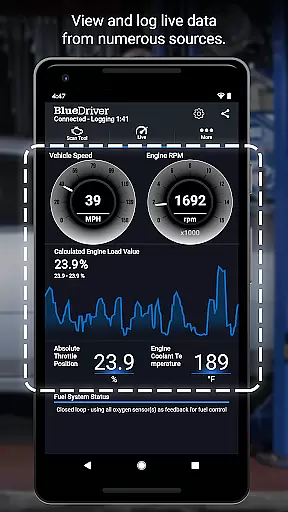
Users can also access advanced diagnostic data such as Mode 6 test results, freeze frame data, and live sensor information through interactive graphs. The wireless Bluetooth functionality eliminates the need for cumbersome cables, offering a clean and efficient workflow. Additionally, the app provides plain-language explanations for likely fixes, making it accessible even for non-experts. Its global compatibility and lack of subscription fees further enhance its appeal.
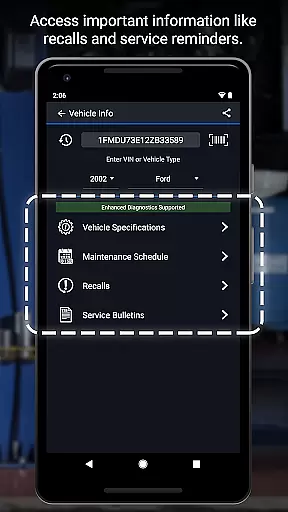
BlueDriver OBD2 Scan Tool provides comprehensive access to detailed vehicle information, empowering users with precise diagnostic data. This includes the ability to read and clear trouble codes across multiple systems such as check engine, ABS, airbag, and transmission.
The app goes beyond basic diagnostics by offering Mode 6 on-board monitoring test results, smog readiness checks, and freeze frame data. These features allow users to understand the exact status and health of their vehicle's critical systems.
With live data graphing capabilities, users can view real-time performance metrics through multi-PID interactive graphs. This functionality enables both professional mechanics and DIY enthusiasts to monitor various parameters simultaneously.
The application's enhanced diagnostics coverage spans major manufacturers including GM, Ford, Toyota, and Nissan, with specific model-year coverage varying by brand. This extensive support ensures that users can access relevant information for their particular vehicle make and model.
BlueDriver OBD2 Scan Tool offers exceptional price transparency in the automotive diagnostic market. Unlike many competitors, the app itself is free to install and use without requiring any subscription fees.
The only cost associated with the service comes from purchasing the BlueDriver Bluetooth Sensor separately. This upfront pricing model allows users to make informed financial decisions about their diagnostic tool investment.
Users can preview Repair Reports without needing a sensor by entering their VIN and trouble code, providing valuable insights before making any purchase commitment. This feature demonstrates the company's commitment to transparent pricing practices.
Additionally, the app delivers millions of real-world fixes specific to each vehicle's year, make, and model without any hidden charges. The comprehensive diagnostic capabilities work globally with the purchased sensor, ensuring users get full value for their initial hardware investment.
User-friendly interface
Comprehensive diagnostics
No subscription required
Wireless functionality
Wide vehicle coverage
Sensor sold separately
Limited free features
Device compatibility issues
Requires account setup
Advanced features for pros only

CVT diagnostics with ELM327 for Nissan-based vehicles
 4.40
4.40
Buy and sell your boat
4.70
Blink Charging Mobile app makes finding an EV charger an intuitive experience.
3.80
Lexus app currently supports 2010 or newer vehicles (2018 or newer for Hawaii).
4.80
Find Your Local Store or Shop Online for the Car, Truck, or SUV Parts You Need
4.70
7-Day Returns on All Cars
4.80
Autotrader is your online solution for buying and selling new and used cars.
4.40
Browse millions of cars, track vehicle listings or sell your car today
4.70
Shop, finance, or sell today.
4.80
Marathon ARCO Rewards members earn rewards & apply the rewards for fuel savings!
4.80
The ExtraMile App allows you to pay for fuel from the comfort of your car!
4.70
Instantly redesign your car with AI. From sporty to futuristic, try it all.
4.50
Automotive Electrical Wiring Diagrams
4.40
Ultimate OBD2 Car Scanner: Diagnostics, Service and Modification Tool
4.30
OBD2 car scanner and diagnostics: read Check Engine, DTC, economy....
4.30
AI Powered - Automotive Mechanic Assistant
4.30
Get your personalized financing options and shop for used cars today!
4.20
Available in select states.
4.00
DIY Vehicle Wheel Alignment
4.1


User Reviews