

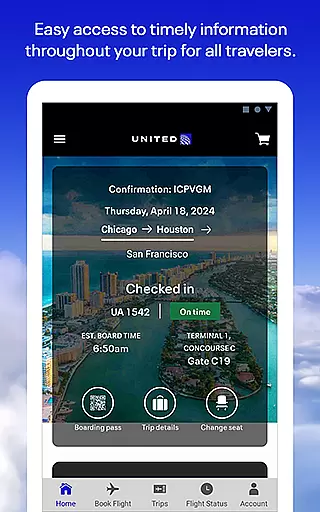
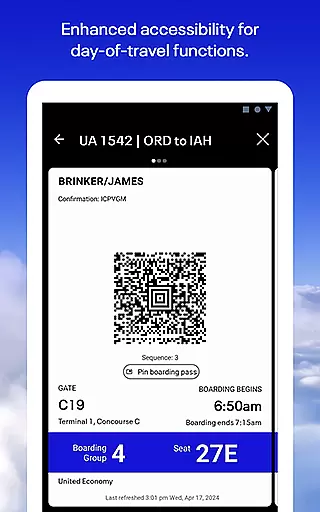
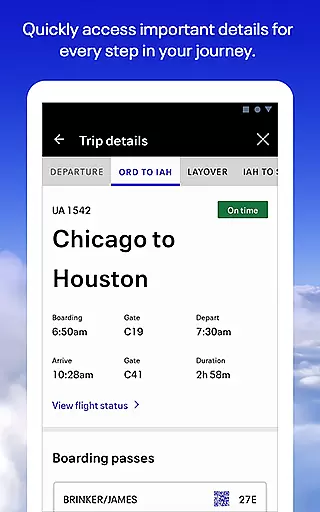
United Airlines app is your all-in-one travel companion, designed to simplify every step of your journey. With a comprehensive suite of features, this application allows users to search and book flights across United's global network, check in seamlessly, and access boarding passes directly from their mobile devices. The app also provides essential tools for managing reservations, selecting seats, and tracking checked baggage throughout the trip.
Beyond basic booking functions, United Airlines app offers a built-in terminal guide for airport navigation, an entertainment hub for inflight enjoyment, and a dedicated Travel-Ready Center to ensure passengers are fully prepared for their travels. Whether you're a frequent flyer or occasional traveler, this app streamlines the entire travel experience while keeping you connected with customer support through multiple communication channels.
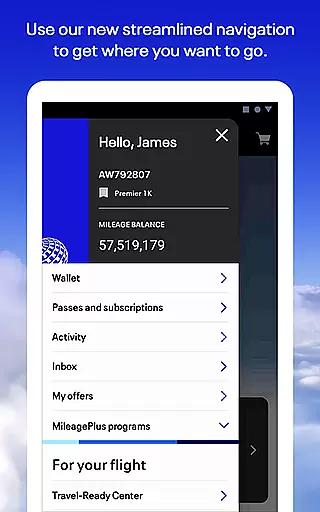
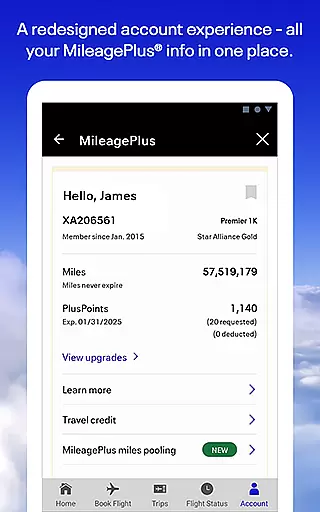
The true value of United Airlines app lies in its ability to consolidate all travel-related tasks into one convenient platform. From managing MileagePlus rewards to handling unexpected travel disruptions, this application empowers travelers to take control of their journeys while providing peace of mind through real-time updates and support options.
What sets United Airlines app apart is its extensive feature set tailored specifically for modern travelers. The application's booking engine enables users to search for flights across United's vast global network and make reservations effortlessly. Its intuitive interface allows passengers to manage various aspects of their travel, including seat selection, flight changes, and baggage tracking through the innovative bag drop shortcut feature.
The app's comprehensive functionality extends beyond traditional booking capabilities. It includes a built-in terminal guide that helps travelers navigate airports efficiently, while the integrated entertainment system provides movies and games during flights. Additionally, the Travel-Ready Center ensures passengers have all necessary documentation and information before departure. These features work together to create a seamless travel experience from planning to arrival.
Another notable aspect is the app's robust customer support system. Users can communicate with agents through multiple channels including voice calls, text messages, and video chats. This multi-faceted approach to customer service, combined with the ability to manage MileagePlus accounts and redeem reward miles directly within the app, demonstrates United's commitment to providing comprehensive travel solutions through their mobile platform.
Booking authenticity is a crucial feature for any travel app, ensuring that all reservations made are legitimate and confirmed. The United Airlines app excels in this area by providing users with a seamless booking experience across its global network.
When you book a flight through the app, you receive immediate confirmation of your reservation, complete with a detailed itinerary. This ensures that travelers can trust the bookings they make, knowing that their plans are secure and verified.
The app also allows users to change seats or flights if better options become available, further enhancing the reliability of the booking process. By offering these flexible options, United Airlines empowers travelers to adjust their plans as needed without hassle.
Ultimately, the booking authenticity provided by the United Airlines app gives users peace of mind, knowing that their travel arrangements are accurate and dependable. This level of assurance is vital for stress-free travel planning.
Price transparency is essential for travelers who want to understand the full cost of their bookings upfront. The United Airlines app addresses this need by clearly displaying prices and fees associated with each flight option.
Users can easily compare different flight options based on price, duration, and other preferences, allowing them to make informed decisions about their travel plans. The app's interface is designed to present pricing information in a straightforward manner, avoiding hidden costs until checkout.
In addition to showing base fares, the app provides details on additional charges such as baggage fees and seat selection costs. This comprehensive view helps customers budget effectively for their trips and avoid unexpected expenses at the airport.
By prioritizing price transparency, the United Airlines app builds trust with its users, ensuring they feel confident about their financial commitments when planning their journeys. This transparency enhances overall customer satisfaction and loyalty.
User-friendly interface
Comprehensive travel tools
Real-time flight updates
Integrated entertainment
Multiple support channels
Limited international features
Occasional bugs reported
Some functions require login
In-flight services may vary
Heavy data usage possible

Apply for an electronic travel authorisation (ETA) to come to the UK.
 3.20
3.20
View delays, closures, and weather-related conditions on Missouri state roads.
3.30
Explore our parks like never before with the completely reimagined Six Flags app
4.30
View current Montana road conditions, cameras, plows, and timelapse videos.
4.70
The mobile panorama panel. Works offline - worldwide!
4.40
GPS Live Satellite Earth to find route navigation and current location map
4.00
Real-time flight tracking with live maps and flight status updates.
3.70
All-in-one delivery and taxi app. Ride, food, & grocery delivery app.
4.80
Frontier’s Android app makes travelling easier than ever before!
4.70
Streamline your U.S. entry
4.90
Booking your bus tickets has never been easier
4.70
Book rooms at any of 4.2M properties worldwide. Find flight deals every day!
4.60
Tickets, hotels, wait times, maps, mobile ordering, Disney PhotoPass & more
4.50
CLEAR provides a safer, easier way through airports, stadiums, and beyond.
4.20
Listen live to pilots and air traffic controllers around the world
3.80
Maps Speedometer shows your current speed in any app
3.60
Get Moving Made Easier® with the official U-Haul® Moving & Storage app.
3.40
Find the best prices, pay for the cheapest gas, and save on every fill up
3.30
Locate and navigate to local holiday displays
4.1


User Reviews