

T-Life is a comprehensive lifestyle app designed to enhance the digital and physical lives of T-Mobile customers. The app serves as an all-in-one platform for managing your T-Mobile account, shopping for new devices, accessing exclusive benefits, and exploring rate plans. With its user-friendly interface, T-Life allows you to pay bills, track usage, and configure your T-Mobile Home Internet gateway with just a few taps.
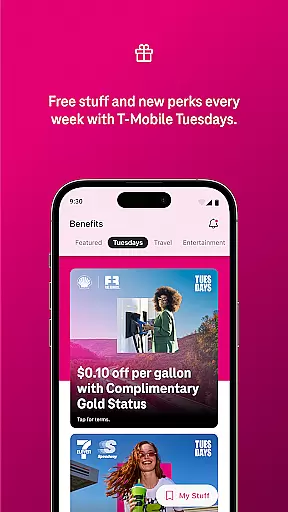
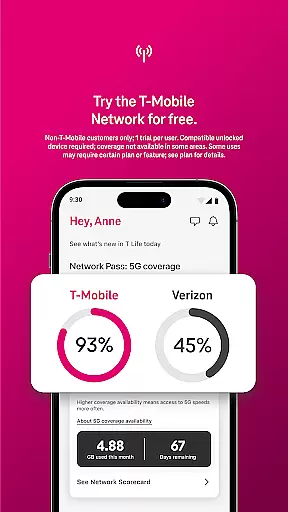
One of the standout features of T-Life is its ability to offer users free trials of America’s Best Network, giving non-T-Mobile customers a chance to experience top-tier network performance for 30 days at no cost. Additionally, the app provides access to a variety of perks such as Netflix On Us, savings on travel and dining, and participation in T-Mobile Tuesday where users can snag freebies and enter to win epic prizes.
Whether you're at home or on the go, T-Life ensures that you stay connected with SyncUP devices tailored for home, car, and family use. It also integrates financial services like T-Mobile MONEY® and T-Life VISA® accounts, while offering protection from spam and robocalls through Scam Shield. This makes T-Life not just a tool for telecom management but a holistic lifestyle companion.
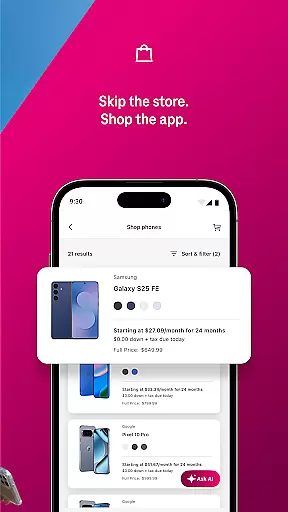
T-Life offers a rich array of features that cater to both existing and potential T-Mobile customers. One of the key functionalities is the ability to shop for a wide selection of devices without leaving your couch. This feature simplifies the process of upgrading or purchasing new devices by providing detailed information and easy navigation within the app.
The app stands out with its exclusive benefits including Netflix On Us, travel and dining savings, and the popular T-Mobile Tuesday program. These benefits are designed to reward loyal customers and provide additional value beyond basic telecom services. Furthermore, T-Life includes a 30-day free trial of America’s Best Network, allowing non-T-Mobile customers to experience superior network performance using a compatible device.
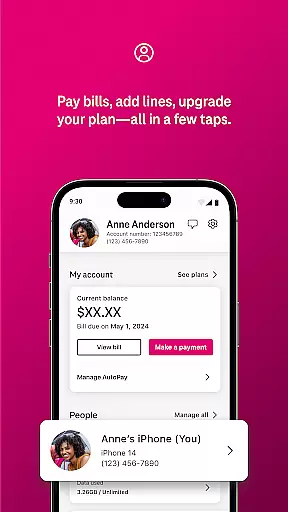
For account management, T-Life excels by enabling users to pay bills, track usage, and manage various settings with minimal effort. The inclusion of T-Mobile Home Internet gateway configuration adds another layer of convenience. Security features like Scam Shield protect users from unwanted calls, enhancing their overall experience. By integrating these diverse features into one cohesive platform, T-Life sets itself apart in the Lifestyle category.
T-Life app offers an extensive range of services that cater to various aspects of a digital lifestyle, ensuring users have access to everything they need in one place. The app provides functionalities ranging from shopping for new devices, managing accounts and bills, exploring rate plans, to accessing exclusive benefits like Netflix On Us.
One of the key highlights is the ability to try T-Mobile's acclaimed network along with some favorite benefits for a 30-day period at no cost. This trial offer, although limited-time, gives potential customers a risk-free opportunity to experience what makes T-Mobile Americau2019s Best Network based on Speedtest Intelligence data.
Additionally, users can easily configure their T-Mobile Home Internet gateway and stay connected with SyncUP devices tailored for home, car, and family use. With features such as T-Mobile MONEY and protection against spam calls through Scam Shield, it ensures comprehensive coverage across essential lifestyle categories.
The content within the T-Life app is meticulously curated to ensure authenticity and credibility, offering users reliable information and services. For instance, the availability of verified benefits such as Netflix On Us assures users that these offerings are legitimate and valuable.
Moreover, financial services like T-Mobile MONEY and T-Life VISA accounts are integrated directly into the app, reinforcing trust through established banking partnerships. These features not only enhance convenience but also assure users of secure transactions managed by credible financial entities.
Furthermore, insights provided about network performance and speed claims are backed by analyses from reputable sources like Ooklau2019s Speedtest Intelligence data. Such authoritative endorsements validate the app's claims, providing users with confidence in the accuracy and reliability of the information presented.
User-friendly interface
Exclusive customer benefits
Comprehensive account management
Free network trial
Integrated security features
Limited to T-Mobile users
Device compatibility required
Some features region-specific
Premium services need subscription
Occasional app instability


Design and brew great homebrewing beer, mead, cider and wine recipes on the go!
 3.60
3.60
Chat, meet genuine singles in your area. Real connections start with being real.
4.30
View over 160,000 line dance stepsheets from the CopperKnob website.
3.30
Discover the "To Be a Christian" App: Your Guide to Deepening Faith!
5.00
Get the news, events and savings that matter to you with AARP Now.
4.80
Your home in your hand
3.80
Zodiac & Horoscope Launcher: Daily Sign Predictions & Astrology
4.40
A smart Siddur with halachic times
4.50
The Miracle Box includes methods used by Steve Huff of Huff Paranormal.
3.20
Digital smart watch face made for Wear OS.
4.70
Share opinions, get paid cash
4.30
Discounts, savings, and rewards
4.20
Digital watch face design. Modern looking, hi-res & battery friendly.
4.00
Turn your watch into a key fob for your Tesla
2.90
LineLearner, the quick way to learn lines.
2.90
Duo Watch Face (animated)
4.1
Immerse yourself in the serenity of lavender fields and white butterflies
4.2
The cutest Autumn watchface featuring the adorable Mr. Squirrel
4.5
Futuristic watchface inspired by Back to the Future: sleek, retro, timeless
4.1


User Reviews